Bibaswan Chakraborty
Enterprise UX · B2B SaaS · 7 Years
India 🇮🇳 · Immediate joiner

Bibaswan

I design enterprise systems
that people actually use.

Senior Product Designer (UX) specialising in complex B2B SaaS — multi-role workflows, admin systems, data-heavy interfaces, and mission-critical platforms where design decisions have real operational consequences.

+67%
Product adoption increase
Enterprise workspace redesign for geoscience operations — 3,000+ users onboarded within 6 months of launch.
21→3
Clicks to complete core task
Workflow simplification that directly unblocked cloud migration for a mission-critical platform.
+80%
User satisfaction increase
Measured post-launch via structured usability validation with domain experts and end users.
Enterprise UX· Workflow Simplification· B2B SaaS· Design Strategy· Interaction Design· Figma· Framer· User Research· Information Architecture· Design Systems· Enterprise UX· Workflow Simplification· B2B SaaS· Design Strategy· Interaction Design· Figma· Framer· User Research· Information Architecture· Design Systems·
Enterprise products fail not because of bad design — but because complexity is never confronted.
Oil & Gas · Pharma · Healthcare SaaS
Multi-role & admin workflow design
Mission-critical, data-heavy interfaces
Adoption-driven UX strategy
Cross-functional design leadership
Influencing engineering & product decisions
Visiting Faculty · UX Design
Selected Work

Projects that
moved the needle

05
04
Healthcare · Pathology
NDA

Clinical Reporting Tool:
100% Team Adoption in 2 Weeks

End-to-end redesign of a pathology reporting system — from zero engagement to full team adoption in 14 days through targeted workflow intervention, not a visual refresh.

100%
Clinical team adoption · 14 days post-launch
What the work involved
18 clinician interviews across 3 specialties · 3 workflow mapping sessions with senior pathologists · Role-based IA redesign separating technician, pathologist, and lead reviewer flows · Iterative prototype testing in a live reporting environment · Zero training documentation required post-launch.
Screens anonymised · Full process available on request
05
Enterprise SaaS · Multi-product Platform
NDA

Design System for Complex Domain Workflows

Scalable component library and design language for a multi-product enterprise platform — built for domain experts across global teams, with governance that survived 3 product teams contributing simultaneously.

Design-to-dev handoff speed · 0 regressions in 6 months
System architecture
3-tier token taxonomy (global → semantic → component) · 60+ components built for domain-specific data states · Contribution governance model with PR-style review process · Accessibility audit baked into component spec, not retrofitted · Reduced design variance across 3 products from 47 to 6 divergent patterns.
Screens anonymised · Component architecture & governance model available on request
How I work

Outcomes over outputs.
Always.

01
Understand the domain

Enterprise work fails when designers don't understand what users actually do. I embed in the domain before touching a screen — learning the data models, the role hierarchy, and the workflows that already exist.

02
Map all the roles

Enterprise products serve multiple user types simultaneously — admins, operators, reviewers, and viewers with conflicting needs. I map every role before designing any flow, because the admin experience shapes everything the end user sees.

03
Map the friction

I find where workflows break — not where they look broken. Click depth, cognitive load, task failure, and support ticket volume are the real diagnostics. Heuristic audits confirm; usage data reveals.

04
Design the decision

Every screen is a decision point. I design for the choice users need to make — not the feature the team wanted to ship. IA defines the structure. Interaction design reduces the friction at every step.

05
Validate and measure

Design is a hypothesis. I test it, instrument it, and hold myself to the outcome — not the deliverable. Post-launch adoption data, support ticket trends, and task success rates are the metrics that matter.

06
Influence without authority

Engineering wants to ship. Sales wants features. PMs want velocity. I navigate these pressures by keeping research visible, tradeoffs explicit, and the cost of bad UX quantifiable. Data beats opinion in every stakeholder room.

Enterprise design depth

What I bring to
complex products.

Five years of enterprise UX means building fluency in the systems that make B2B SaaS hard — not just the screens that face users.

Multi-role IA
Admin, operator, reviewer, and end-user flows — designed so each role sees exactly what they need and nothing they don't.
Data-heavy dashboards
Geoscience workspaces, compliance reporting, pharma SFA analytics — designing for domain experts who read data differently than general users.
Complex workflow design
Nested logic builders, multi-step configuration flows, state-dependent interfaces — simplifying without losing the power experts depend on.
Design systems
Token taxonomy, component governance, cross-team contribution models — built for multi-product platforms where design debt compounds fast.
AI / NLP integration
Designing trust architectures for AI features in compliance contexts — where the cost of a wrong suggestion is measurable.
Stakeholder navigation
Engineering constraints, sales commitments, customer success escalations — I keep design grounded in evidence when organisational pressure pushes toward shortcuts.
From people I've worked with

What they say

He doesn't just design screens — he redesigns how the team thinks about the problem. The workspace project would have shipped as a visual refresh without him pushing for the architectural rethink.

Rashmi Mishra
Technology Leader · Ex VP Thoughtworks, UST & PierianDx

In 24 months on the geoscience platform, I watched him win three separate arguments with engineering using research, not opinion. Stakeholders started asking for him in scoping calls.

Dhiraj Shelke
Senior UX Designer · SLB

Rare combination: rigorous with research, fast with a prototype, and willing to tell a VP why they're wrong about their own users. That last quality is the hard one to find.

Shishir Kanthi
Vice President · JP Morgan Chase & Co.
Bibaswan Chakraborty
Bibaswan
Chakraborty
Senior UX Designer
India 🇮🇳 · Immediate joiner

Have a complex workflow
that needs untangling?

7 years of enterprise UX across pharma, oil & gas, and healthcare. I work best on hard problems where design decisions have real operational consequences.

Let's talk LinkedIn →
All work Hire me
Case Study · 02

Reducing Enterprise
Workspace Friction
by 67%

Domain
Oil & Gas · Geoscience SaaS
Timeline
24 months
My role
Lead UX Designer
Team
Product, Design, Engineering, SMEs

Redesigned a mission-critical geoscience workspace to unblock cloud migration — by confronting 21-click complexity and rebuilding around how geologists actually work.
+67%
Active product adoption
21→3
Clicks for core task
+80%
User satisfaction
3K+
New users in 6 months
The Problem

Users were losing time before work even started

Enterprise users — geologists, geophysicists, and technical operators — needed a faster and clearer way to discover applications, resume recent work, view updates, and monitor product status. But the existing workspace experience was fragmented, forcing users to rely on manual search, repeated navigation, and disconnected tools just to begin everyday tasks.

The business consequence was direct: users were hesitant to adopt the cloud workspace because the experience created friction in daily workflows — too many steps before they could start work, weak visibility of recent projects, fragmented application access, and unclear system status.

"I spend more time navigating than actually working. By the time I get to the data, I've already lost my train of thought."

Cloud infrastructure was ready. Adoption wasn't. The gap was entirely in the user experience — and it was measurable: 21 clicks to complete a core task that should have taken 3.

My Role

What I owned —
and what I fought for.

I led end-to-end UX strategy for the workspace redesign — owning research direction, design principles, prioritisation calls, and validation. My remit was the user experience. In practice, it also meant being the person who kept surfacing the research when the conversation drifted toward surface-level fixes.

The 24-month timeline reflects the reality of enterprise B2B: stakeholder alignment, legacy dependency mapping, phased rollouts, and iteration on real usage data. The design took 4 months. Getting it built correctly took the rest — and that gap is where most of the real design work happened.

My research showed the problem wasn't visual. It was architectural.

Three weeks in, Engineering proposed a visual cleanup — keep the navigation, add a recent work widget. 6 weeks of dev.

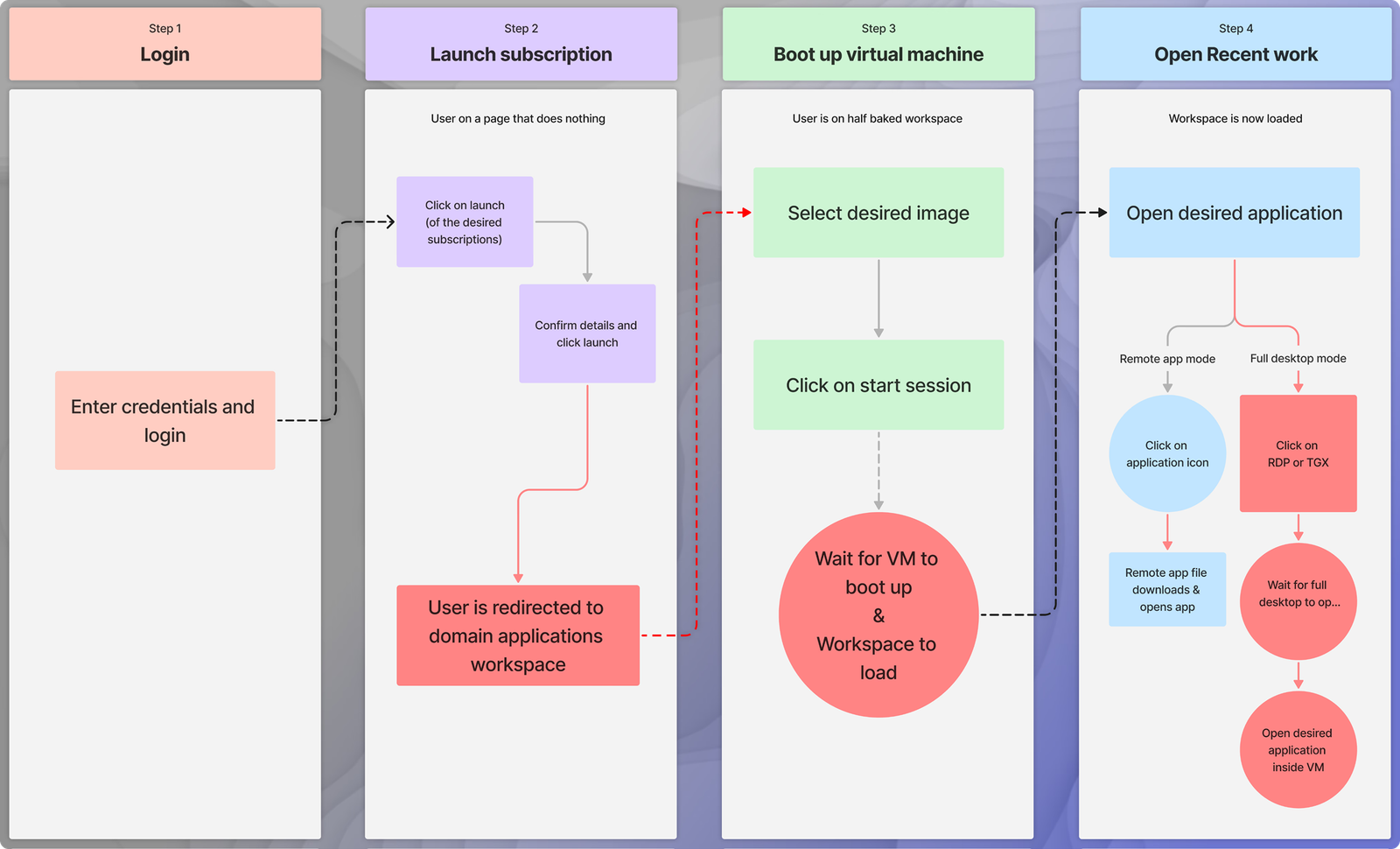
The 21-step journey map I brought into the working session. I asked the engineering lead and PM to walk it as if they were a geologist starting their day for the 400th time.

The engineering lead stopped at step 9 — "this is where the VM boots, right — can we hide that?"
That question became the breakthrough.

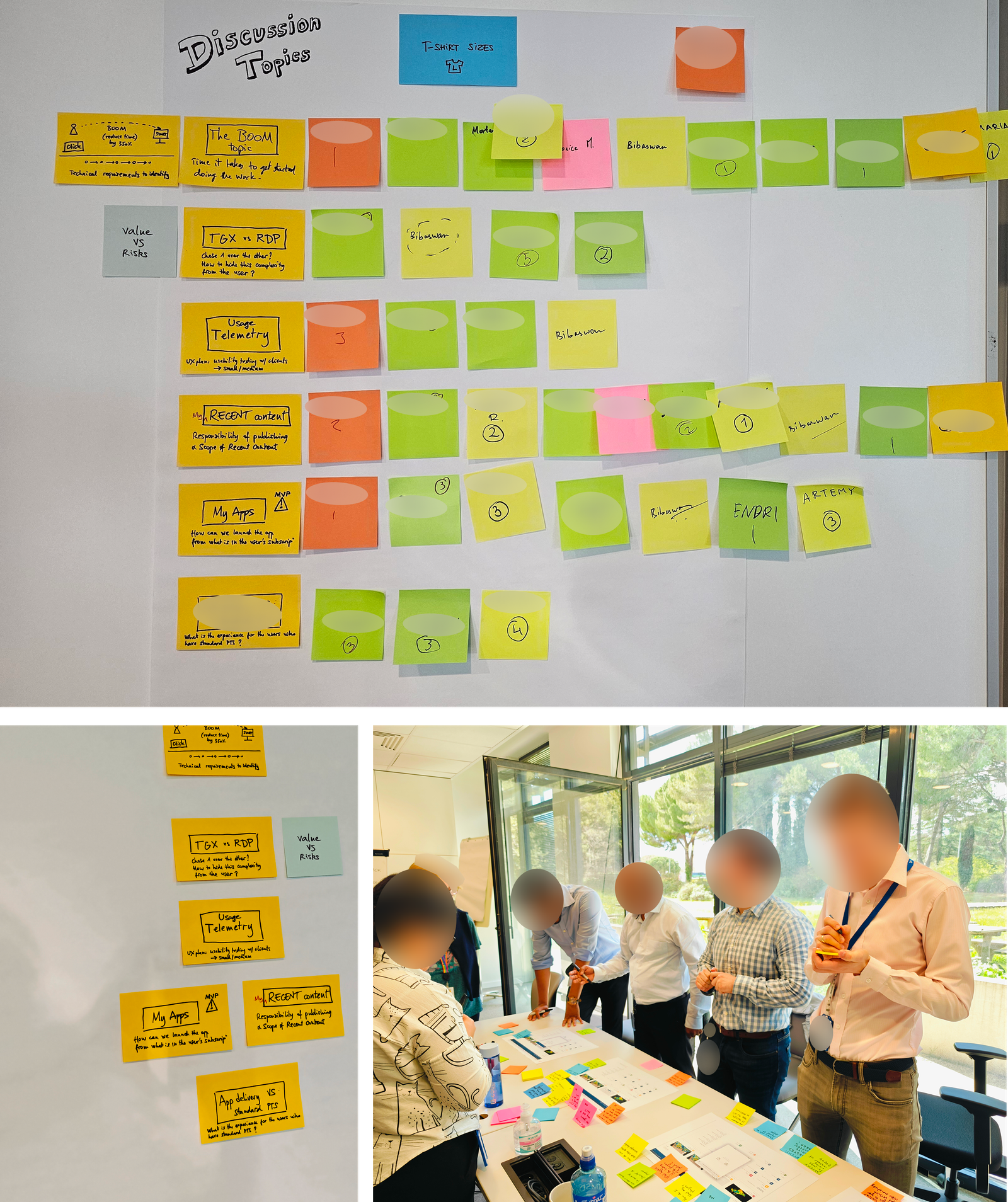
Three rounds of cross-functional workshops over two weeks. Two sessions ended without resolution. The third produced the infrastructure architecture that made 21→3 possible. A cosmetic fix would have shipped in 6 weeks and delivered a fraction of the value.

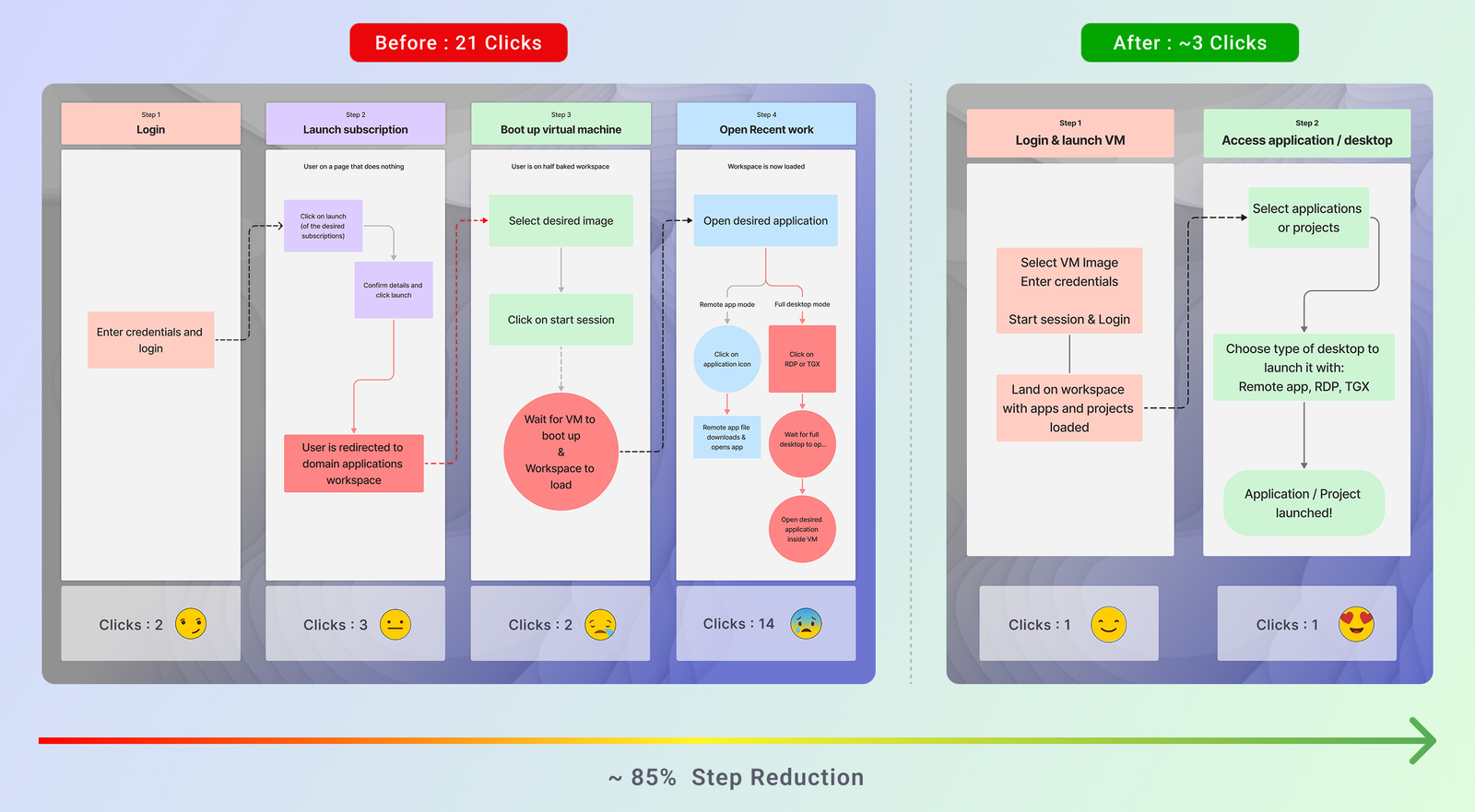
Before: Login → Launch Subscription → Boot VM → Content access — 4 stages, 21 clicks, multiple redirects.

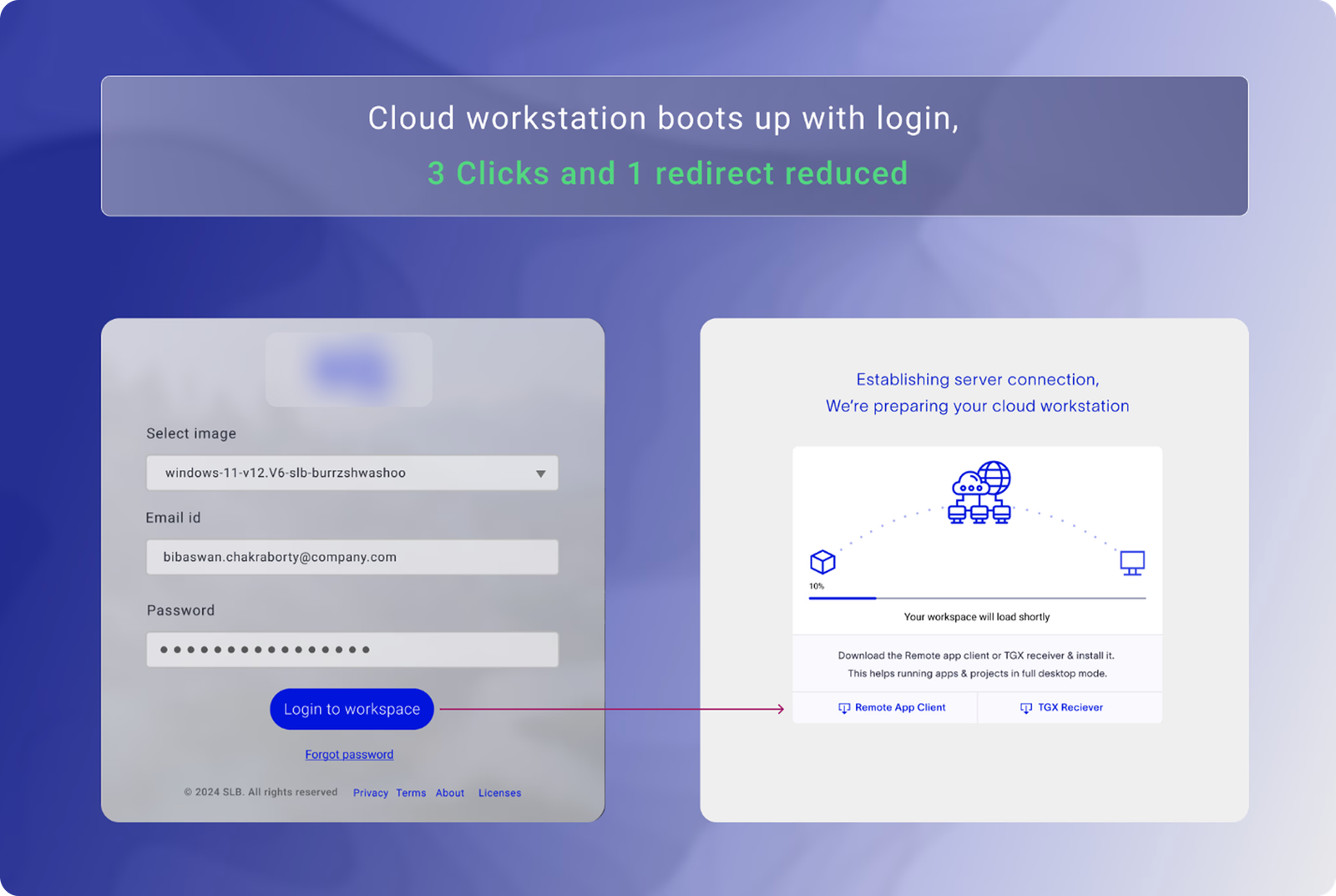
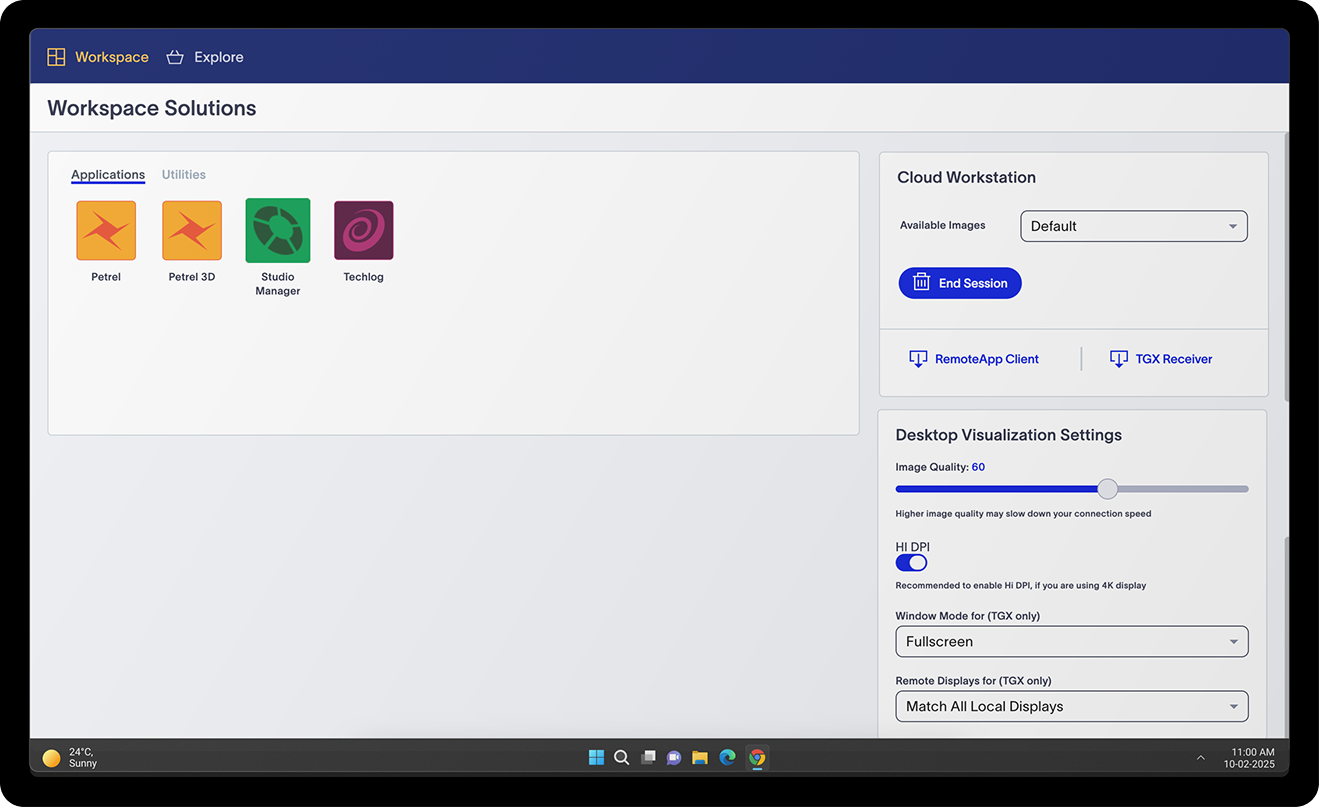
After: authentication and VM boot collapsed into a single background process — workspace ready on arrival.

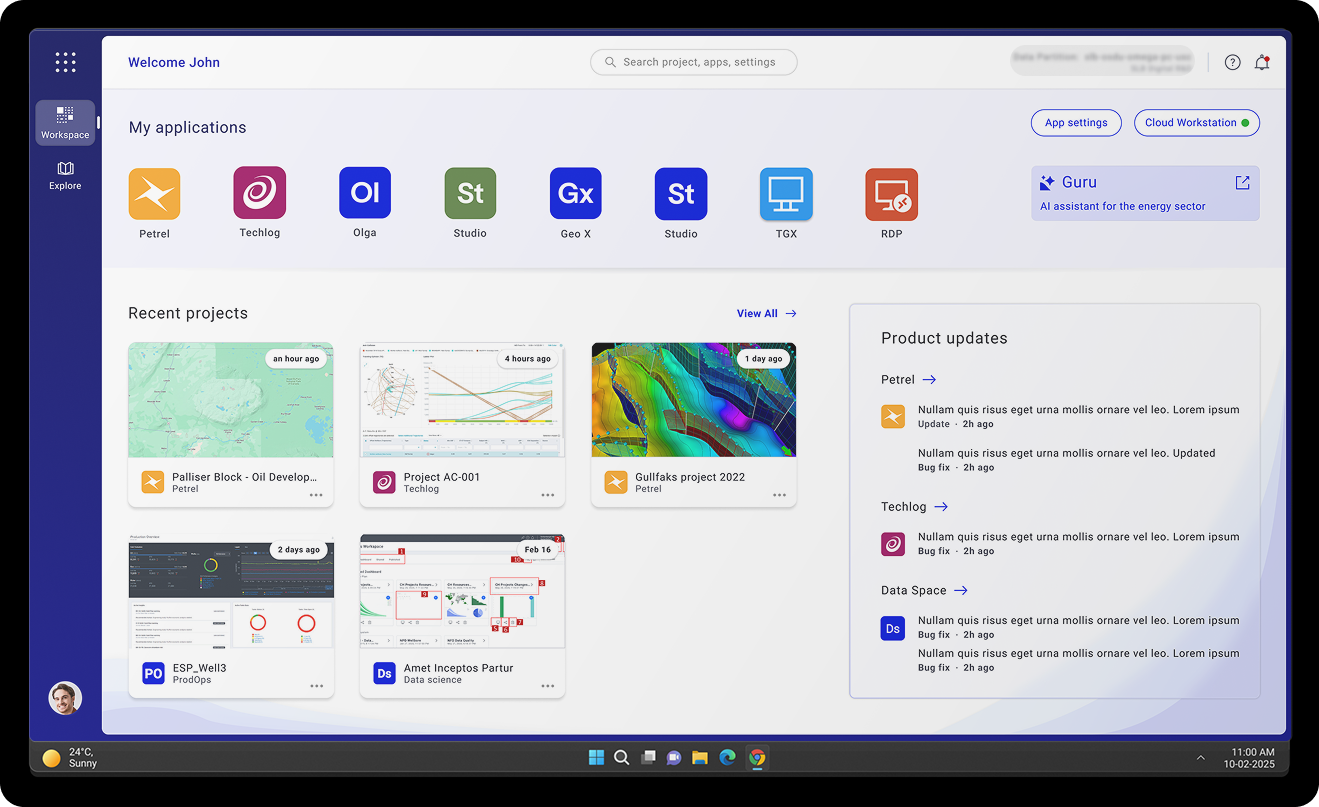
Sneak peak —
Before and After.

Before
Before: settings-heavy, fragmented navigation
After
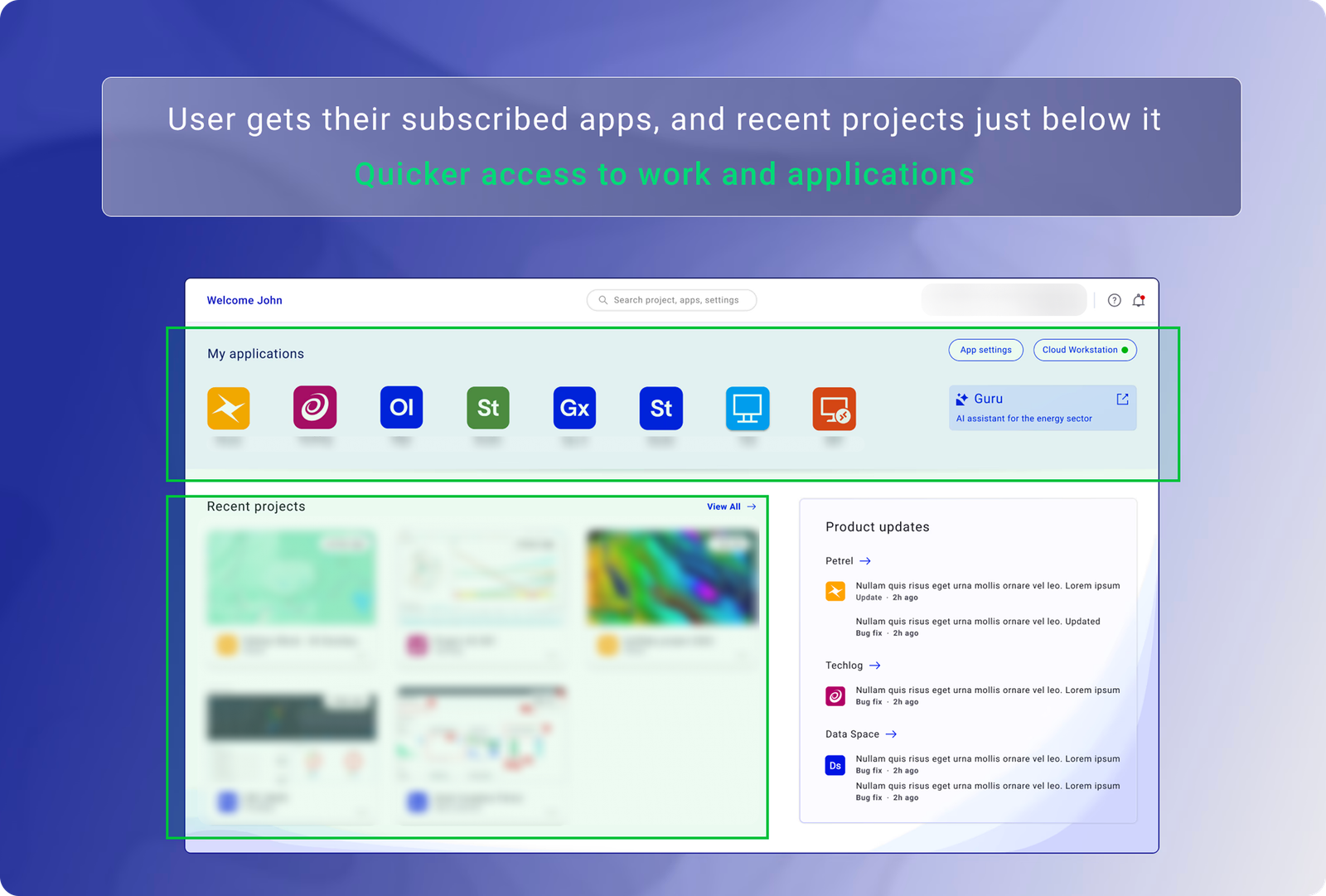
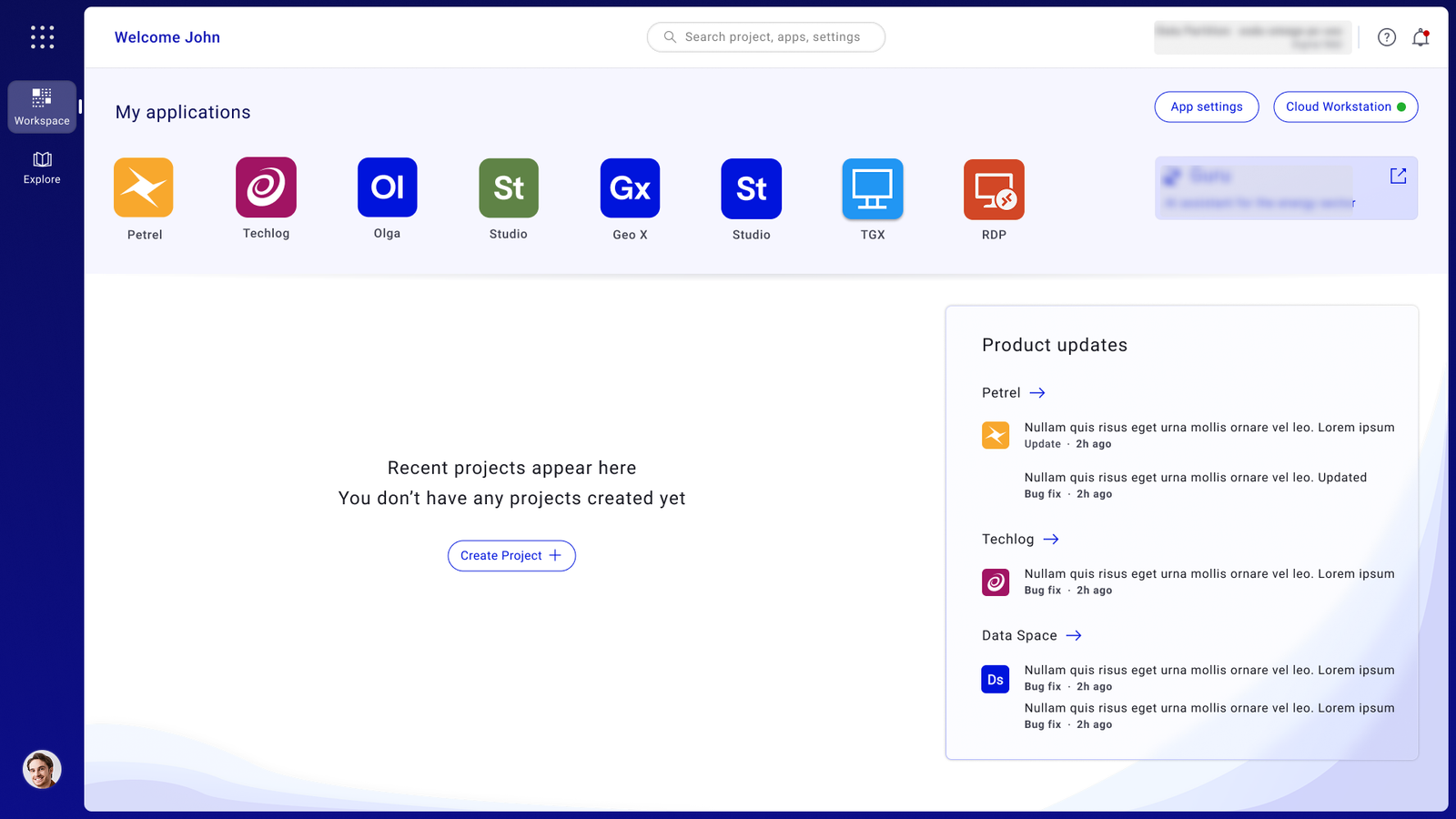
After: work-first, unified workspace
User Research

Starting with listening — not assumptions

My process started with listening to users and understanding how they moved across tools, projects, and cloud workflows. To understand why users were facing friction, I studied how geologists, geophysicists, and enterprise users moved from login to actual work — analyzing the workspace not just as a dashboard, but as a daily productivity environment.

Listen and think

The research focused on four areas: how users accessed applications, how they resumed recent projects, how they understood cloud-session status, and where they lost time in the workflow.

40
User Interviews
1:1 sessions with geologists, geophysicists, and enterprise cloud users to map needs and workflow friction.
3
Workflow Walkthroughs
Mapped login, app launch, and recent work access — tracking every decision point users encountered.
5
UX Audit Areas
Identified navigation, visibility, and trust issues across the existing workspace experience.
21→3
Click Reduction Target
Usage and support ticket analysis revealed the quantifiable opportunity to simplify core workflows.

Interview Methods

I conducted feedback synthesis from 40 professional geologists and geophysicists — combining 1:1 interviews, workflow walkthroughs, support-ticket analysis, contextual inquiry, and review of product usage data. I collaborated closely with internal domain experts throughout.

Research Method Scale Purpose
User Interviews 40 users Understood user needs and workflow friction
Workflow Walkthroughs 3 core workflows Mapped login, app launch, and recent work access
UX Audit 5 friction areas Identified navigation, visibility, and trust issues
Usage & Support Analysis 21 → 3 clicks Found opportunities to reduce workflow effort

Research document

Before any interviews were conducted, a structured research document was prepared to align the team on what we were trying to learn and why.

Problem

Feedback from the engineering operations team and platform analysts revealed that the existing workspace was a fragmented collection of disconnected tools and entry points. Geoscientists — who work under significant time pressure on mission-critical data — were forced to rebuild their session context from scratch on every login.

A geologist needs to think from the perspective of the entire subsurface analysis chain — not just their own task. Keeping that in mind, their workspace needed to surface the right information at the right moment. The current flow made this impossible.

User interviews were planned to get a ground-level view of the workflow breakdowns and to hear directly from domain experts about what the ideal experience would look like.

Research goal

Below is what we wanted to learn from domain experts:

  • Geoscientist's existing workflow and session patterns.
  • Key tasks, application touchpoints, and handoff moments.
  • Pain points at each stage of the workspace launch and resume flow.
  • User's mental model of how the workspace should behave on login.
  • Understand what "resuming work" means to a geologist vs a new user.
  • Any system trust issues — session state, data visibility, application behaviour.
  • General observations and suggestions from power users.
Research methodologies
  • Heuristic audit of the existing workspace against Nielsen's 10 usability heuristics.
  • Support ticket analysis to identify the highest-frequency failure points before interviews.
  • 40+ contextual user interviews with geologists, geophysicists, and technical operators to understand real-world workflow constraints.
  • Workflow walkthroughs to observe how domain experts navigate the existing system in situ.
  • Usability testing on redesigned prototypes to validate decisions before engineering handoff.
Timelines
Phase 1 Heuristic audit & support ticket analysis
Phase 2 Contextual user interviews & workflow walkthroughs
Phase 3 Prototype usability testing & iteration

Interview framework

Each interview followed a structured framework to ensure consistency across 40+ sessions while leaving room for the conversation to go where the user's experience led.

Introduction
  • Introduce myself and the design team.
  • Explain my role and why I'm conducting research.
  • Time estimate: 30 minutes approx.
  • Ask permission to use audio or video recording for note-taking purposes.
  • Provide context on the interview process and goals.
Questions
  • Could you explain a bit about yourself and your role at the operations team?
  • What is your existing workflow today when you start a session and begin your analysis work?
  • What is the part you find most difficult or frustrating in this process?
  • How many active projects or datasets are you typically working on at a time?
  • How often do you need to resume work mid-session — and what does that look like today?
  • What would you suggest an ideal workspace experience to be?
  • Do you have any preferences for how applications should launch or behave?
  • How would you feel about the system surfacing recent projects automatically on login?
  • What could be some ideas you would suggest for improving the workspace?
  • Any general comments and suggestions?
Participant framework
Participant ID: P1 — P40+
Age:
Gender:
Highest Qualification:
Years of experience:
Tech proficiency:
Domain: Geoscience / Operations
Organisation:
UX Audit

Five major friction areas — all measurable

I audited the existing workspace experience across navigation, app access, recent work visibility, system feedback, and user confidence. The audit surfaced five critical failure points — not aesthetic issues, but structural problems in how the workspace communicated and responded to users.

Heuristic Evaluation Finding
Visibility of System Status ✗ Fail Navigation unclear. App does not communicate well with the user — information is present but not discoverable.
User Control & Flexibility ✗ Fail User feels no sense of control. No customisations available — no ability to prioritise or personalise workflow.
Learnability ✓ Pass Terminology is fair but improvable. Basic task completion is possible for experienced users with patience.
Error Control ✗ Fail No provision for error recovery or help documentation. Edge cases produce dead ends with no guidance.
Operability ✗ Fail Inconsistent app behaviour, no rapid response feedback, no option to save defaults. No keyboard navigation path for users on remote desktop configurations — a functional constraint for Technical Operators managing sessions across multiple screens simultaneously.
Fragmented App Access
No centralized entry point. Users had to move between different areas to find and launch the tools they needed, making the experience feel disconnected.
Poor Task Continuity
Users lacked a quick way to resume recent projects or continue work from where they left off — forcing repeated manual search every session.
Unclear Launch Behaviour
Users needed clarity on whether an application would open in browser, desktop app, or another environment. Uncertainty interrupted the workflow at the critical moment.
Weak Discoverability
Available products were not easy to find or understand — especially for new or occasional users who hadn't memorized the workspace structure.
No System Visibility
Cloud session health was hidden or unclear. Users couldn't tell if an issue was a system problem, network issue, or application failure — eroding trust.
Click-Heavy Flows
Everyday tasks required far more clicks than necessary. The 21-step core workflow was the most extreme symptom of a systemically overengineered navigation model.
Research Synthesis

What the data actually said

Mapping user struggles to business impacts made the cost of inaction impossible to ignore. Every friction point in the user experience had a direct operational consequence for the business — stalled cloud migration, unused infrastructure, and rising support load.

Key Insight Evidence
Users frequently resume the same work multiple times a day 6 in-depth interviews with geologists and geophysicists
Finding "where I left off" was harder than performing the task itself Product usage data + workflow walkthroughs
Tool discovery was a secondary friction — the launch flow was the primary blocker Usage data + interview synthesis
Context switching between views increased errors and user hesitation Shadowing sessions + support ticket review
User Friction Business Impact
21 clicks + multiple redirects before starting work Users hesitant to migrate to cloud — expensive servers going unused
Outdated tech, inconsistent interface, high cognitive load Users reverting to legacy systems — high cost of maintaining parallel infrastructure
No visibility of system status, overwhelming technical jargon Poor app access and trust deficit — preventing business scaling and adoption targets

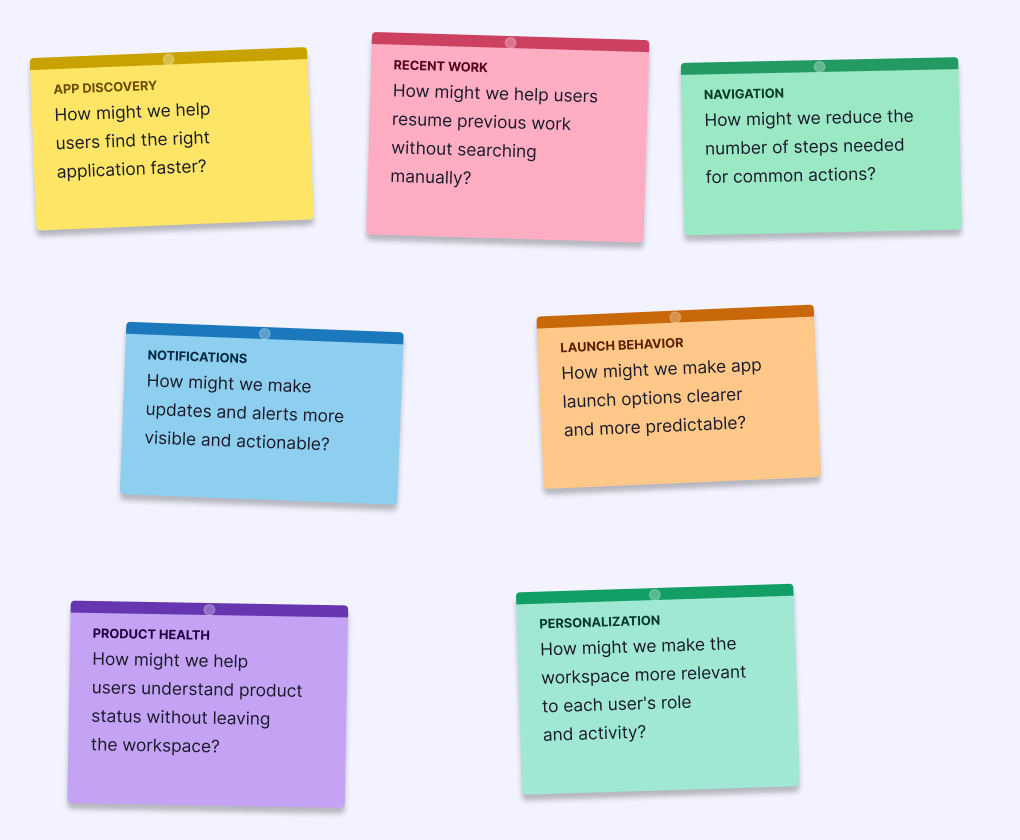
How Might We

How might we reduce the steps between login and starting actual work to under 3 clicks?

How might we surface recent projects so users can resume work without searching again?

How might we give users visibility into system health without overwhelming them with technical detail?

How might we make application discovery intuitive for both new and experienced users?

How might we
Design Opportunity

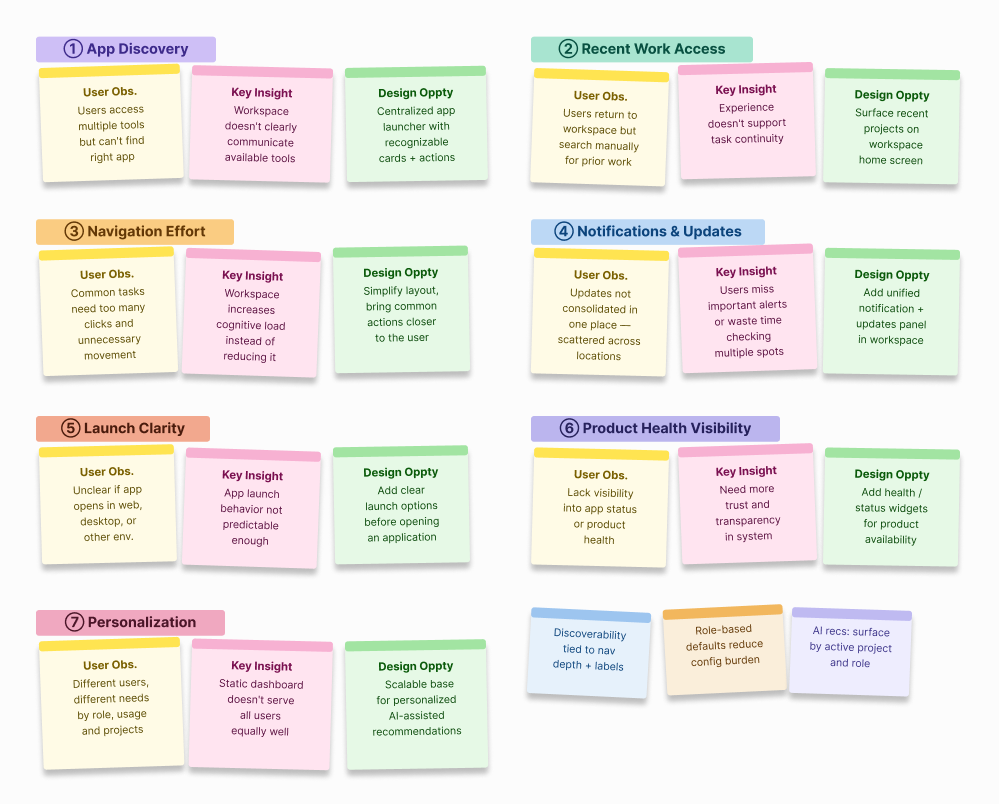
Translating user needs into design decisions

Each insight from research was mapped directly to a design intervention — and each intervention was evaluated against the value it would deliver to users. This kept the work anchored to outcomes, not features.

User Need
Cloud workstation ready on login — apps and projects loaded immediately
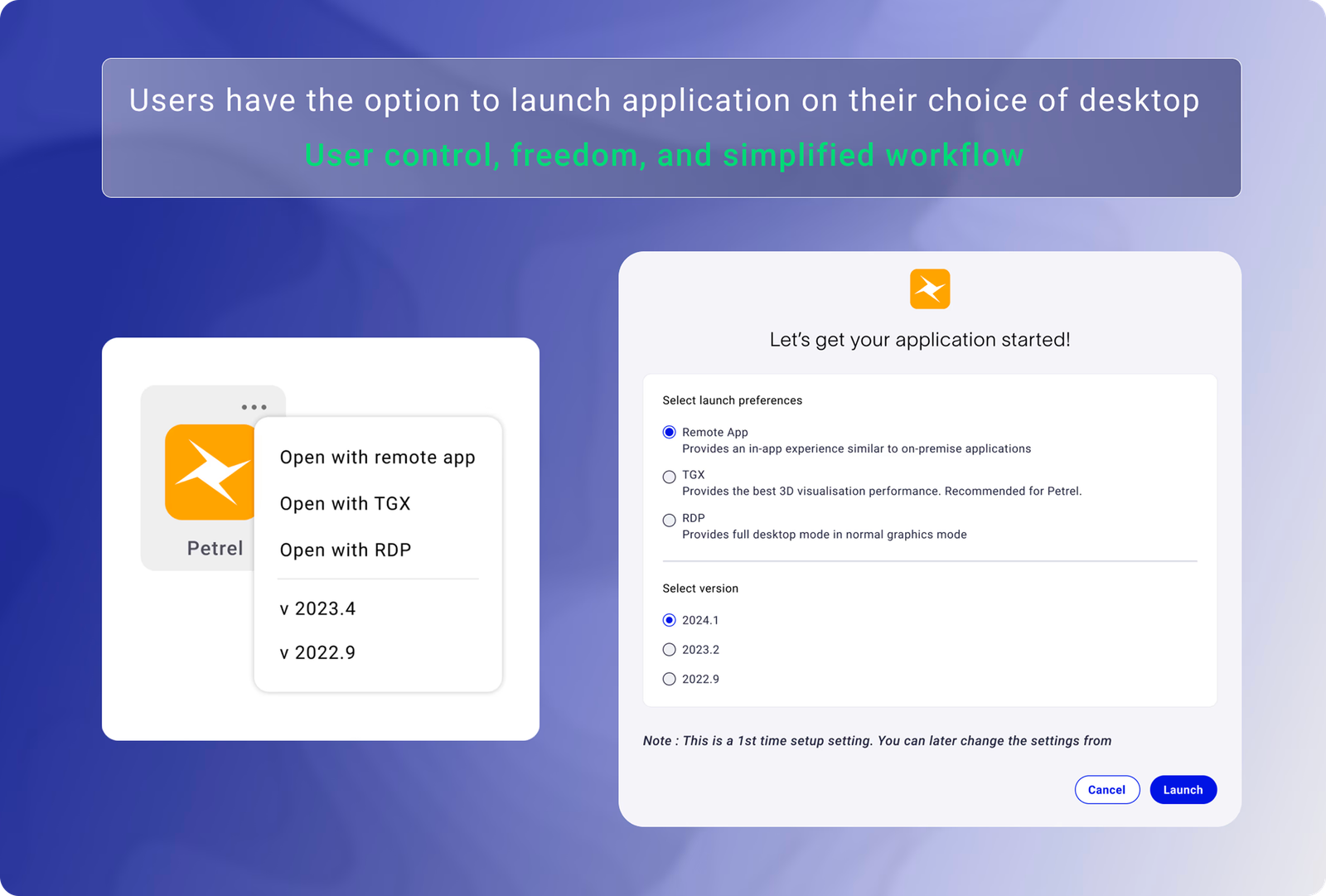
Choose desktop type for app launch (RDP, Remote, TGX)
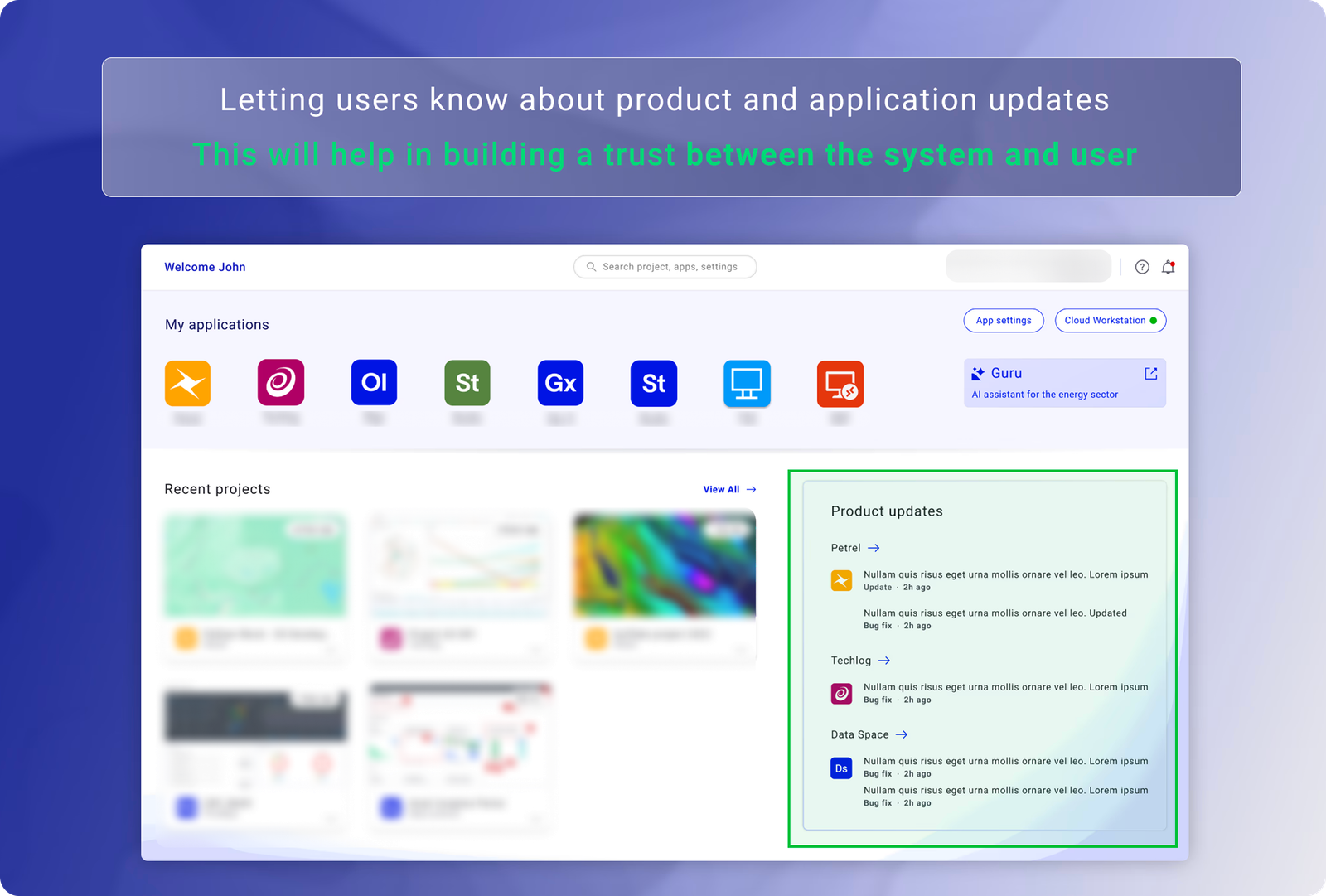
App & product updates visible and meaningful
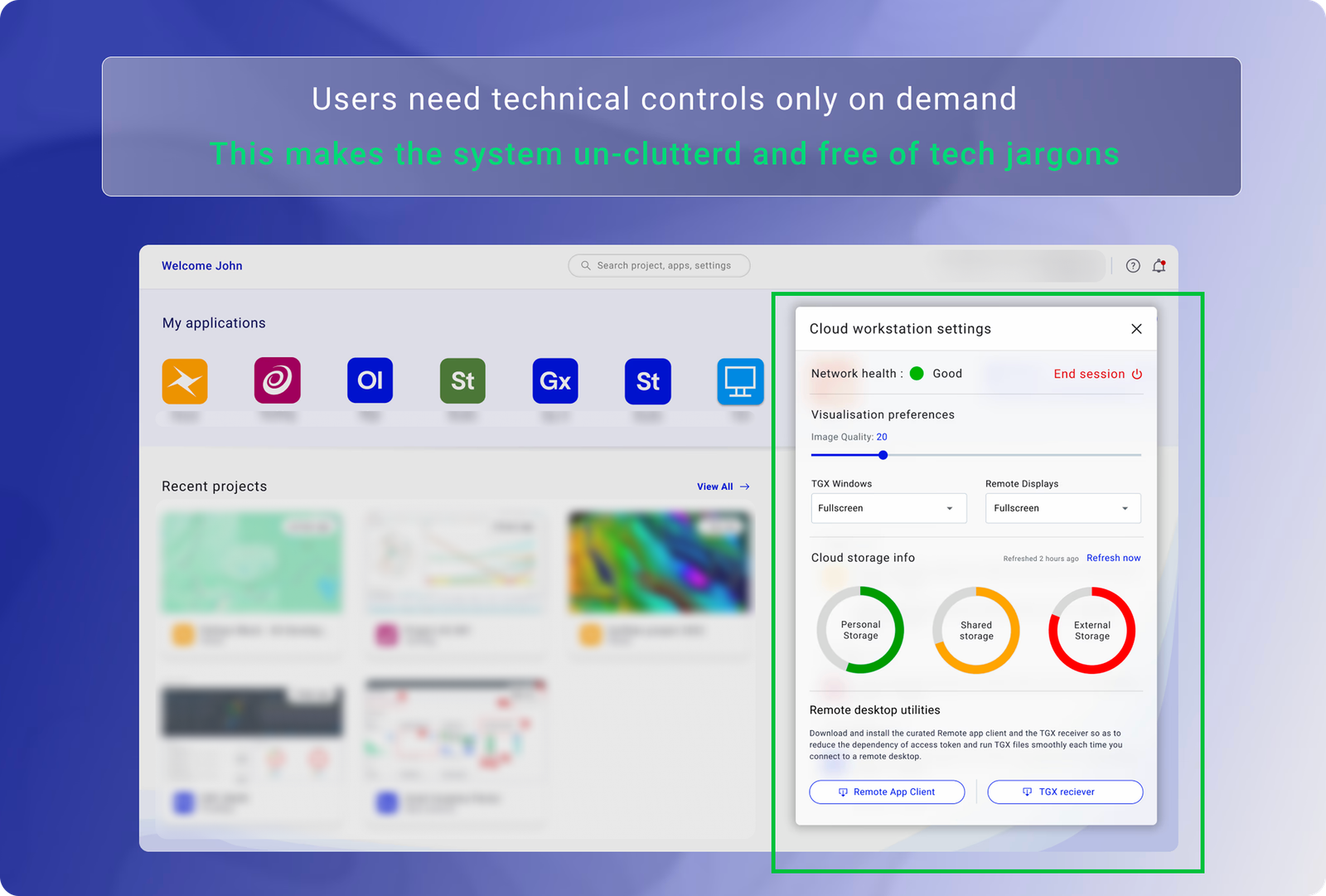
Tech control on demand — not always visible
Design Intervention
Combine login & session start · Main workspace covers work access
Provide choice of RDP, Remote app, or TGX at launch
Dedicate part of workspace to recent app updates
Hide unnecessary settings unless explicitly needed
Value for Users
Clicks & redirects reduced · Productivity
User control and freedom
Increases trust between user and system
Increase in productivity
Affinity Map
Design opportunity map — user need → design intervention → value for users
IA & Multi-role Design

The workspace serves three distinct user types.

Designing a single workspace that works for all three required mapping each role's mental model before any wireframe was drawn. The IA had to accommodate their different entry points without creating three separate products.

Geologist / Geophysicist

Primary task-doers. Need to resume work instantly, access specific applications, and understand session state. Cognitively loaded before they open the workspace — every friction compounds.

Technical Operator

Manages infrastructure configuration, monitors system health, and troubleshoots session issues. Needs system visibility without context-switching out of the workspace. Often the person scientists blame when things go wrong.

New / Occasional User

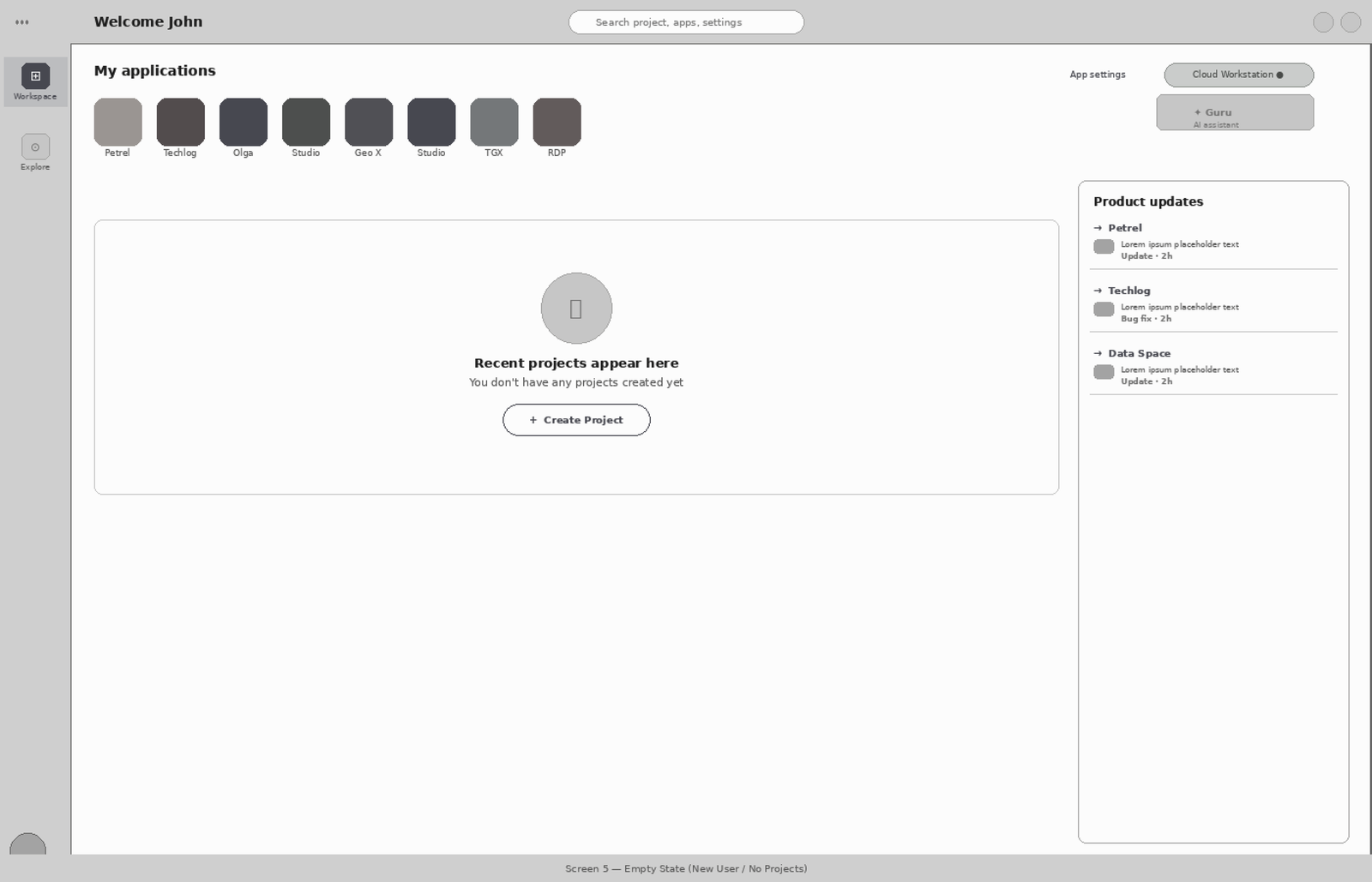
Onboarding regularly post-migration. Needs application discovery, clear empty states, and guidance on launch behaviour — without the workspace feeling like it was designed only for experts.

The navigation architecture before the redesign.

The existing IA forced every user through the same four-stage flow regardless of their goal: Login → Subscription launch → VM boot → Content access. There was no role-based differentiation, no state persistence, and no separation between infrastructure controls and work tools. The architecture treated every session as a first session.

User Type Primary Goal What the Old IA Required What the New IA Does
Geologist / Geophysicist Resume yesterday's project Navigate 21 steps before touching any data Recent work surfaces at login — 1 click to resume
Technical Operator Check session and network health Navigate to a separate system status area Embedded health panel in the workstation — no context switch
New User Discover available applications Blank screen with no orientation or guidance Designed empty state with clear application discovery path

Four design principles.
Every decision ran through them.

Based on research with all three user types, I defined four principles that governed every design decision. Not aspirational guidelines — actual filters. If a proposed solution didn't hold up against all four, it didn't ship.

01
Resume over rediscover

Help users continue work instantly. The home screen is not a launchpad — it's a resumption point.

02
Task-first, not tool-first

Organise the interface around what users are doing, not what features the product has.

03
Reduce cognitive load

Minimise decisions required before meaningful action. Every extra choice is friction.

04
Respect domain complexity

Simplify the workflow — never the domain. Geologists need professional-grade tools.

Wireframes

Initial wireframes
which provided a direction

Workspace layout
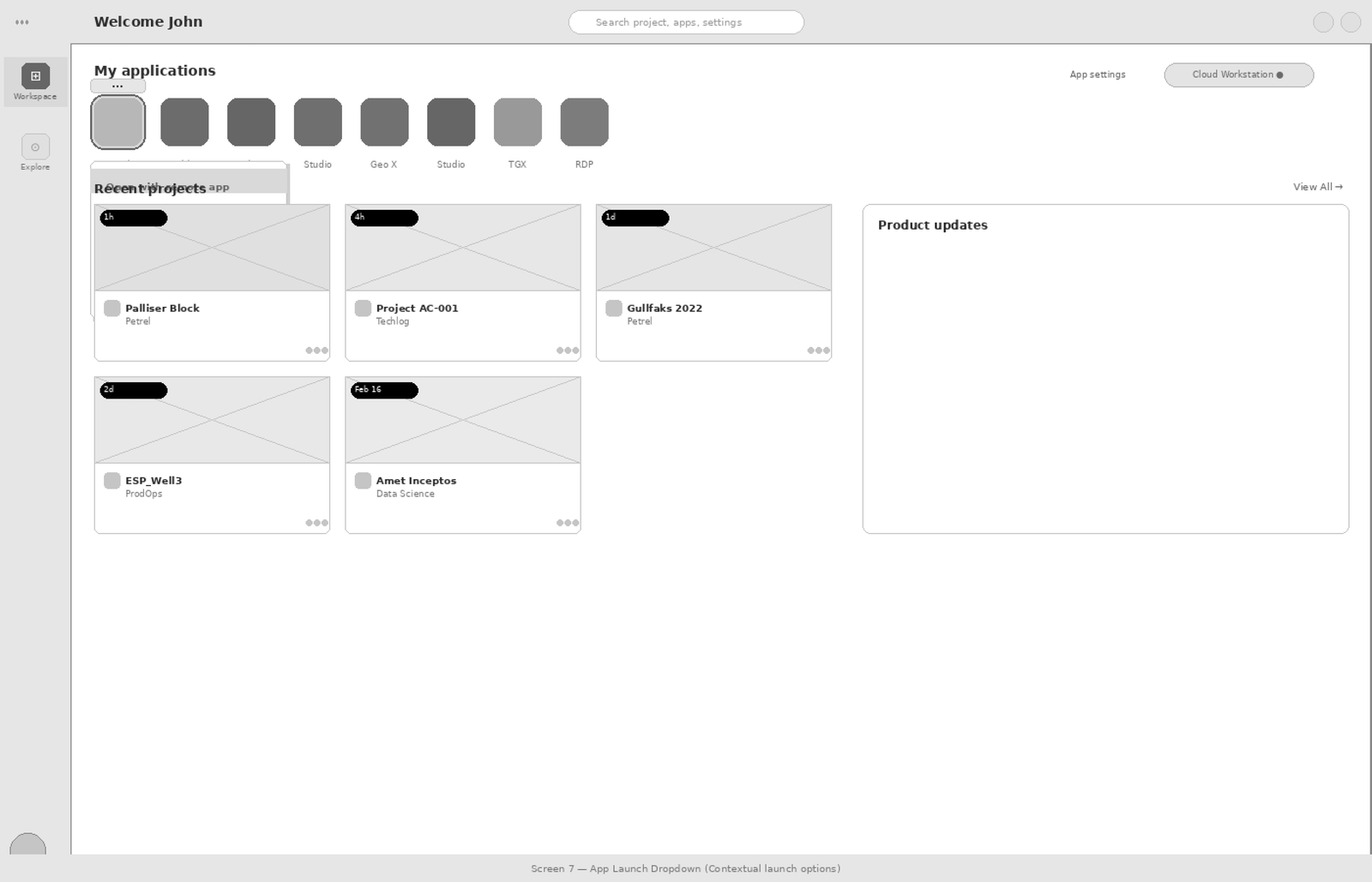
Apps and Projects
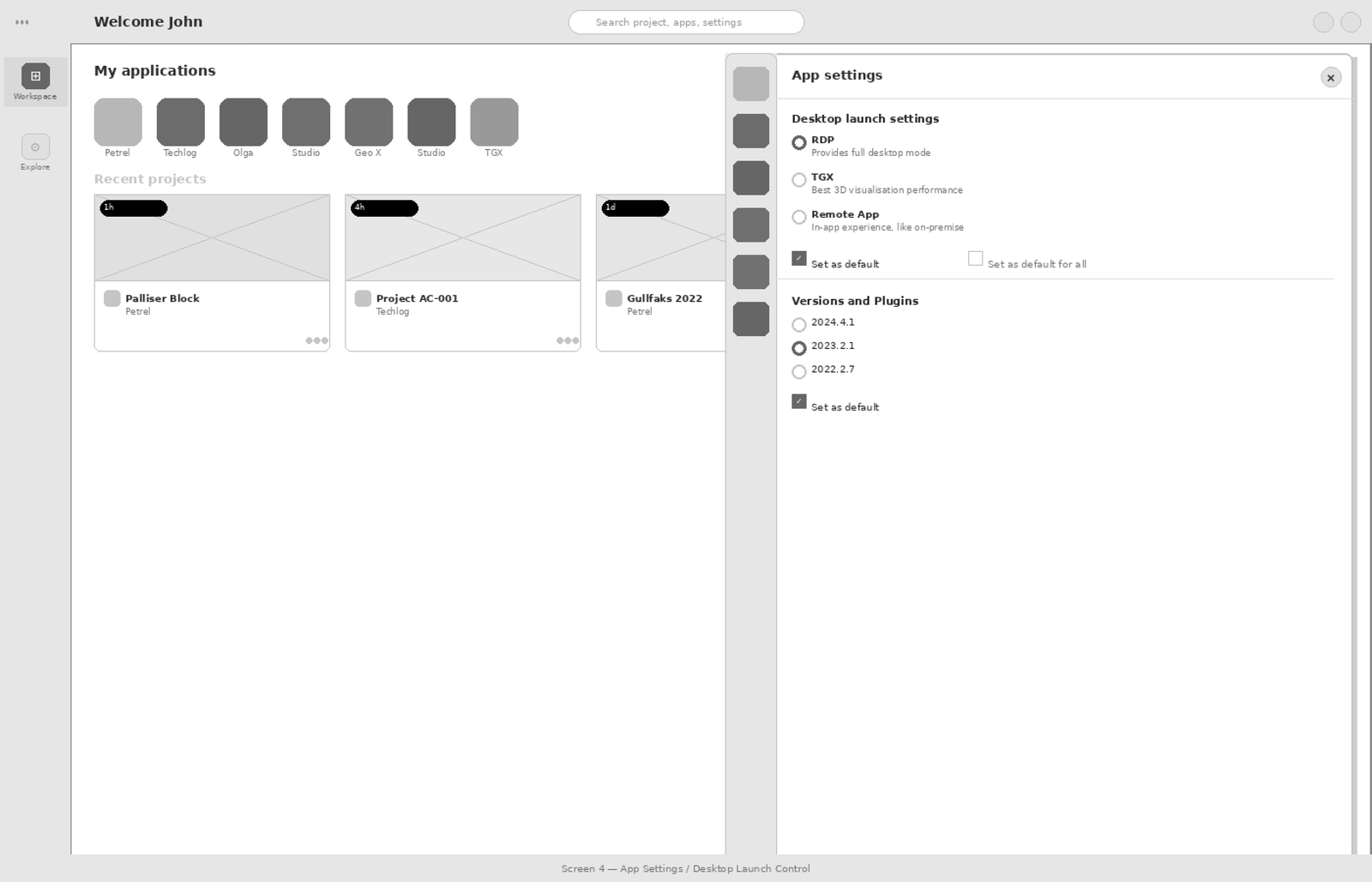
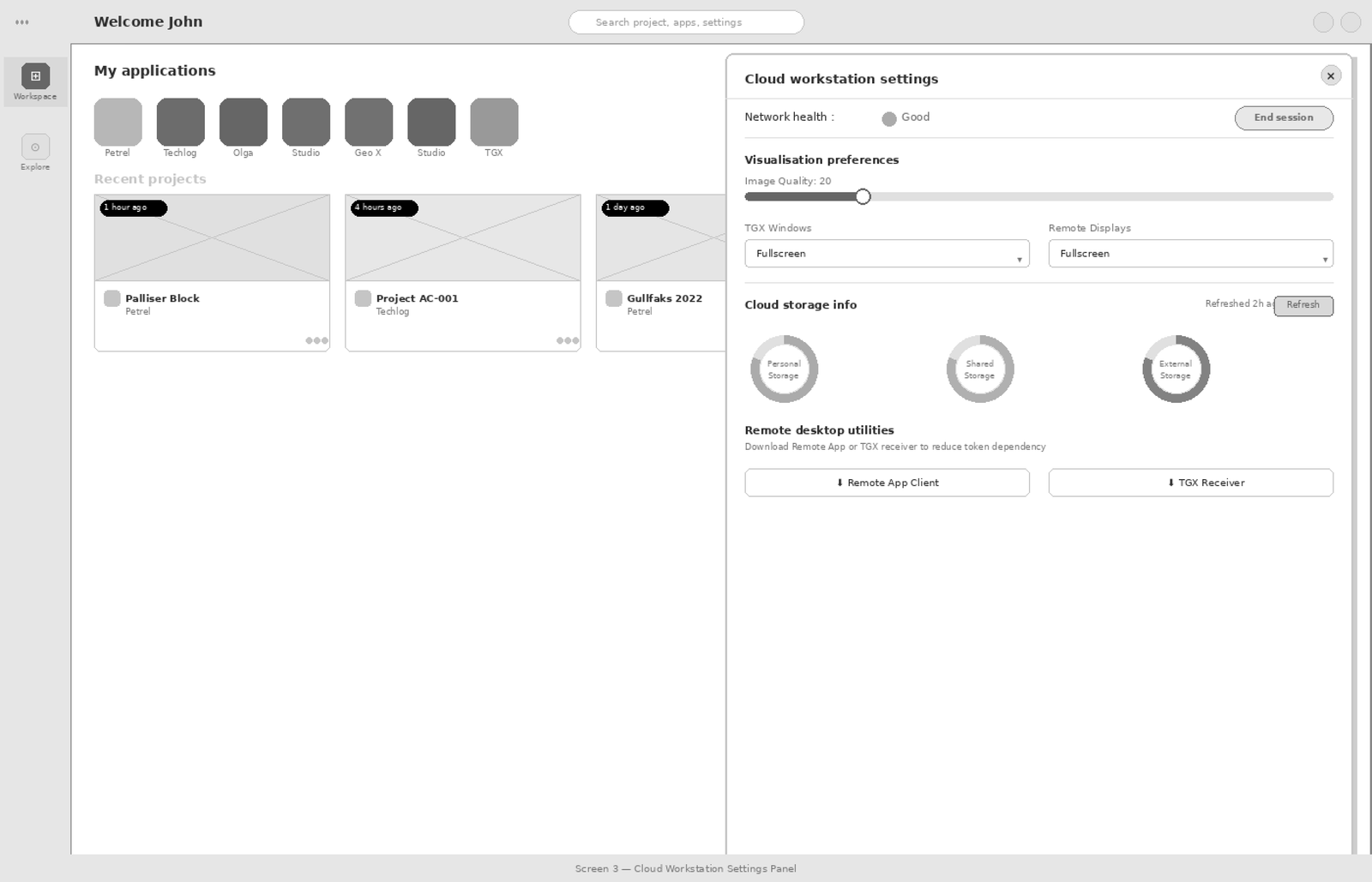
App settings
Workspace settings
Design Decisions

The calls that changed adoption

Every design decision was tied to a specific friction point identified in research. The goal wasn't to redesign the interface — it was to remove the obstacles between users and their work.

Decision 01 — Recent work
SURFACE RECENT WORK AS THE PRIMARY ENTRY POINT
Users consistently expressed frustration with finding their last active datasets. I introduced a "Recent Work" section as the primary entry point — enabling users to resume tasks in a single interaction. Surfacing recent projects and key actions upfront reduced time-to-task and improved re-engagement significantly.
Decision 02
Reduce click depth from 21 to 3
Deep hierarchies increased time-to-task and cognitive load. I collaborated with engineering to remove unnecessary decision points and simplify the workflow. Every redirect, confirmation step, and loading state was examined and either eliminated or absorbed into the background.
Decision 03
GIVE USERS LAUNCH CONTROL — CONTEXTUALLY
Users were confused about how to open applications: Remote App, RDP, or TGX. Rather than hiding this complexity, I surfaced it as a contextual choice per app — a lightweight dropdown at point of launch, with ability to set a default. Clarity over simplification.
Decision 04
EMBED SYSTEM HEALTH — DON'T CREATE A NEW DESTINATION
Users lost confidence mid-session when they couldn't tell if the system was working. Rather than adding a status dashboard (a new place to navigate), I embedded health signals directly into the Cloud Workstation control surface — network health, storage, and session state visible in one panel without leaving context.
Decision 05
DESIGN THE EMPTY STATE — IT'S A FIRST-WEEK EXPERIENCE
With 3,000 new users onboarding, the empty state wasn't an edge case. I designed a clear zero-data state that communicates what recent projects are, why there are none yet, and gives a single clear action — rather than leaving new users staring at a blank screen wondering if something broke.
Decision 06
STATUS LEGIBLE WITHOUT COLOUR — DESIGNED FOR FIELD CONDITIONS
Cloud session failures produce ambiguous UI states. I specified four distinct system states — active, loading, degraded, failed — each with distinct visual treatment using shape, label, and icon, not colour alone. The reason was domain-specific: geoscientists frequently work in remote field environments with high screen glare, and a meaningful proportion report some degree of colour deficiency. Relying on red/green to communicate session health would have created a silent accessibility failure in exactly the conditions where system status matters most. This wasn't a WCAG checkbox — it was a functional constraint surfaced by research.
Trade-offs & Prioritisation
To maximise adoption impact within delivery constraints, I prioritised high-frequency daily workflows and deferred lower-frequency enhancements. Prioritised core flows over long-tail edge cases for v1 · Deferred advanced personalisation to reduce engineering complexity · Used progressive disclosure instead of adding more controls on the first view.
Friction Map

Flow Comparison — 85% step reduction from redesign

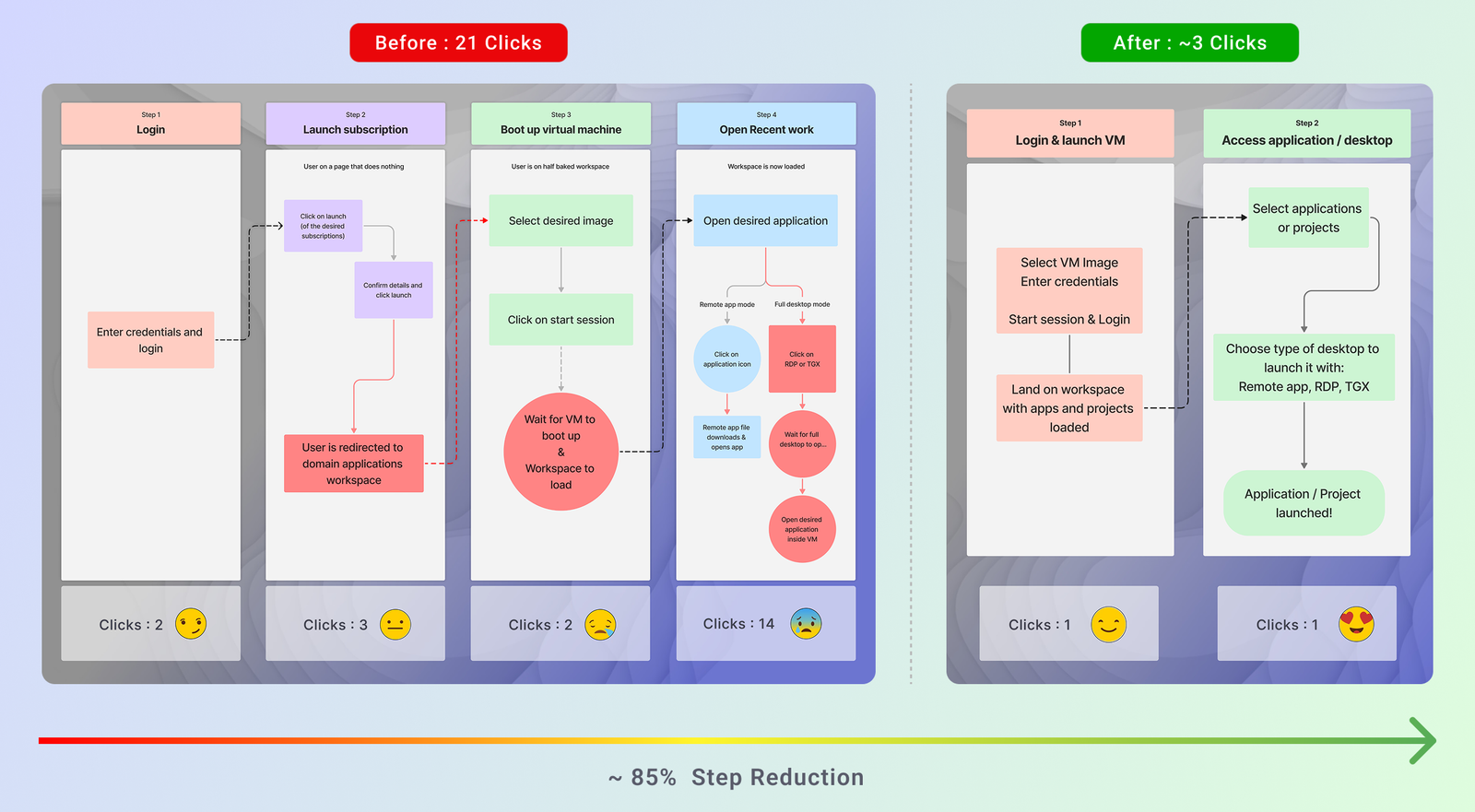
The friction map documents the exact journey users had to take before and after the redesign. It reveals where unnecessary steps, repeated navigation, and unclear states were costing users time — and shows exactly how the redesign collapsed a four-stage, 21-click process into a two-stage, ~3-click flow.

Before: Users navigated through Login → Launch Subscription → Boot Virtual Machine → Open Recent Work — accumulating 21 clicks, multiple redirects, and significant wait time before starting actual work.

After: Login & VM launch are combined into a single step. The workspace loads ready-to-use with apps and recent projects visible. One click to start working.

Flow comparison diagram showing 21-click before flow and 3-click after flow with 85% step reduction
Flow comparison — Before: 21 clicks across 4 steps · After: ~3 clicks across 2 steps · 85% step reduction
Impact

The redesign converted a flat adoption trend into measurable growth

Within six months of launch, the redesign delivered results that were measurable across every dimension — user behaviour, satisfaction, and business adoption. The data validated not just the design decisions, but the research approach that preceded them.

Impact metrics — 5.5K total user traffic, 3.5K accessed recent projects, 2K directly opened apps, 85% task efficiency, 18 clicks reduced, 95% discoverability
Usability validation data — Google Analytics confirmed the hypothesis that users prioritise recent work access

The adoption rate chart below tells the fuller story — a flat growth curve from 2020–2024 that sharply inflected upward immediately after the redesign launch, reaching +13,000 new users by December 2024.

User adoption rate chart — flat from Jan 2020 to Jan 2024, steep rise from Jan 2024 to Dec 2024 post-redesign
User adoption rate on cloud profile — before and after the redesign
+67%
Active product adoption
Measured against pre-launch baseline across the geoscience user base within six months.
+80%
User satisfaction
Measured post-launch via structured usability validation with domain experts and geoscientists.
3K+
New users onboarded
New customers onboarded within 6 months of launch — the direct result of removing the adoption barrier.
85%
Task efficiency gain
Step reduction in core workflow — from 21 clicks to approximately 3, with 95% discoverability score.
Reflection

What I'd do differently

Four honest calls — things I'd change if the project started today.

01
Instrument from day one

Analytics went in three months post-launch. The early adoption curve — the data that would have told us why users weren't returning — was gone. A prioritisation failure I should have pushed harder on at kickoff.

02
Prototype personalisation in Phase 1

Deferred pinned apps and custom layouts to Phase 2. When we got there, users had conflicting mental models we could have surfaced cheaply earlier. That delayed learning cost six months of scoping.

03
Design the non-technical entry point

We designed for geologists. The 3,000+ new users included IT admins and project managers. Documentation wasn't enough. A guided first-run experience would have cut the first 8 weeks of support load significantly.

04
Use the flow — not the screen — as evidence

My internal before/after showed side-by-side screens. Stakeholders read "it looks cleaner" — not "the architecture changed." The 21→3 story is a flow story. I should have used the journey map. My own presentation choices obscured the argument for months.

Next case study

Simplifying complex Business Rule builder with AI assistant

AI integration in a pharma SFA rules engine — reducing rule creation time from 47 minutes to 19 through natural language input, contextual suggestions, and a trust architecture built for compliance.

Read case study →
Pharma & Sales SaaS AI / NLP integration Rule builder UX
−76%
workflow time
Bibaswan Chakraborty
Bibaswan
Chakraborty
Senior UX Designer
India 🇮🇳 · Immediate joiner

Want to discuss this
or a similar challenge?

7 years of enterprise UX across pharma, oil & gas, and healthcare. I work best on hard problems where design decisions have real operational consequences.
Get in touch LinkedIn →
All work Hire me
Case Study · 01

Simplifying Complex
Rule Logic
into Clarity

Domain
Sales Tech · Pharma SaaS
My role
Lead UX Designer · Research, IA, Interaction Design
Users
Pharma Sales Managers · Compliance Leads · Sales Reps
Complexity signal
Multi-role admin system · nested logic · AI trust architecture

Redesigned a rule builder with AI integration — replacing a brittle, 3rd-party-dependent interface with a system that supports complex nested logic. Rules that took 47 minutes now take 19.

47→19 min
Rule creation time (−76%)
87%
Task success rate · 8 users tested
Zero
Compliance escalations from AI suggestions · 6 weeks
1
3rd-party dependency eliminated
−41%
Support tickets · rule creation
Context & Framing

The Product

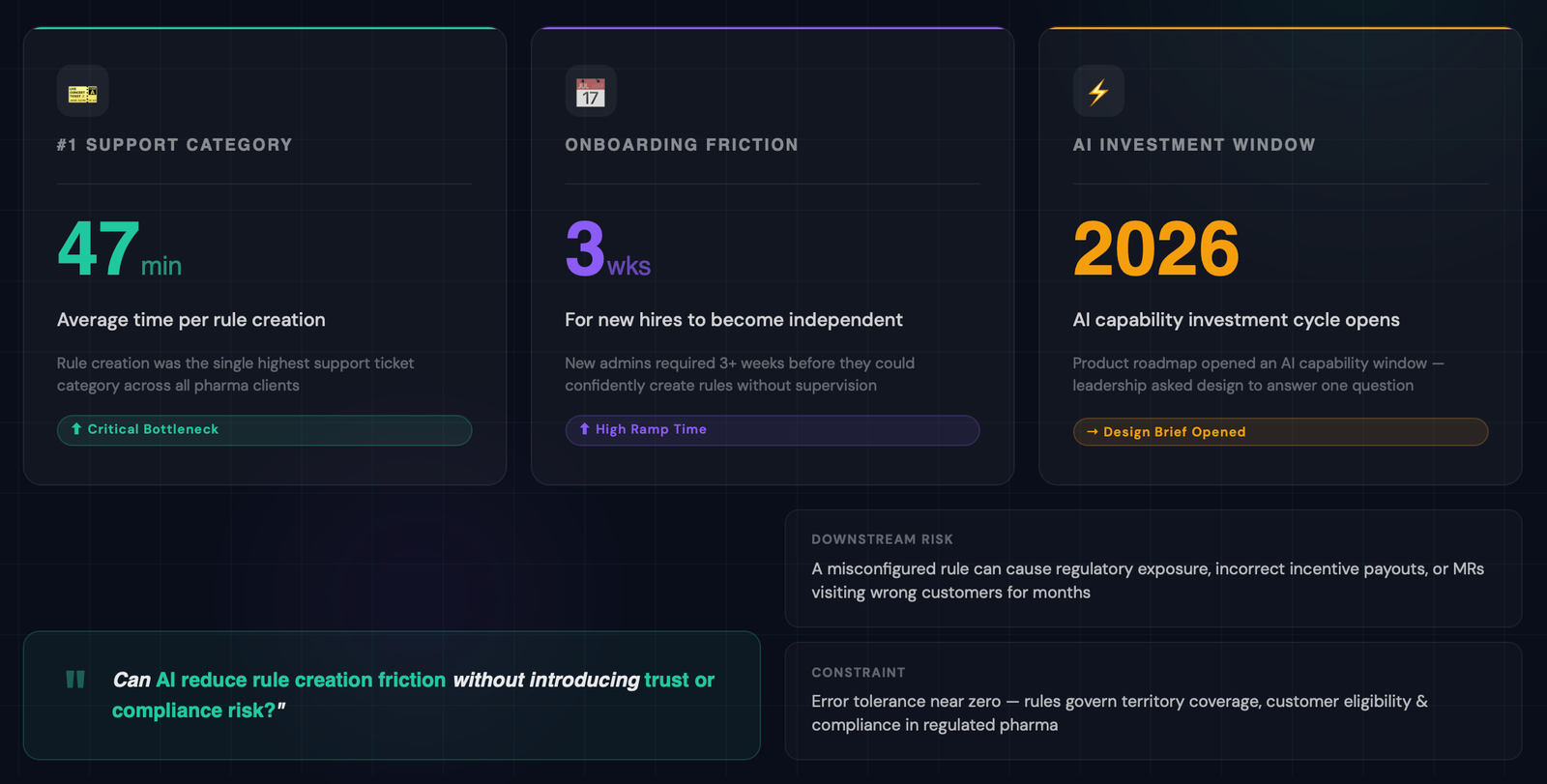
This case study covers a Sales Force Automation (SFA) platform used by pharmaceutical companies across India and South-East Asia. The platform enables sales managers and compliance leads to configure business rules that govern which medical representatives (MRs) visit which doctors, under what conditions, and during which coverage periods.

Business rules are the backbone of compliant field operations..They determine territory coverage, customer eligibility, product promotion boundaries, and visit frequency targets. A misconfigured rule doesn't just create bad data — it can result in regulatory exposure, incorrect incentive payouts, or MRs visiting the wrong customers for months before anyone notices.

The Strategic trigger

The product team identified a sharp bottleneck: Rule creation was the #1 support ticket category. Admins — the primary rule authors — were spending an average of 47 minutes per rule. New hires took over 3 weeks to become independent on the rules module. The product roadmap had an AI capability investment cycle opening, and leadership asked the design team to answer one question:

This case study documents how we answered that question — and what we shipped.

Why this problem becomes Hard

Business rules in pharma SFA are not simple filters. A single rule can combine team-level targeting, customer type segmentation, speciality conditions, effective date ranges, product inclusions, and minimum sales thresholds — all nested with AND/OR logic. The UI is expressive, but expressive UIs have steep learning curves. The challenge was not 'how do we simplify the UI' — it was 'how do we help experts work faster without dumbing down a tool they depend on.'

The Problem

Wrong rules. Wrong customers.
Measurable commercial damage.

"I need to create a complex rule and I can't — so I just create a simpler one that's wrong. Then the rep visits the wrong customers."

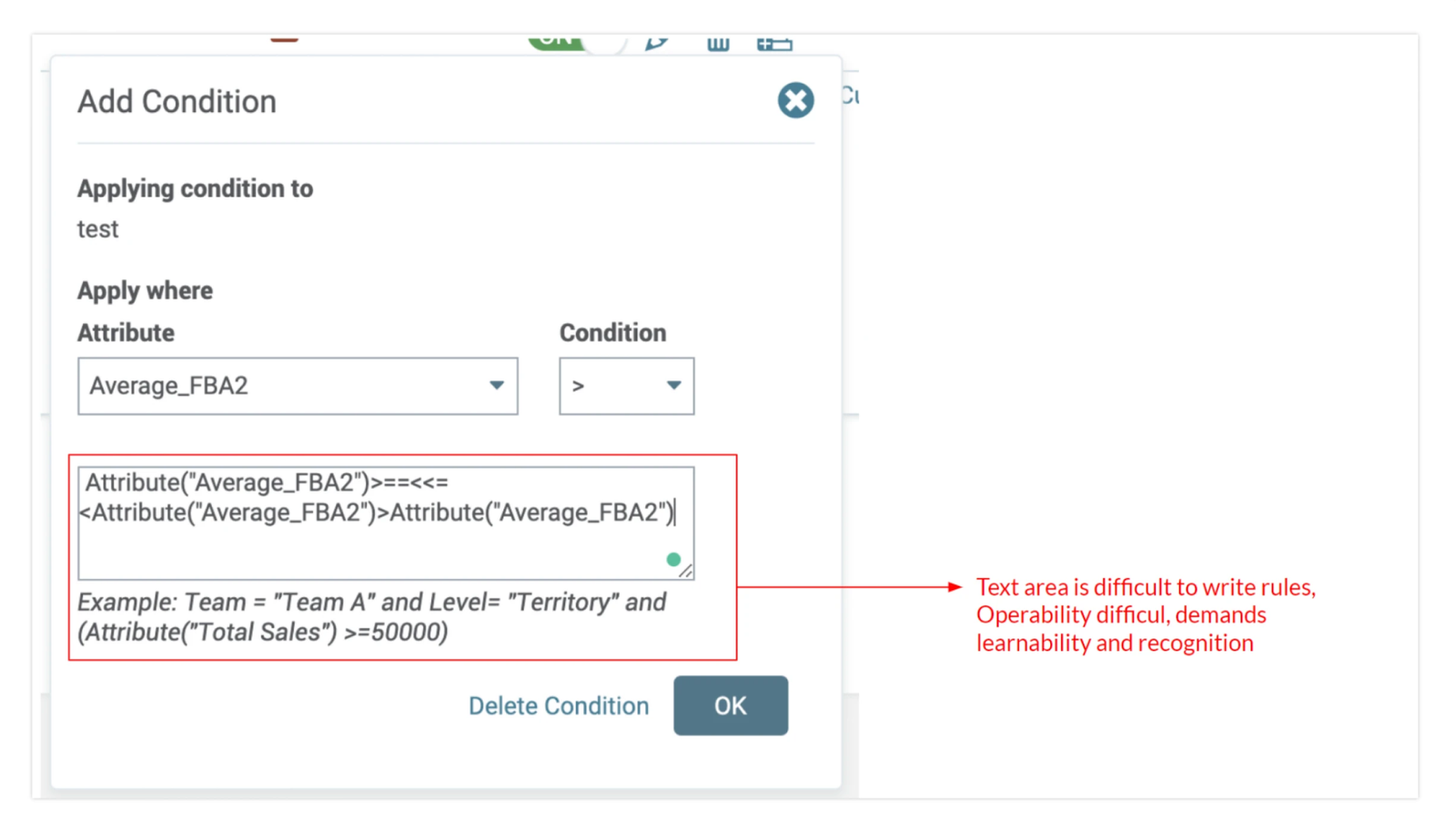
The interface couldn't handle nested rule structures — so users simplified their rules to fit what the tool could express, not what the business actually needed. The result was systematic field misalignment: reps visiting the wrong doctors, incentive payouts calculated on bad data, and compliance exposure that could run for months before surfacing.

The problem wasn't user skill. It was that the interface was designed around the tool's data model — not around how managers actually think about territory coverage. That mental model mismatch was upstream of every downstream failure.

Research

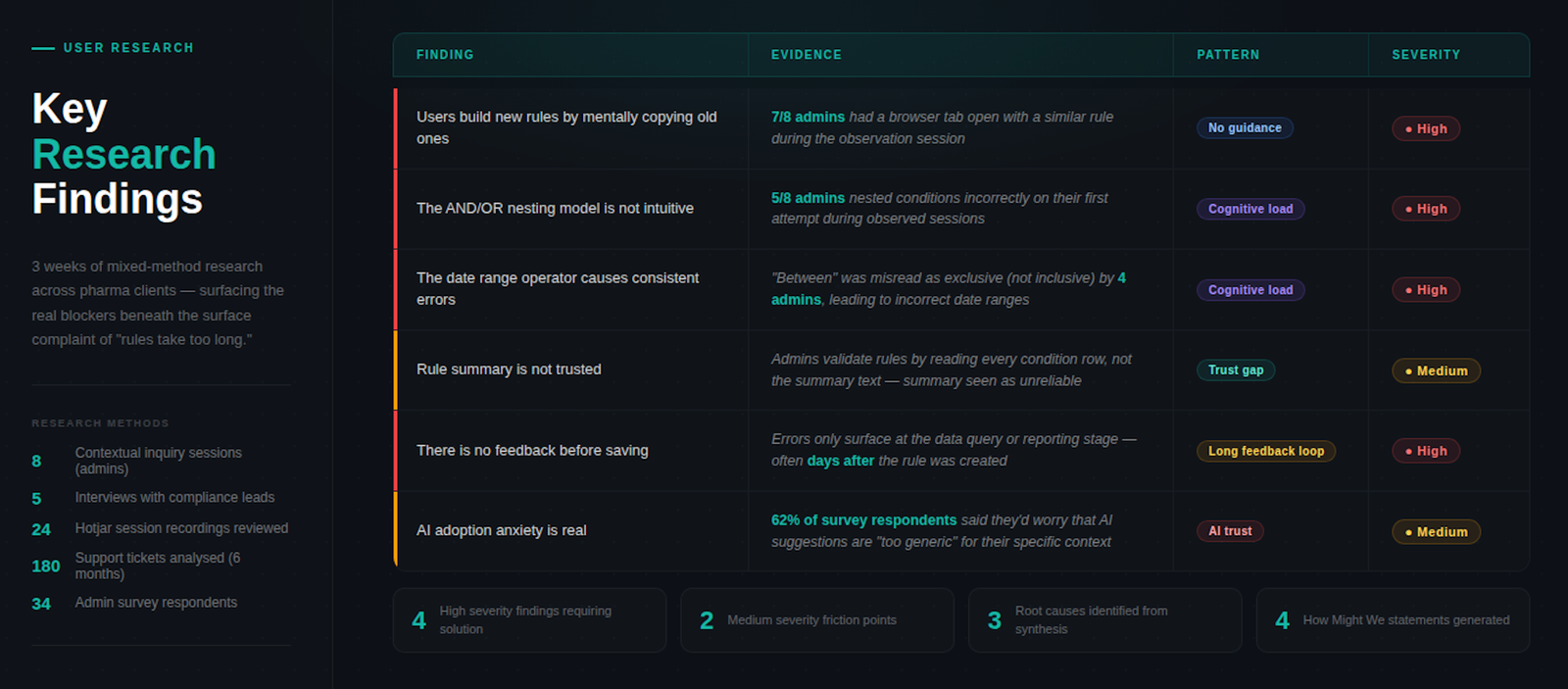
3 weeks of mixed-method research

8
Contextual Inquiry Sessions
With admins across 3 pharma clients (observed live rule creation)
5
Interviews
Compliance leads (rule reviewers and approvers)
24
Recordings review
Hotjar sessions on the rule builder
180
Support Ticket analysis
Categorised 180 tickets from the past 6 months. Survey to 34 admins across the customer base on confidence, frequency, and pain points

Two users. Incompatible navigation architectures.

Research surfaced two distinct user types — but the real finding wasn't a personality difference. It was a structural one. Their needs don't just diverge — they require opposite things from the same interface at the same decision point.

01
The Expert Manager

IA requirements: Full condition nesting from the first screen. No mandatory AI step — it slows them down. Persistent rule state across sessions. Mode memory so they don't re-configure on return. Any simplification that sits between them and the builder is friction they will route around.

02
The Occasional User

IA requirements: Guided entry — they don't know what to type until they understand the schema. Plain language labels, not data-model terminology. AI-first path as default, not opt-in. Recoverable errors at every step. Any interface that assumes prior knowledge produces the wrong rule.

These aren't preferences — they're incompatible navigation architectures. A single entry point cannot serve both. The design problem was: how do you build one product that lets each persona enter on their own terms, without a toggle that patronises either?

Design Audit

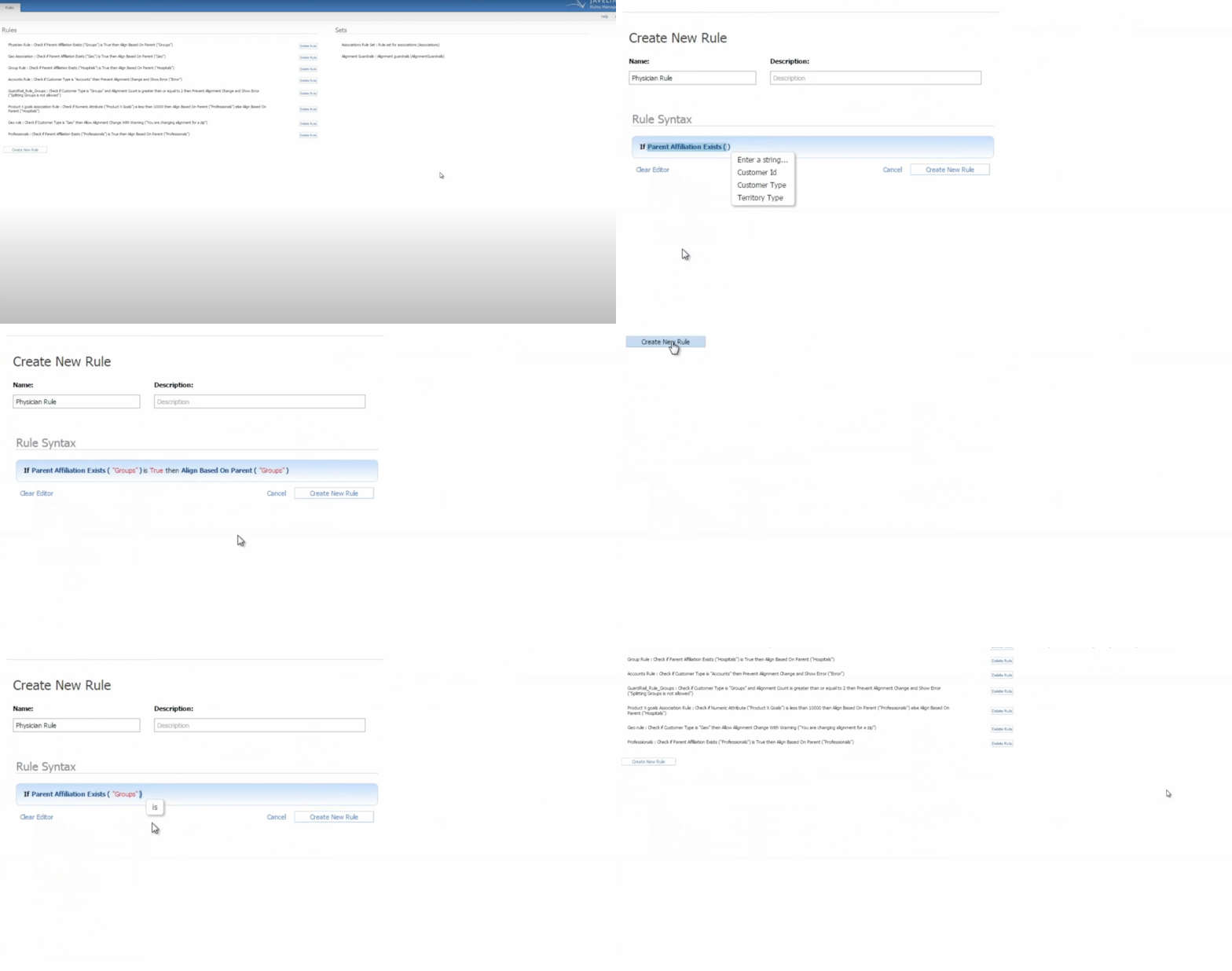
A Design audit using established heuristics revealed three critical failures in the existing interface: Visibility (partially passed — key rule state was not always visible), Flexibility (failed — no support for nested or grouped rules), and Learnability (failed — required training and prior knowledge to use correctly).

Old UI
Old UI
Problem Definition

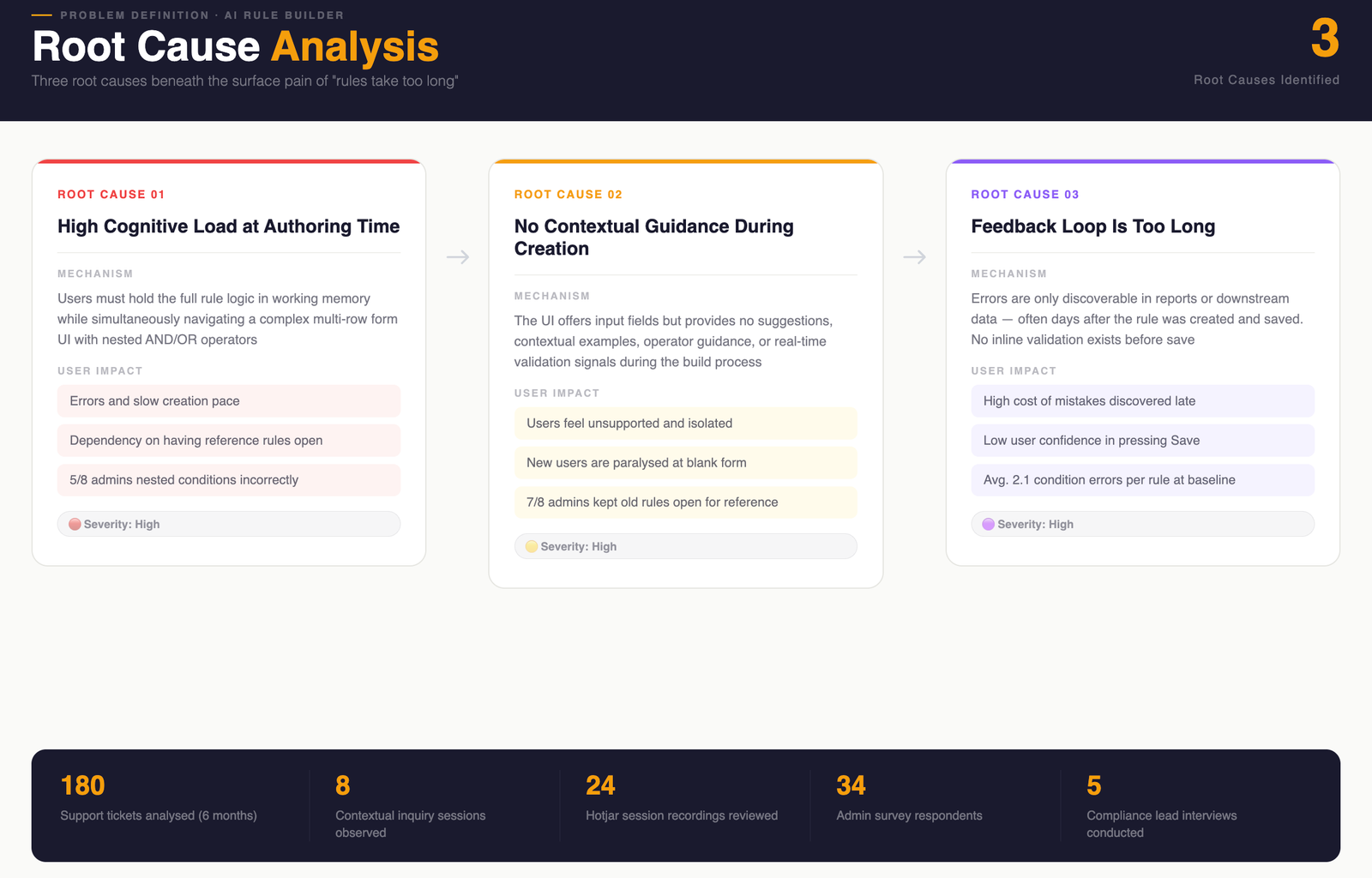
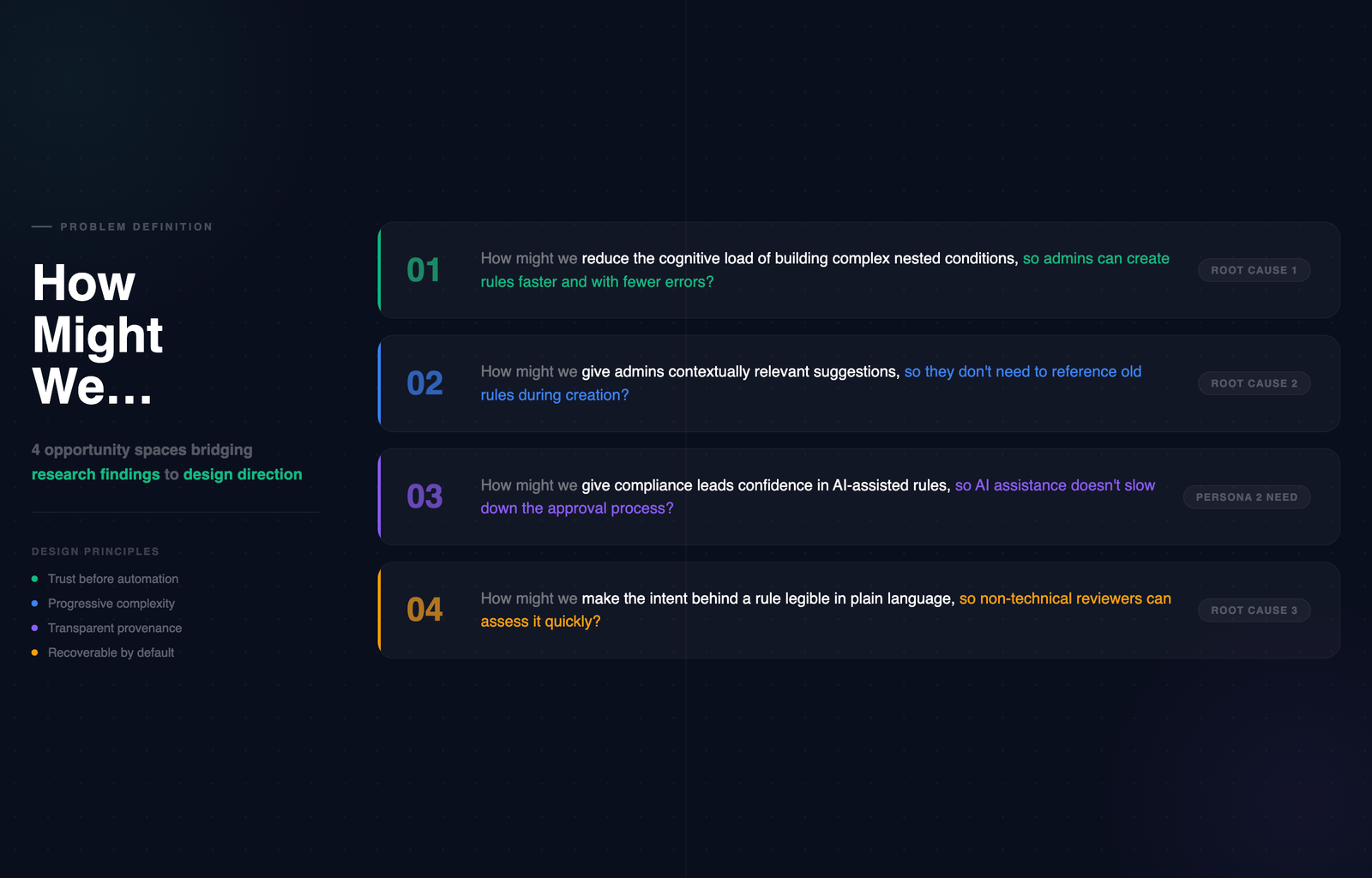
The root cause wasn't the UI.
It was the mental model it assumed.

Every path through the 5-Whys landed at the same place. The interface was built on the rule's data schema — conditions, operators, values, effective dates — because that's how the database represents a rule. But that's not how a manager thinks about coverage.

A rule isn't "a set of AND/OR conditions with effective dates." It's "who should my rep visit, under what conditions, starting when." The redesign had to map to that mental model first, and generate the schema second. That inversion is the entire case study.

Once the root cause was clear, the design direction followed: don't simplify the interface — change what the interface is an interface of. The tool needed to think in coverage terms, not data terms. That reframe is what made AI assistance viable — because natural language is how managers already describe coverage, and it's what the NL parser would receive.

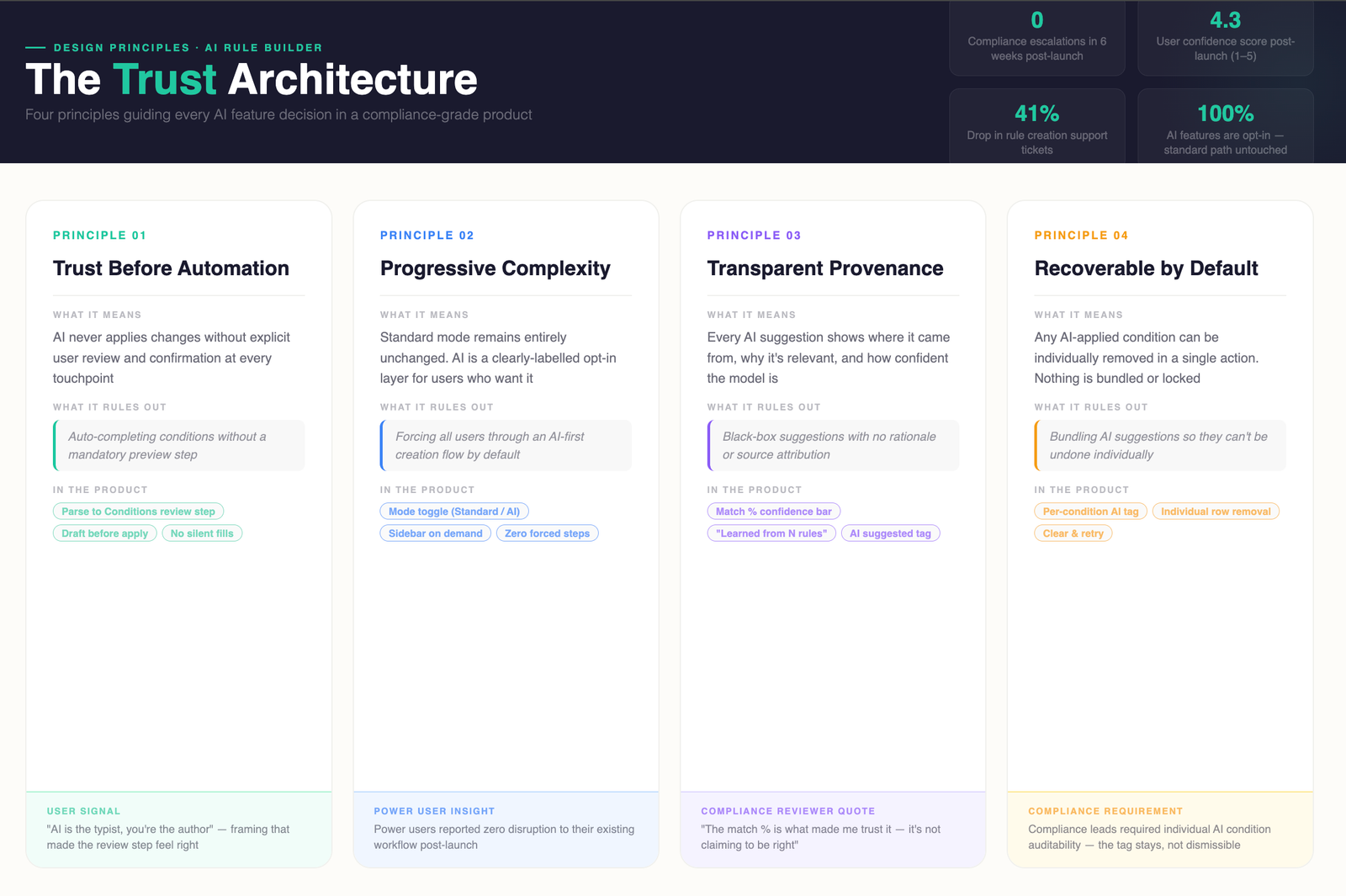
Five principles.
Every decision ran through them.

Not aspirational values — actual filters used to evaluate every design option, including the three prototypes we built and tested before committing to direction.

Trust before automation
AI never applies changes without user review and explicit confirmation. Every suggestion enters as a draft condition — not a saved one.
Progressive complexity
Standard mode is the primary path, unchanged. AI is an opt-in layer. Expert Managers never encounter it unless they choose to.
Transparent provenance
Every AI suggestion shows where it came from and how often it appears in similar rules. Compliance reviewers can trace any condition back to its source.
Recoverable by default
Any AI-applied condition can be removed in one action. No state change is permanent until the rule is explicitly saved.
Operable without AI
Every AI-assisted path has a complete manual equivalent. No function requires hover, tooltip, or mouse-only interaction — pharma enterprise environments frequently run locked-down configurations with keyboard-only access policies. Accessibility was a compliance constraint, not a polish item.
Design process and decisions

Three options.
One clear winner.

We prototyped three distinct approaches and tested each with both user types before committing to direction. The evaluation criteria for each rejection was persona-specific — not a general usability call.

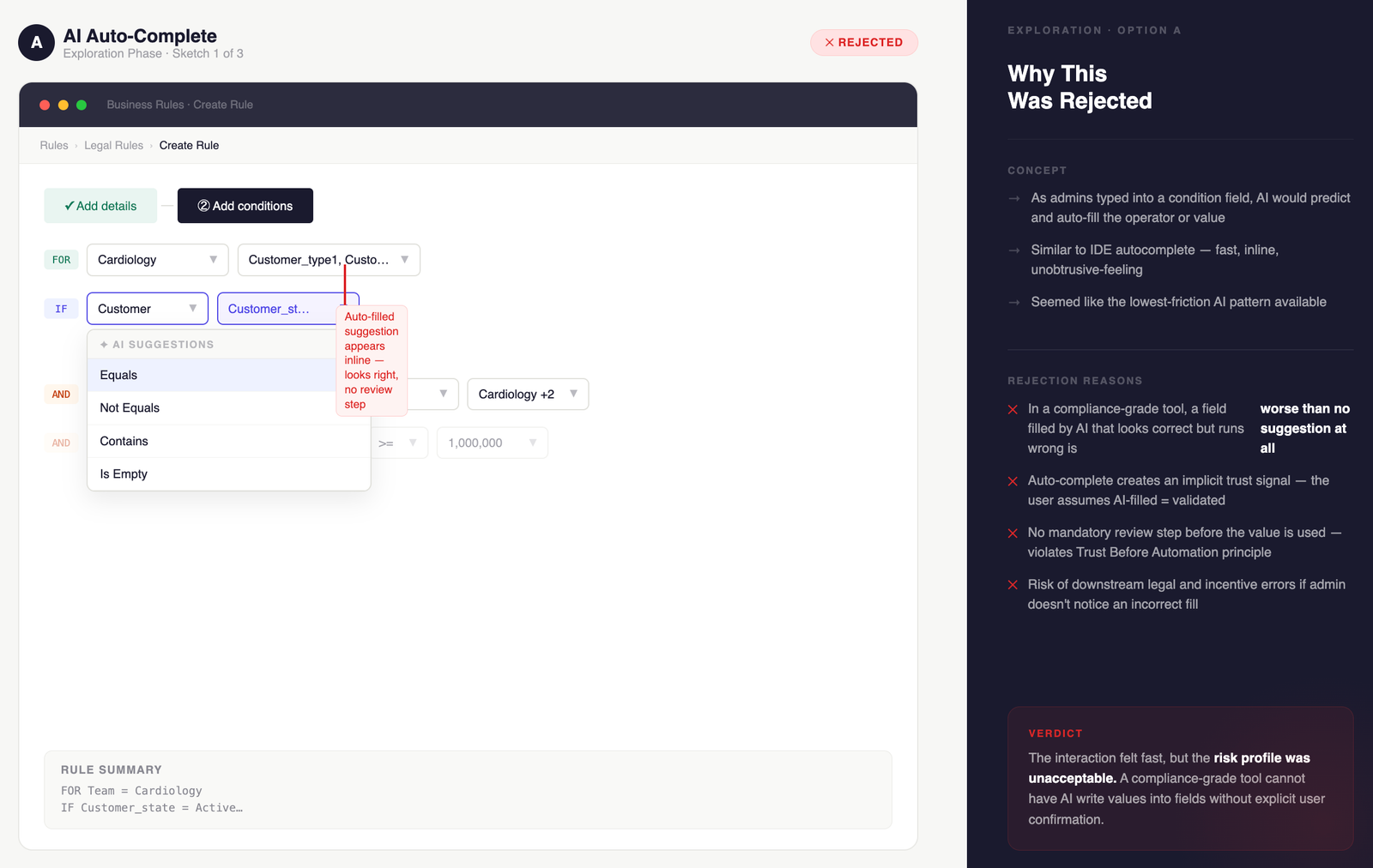
Option A — Rejected
AI auto-complete inline

AI suggested completions as users typed conditions, similar to code autocomplete. Failed Expert Managers first: suggestions appeared before they'd finished forming their intent, interrupting a flow they'd built muscle memory around. The inline suggestions also gave no transparency into provenance — compliance leads flagged this immediately as a regulatory concern. Occasional Users didn't benefit either — they needed guidance before they'd formed enough intent to autocomplete.

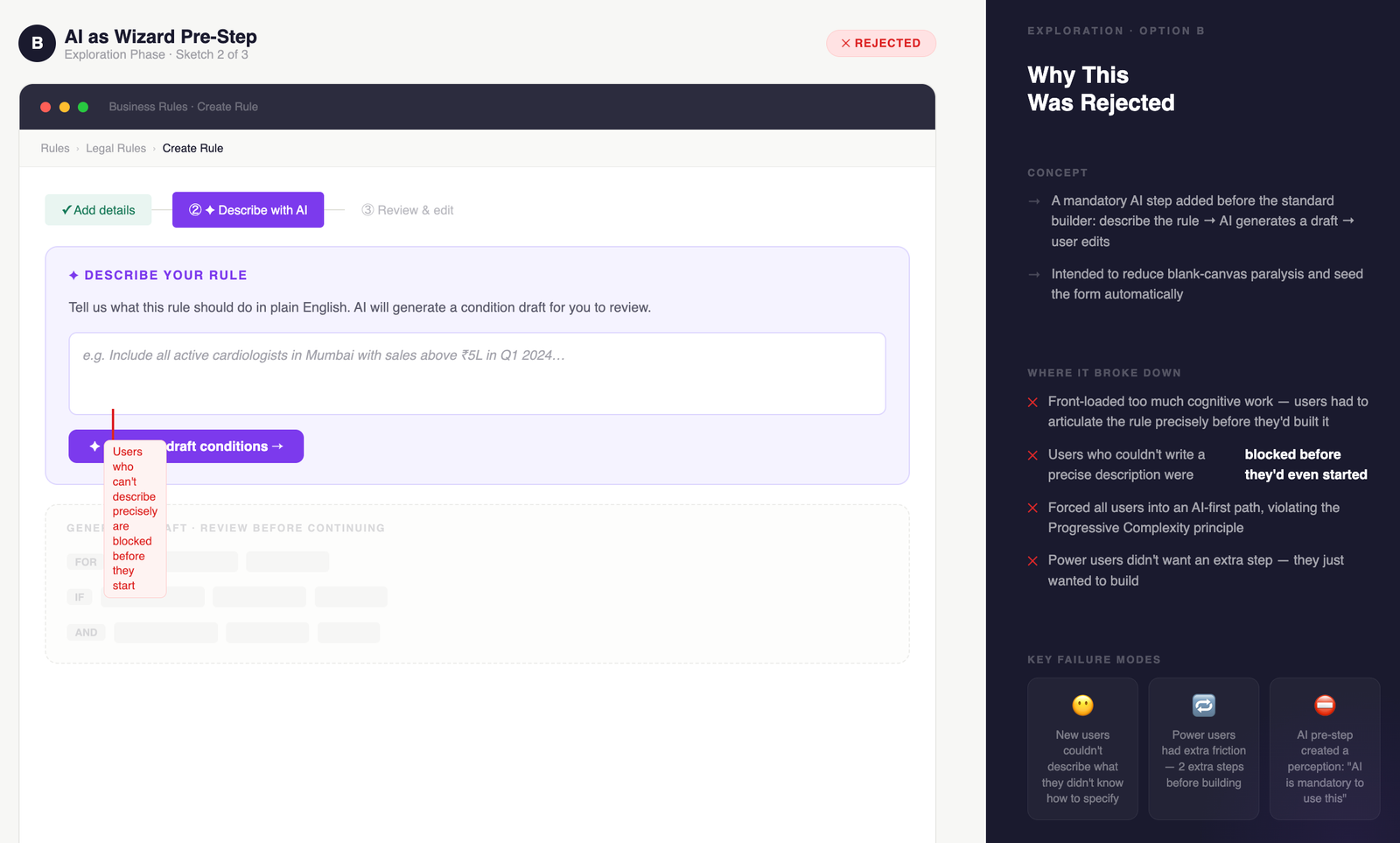
Option B — Rejected
AI as a separate wizard step

AI assistance was a dedicated step before entering the standard builder — a natural language input screen that generated a draft rule. Failed both personas at their entry point: Expert Managers were forced through an AI gate before reaching the tool they already knew — slower than building manually. Occasional Users failed at the first prompt because they didn't know how to describe a complete rule before they understood the schema. The wizard assumed knowledge neither persona had at that moment.

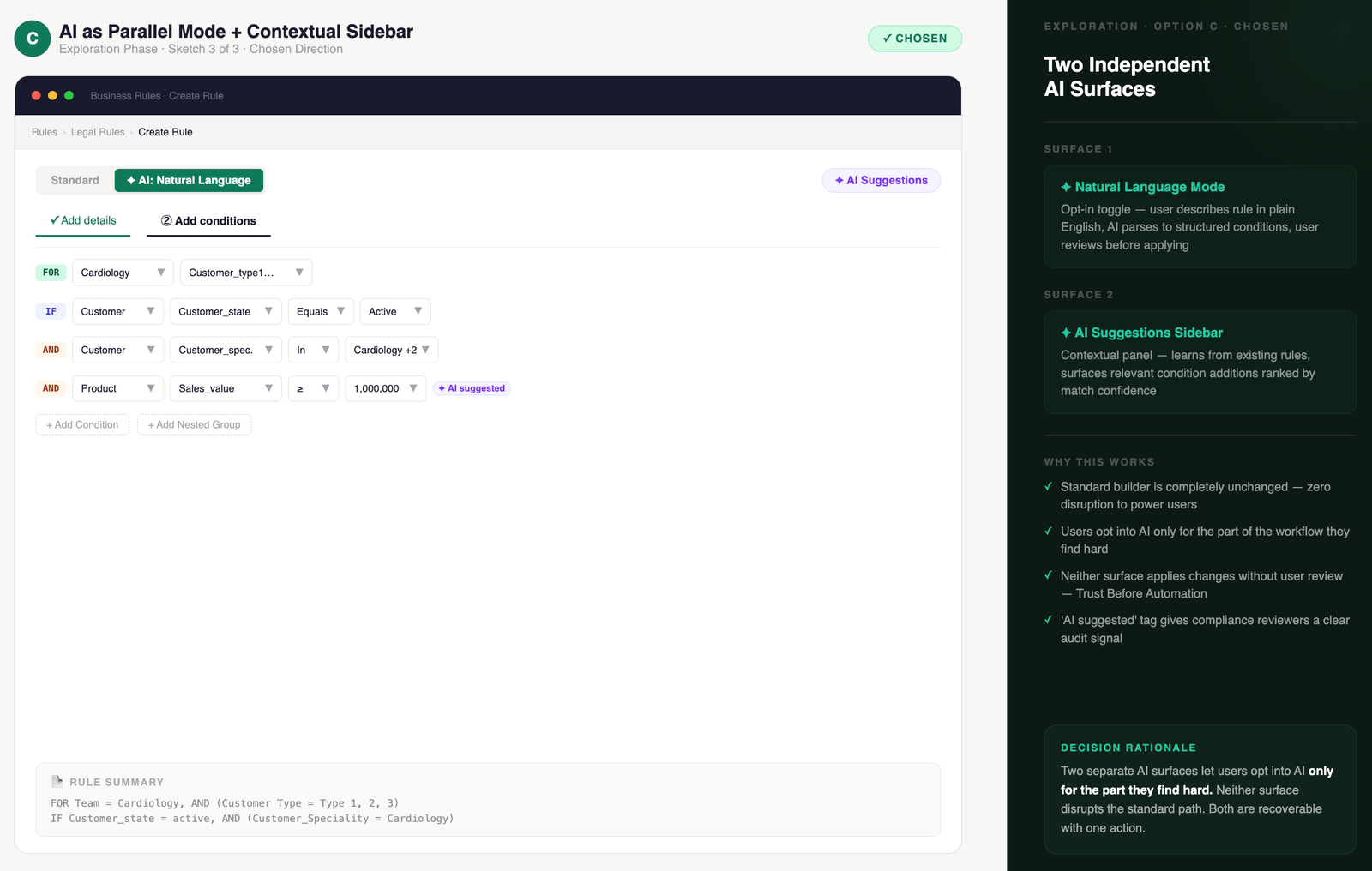
Option C — Chosen
AI as a parallel mode and contextual sidebar

The standard builder remains the primary path, unchanged. AI surfaces as an opt-in mode toggle (Natural Language) and a contextual sidebar (Suggestions). Expert Managers never see AI unless they choose to — their workflow is untouched. Occasional Users can activate NL mode at any point or accept a suggestion without leaving the builder context. Both can switch modes mid-session. This was the only architecture that let each persona enter on their own terms without a toggle that patronises either.

Final Screens

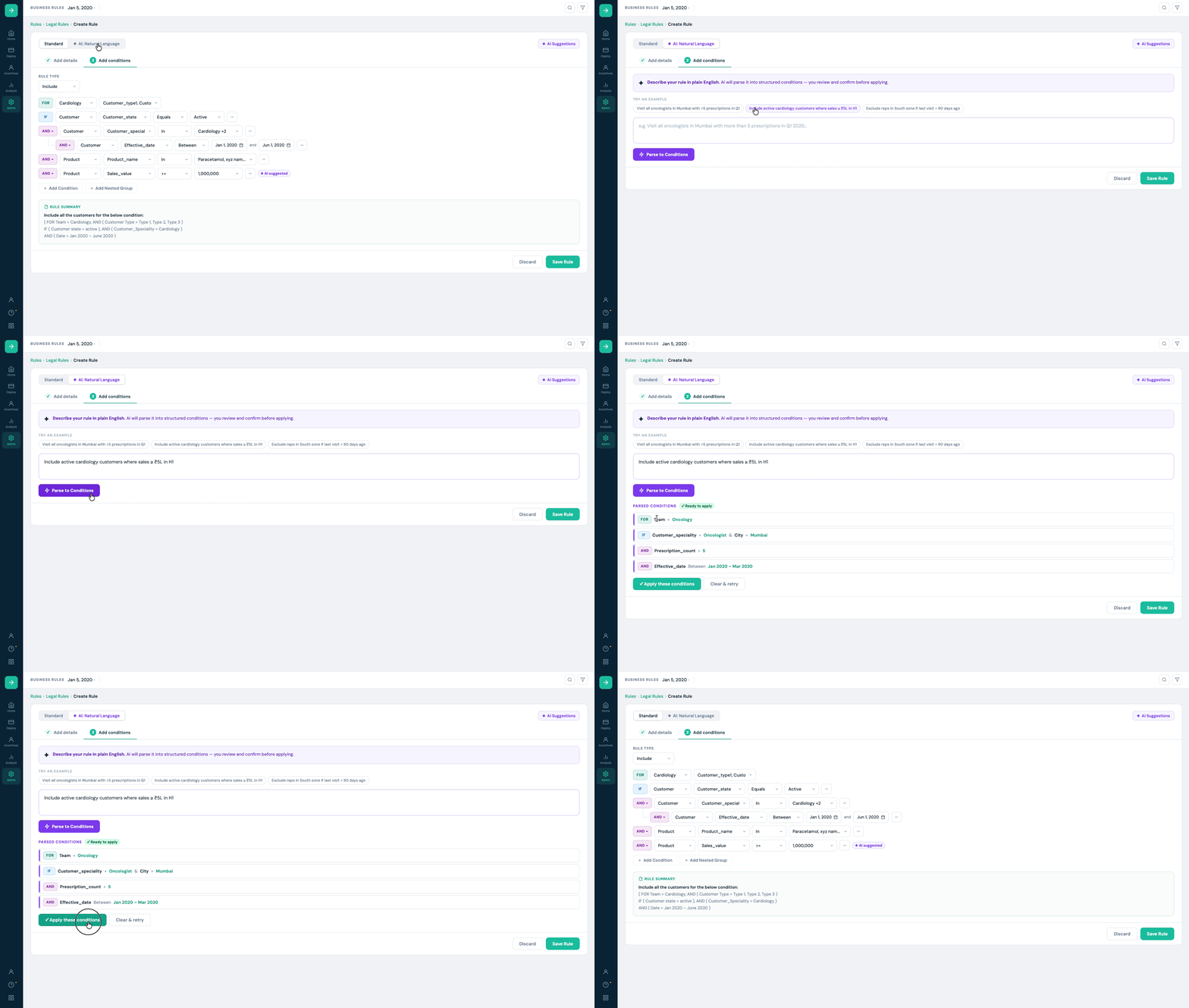
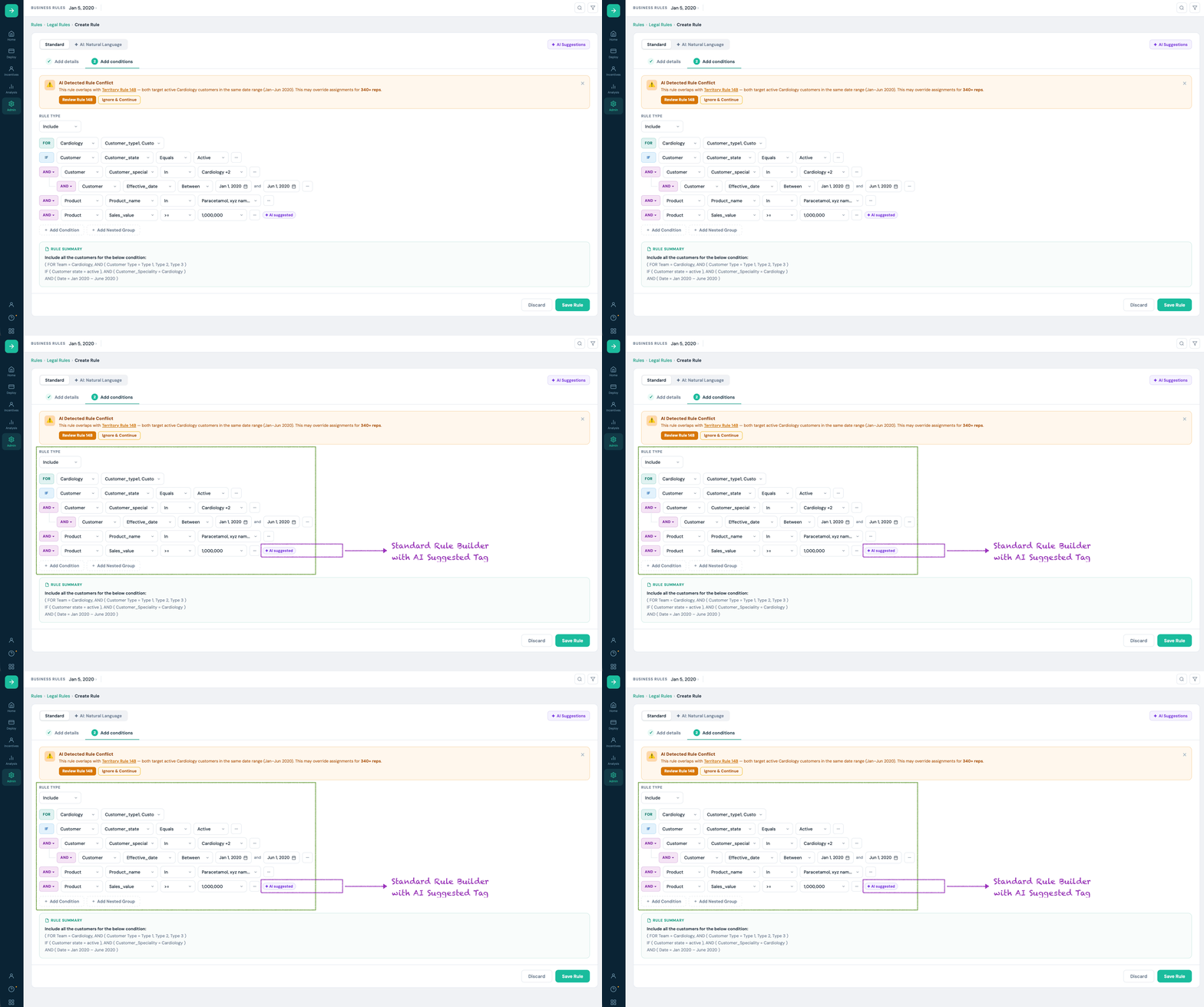
The shipped solution adds AI surfaces to the existing rule builder without modifying the standard creation flow. Both are opt-in and clearly labelled. The standard builder remains the primary path for power users.

Surface 1
Standard builder with AI suggested tag

Design Decision 01
We debated making the AI tag dismissible. Compliance leads pushed back strongly in review — they wanted to see which conditions were AI-sourced as part of their review workflow. The tag stays.
Design Decision 02
The rule summary box at the bottom was already present in the product. We made it live (updates on every change) and moved it above the Save button. Admins reported it as the single most useful improvement in post-launch feedback.

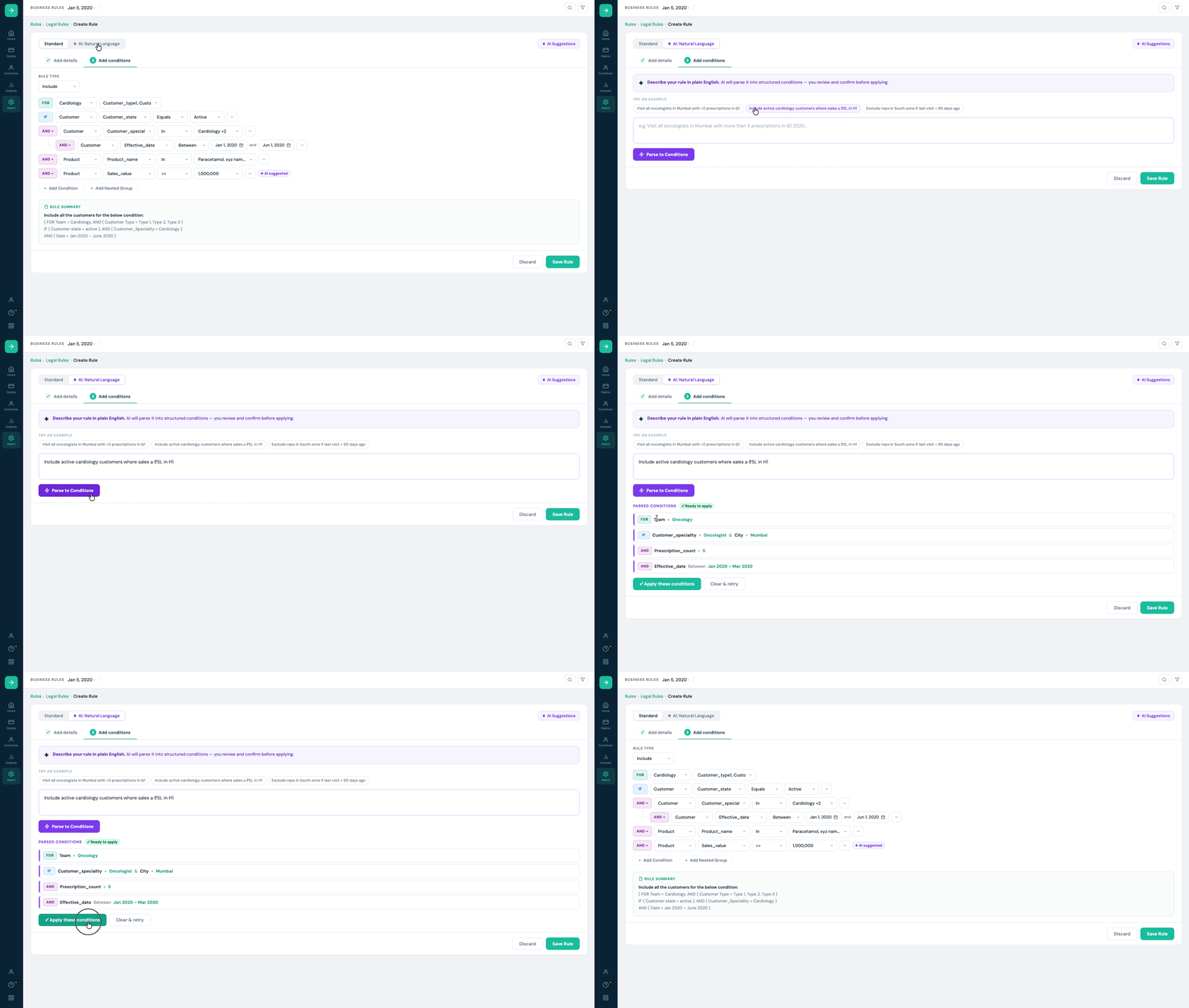
Surface 2
AI : Natural Language Mode

AI is the parser. User is the author.
The NL input generates a structured draft — not a saved rule. The user reviews every parsed condition before it enters the builder. Nothing is applied without explicit confirmation.
Mode toggle always visible
The Standard / AI: Natural Language toggle is persistent — users can switch at any point, even mid-session. This was essential for Expert Managers who wanted to start in NL but finish with manual control.

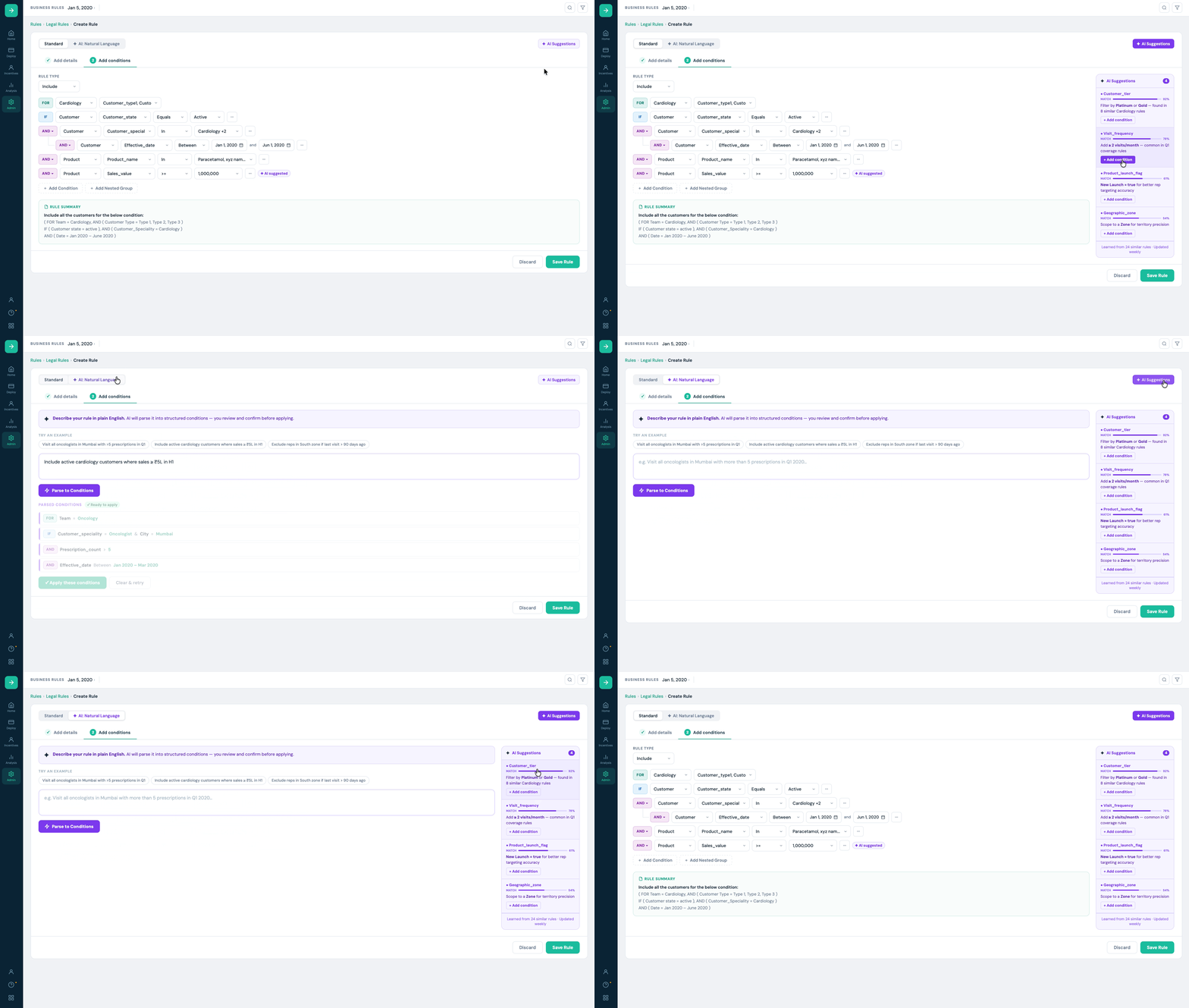
Surface 3
AI Suggestions panel

AI Pattern 1
Contextual suggestions from learned patterns.
AI Pattern 2
Transparent provenance — 'Learned from 24 similar rules — Updated weekly.'
AI Pattern 3
Human-in-the-loop — adding a suggestion inserts a draft condition row, not a saved condition.
The Hard Call

One I fought for.
One I got wrong.

Both shaped the product more than any screen decision did.

✓ The call I'm proud of
Keeping the AI tag visible

Product wanted it dismissible — visually noisy in dense rules. I pushed back using direct quotes from compliance lead interviews: they needed to see which conditions were AI-sourced as part of their review workflow. Removing it wasn't a UX preference — it was a regulatory risk.

The outcome

Tag stayed. Post-launch, compliance reviewers cited it as one of the most important features in the redesign. Research as argument — not instinct — made the difference.

✗ The call I got wrong
The mode toggle — too subtle

I made it visually understated to keep the interface clean. Post-launch: 28% of users who activated Natural Language mode switched back before completing a rule. Exit interviews said why — they didn't know which mode they were in mid-session.

The lesson

This was testable. I had prototypes. I should have run a task where users switched modes mid-session. Visual restraint is not always user clarity.

The hardest stakeholder push

The product lead proposed auto-save: silently apply the highest-confidence AI suggestion after a 3-second pause. Fast on paper. Dangerous in a compliance context — a reviewer approving a rule with auto-applied conditions has no audit trail. I blocked it with two things: a verbatim compliance lead quote and the regulatory language around documented rule authorship in pharma SFA. Auto-save was dropped. Research as a stakeholder argument — not just a design input.

Impact & Outcomes

Usability testing (pre-launch)

We ran moderated usability testing with 8 admins (mix of power users and relative newcomers) across 2 sessions. Tasks: create a rule from scratch using natural language, add a condition from the suggestions panel, review and save.

Metric Before (baseline) After (V1)
Avg. time to complete a representative rule 47 min 19 min
Task success rate (no errors) 58% 87%
User confidence rating (1–5 scale) 2.9 4.3
Condition errors requiring re-work Avg. 2.1 per rule Avg. 0.4 per rule
Compliance reviewer time per approval ~22 min ~11 min (live rule summary)

Post-launch signals (6 weeks)

34%
Natural language adoption
Of new rules in the first 6 weeks used NL input at least once during creation.
61%
Suggestions panel adoption
Of sessions with the panel open resulted in at least one suggestion being added.
−41%
Support tickets
Rule creation support tickets down 41% vs the prior 6-week period.
Zero
Compliance escalations
Zero compliance escalations linked to AI-suggested conditions in the first 6 weeks.

Qualitative wins

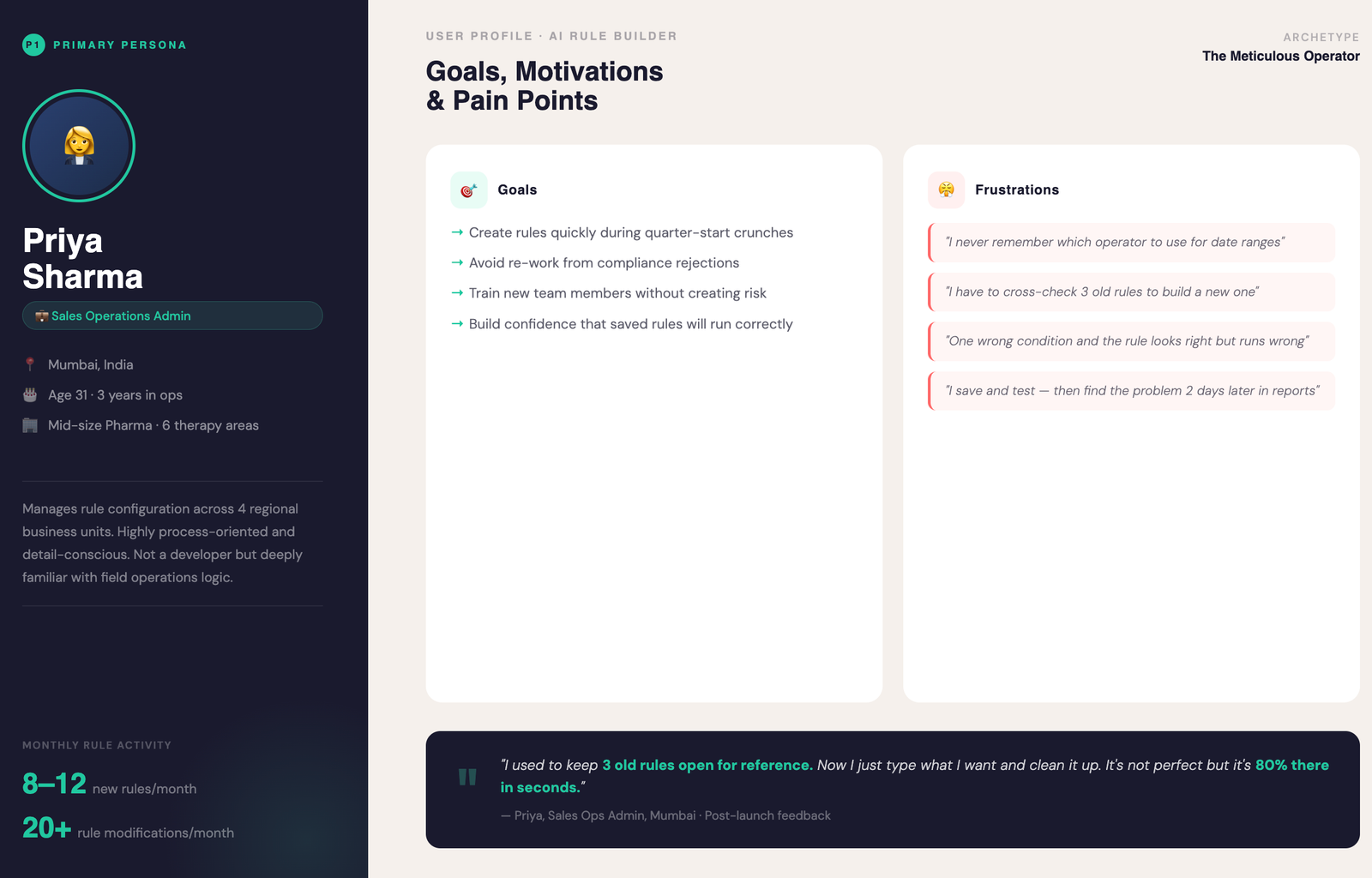
"I used to keep 3 old rules open for reference. Now I just type what I want and clean it up. It's not perfect but it's 80% there in seconds."

— Priya, Sales Ops Admin, Mumbai

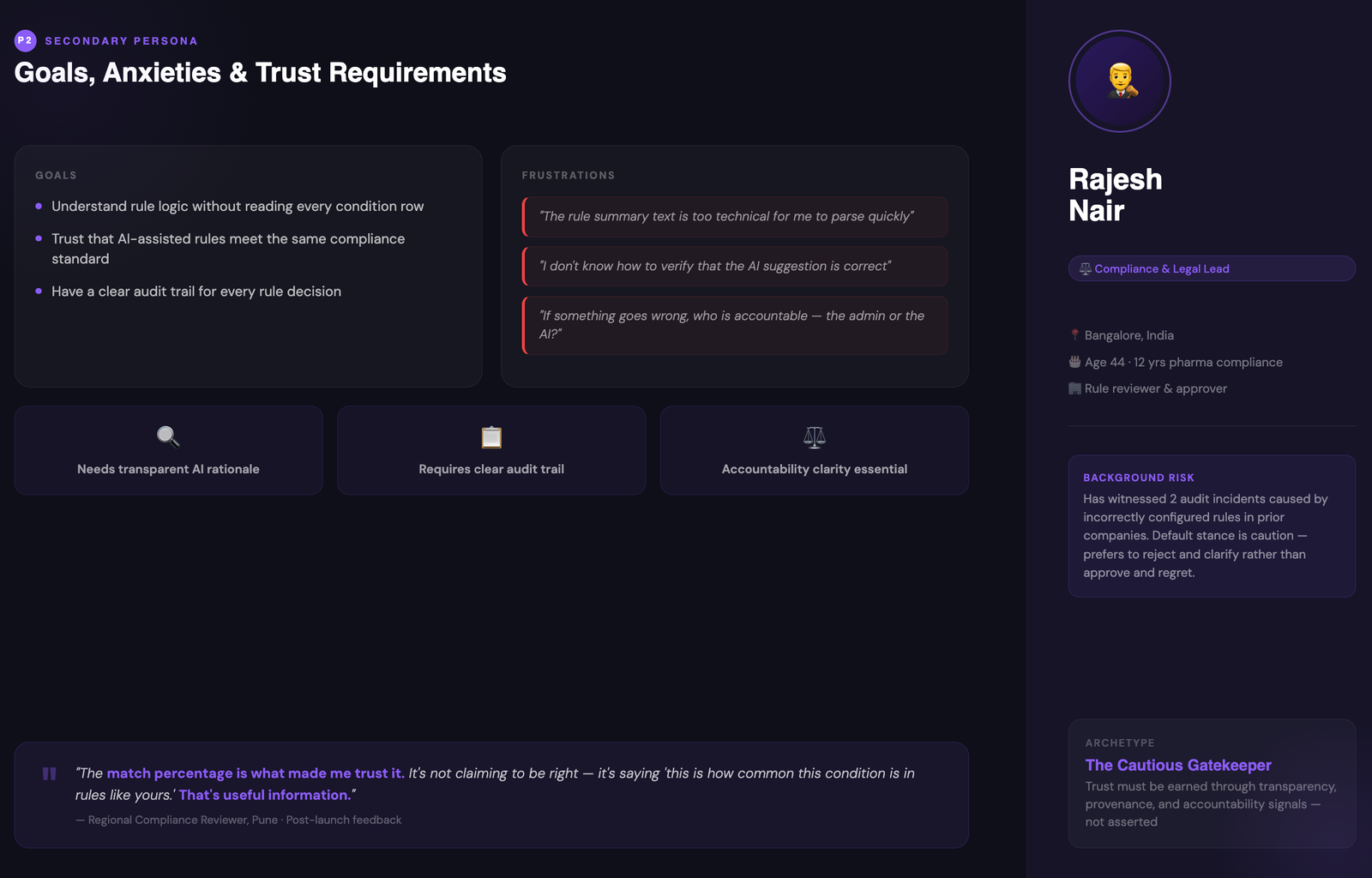
"The match percentage is what made me trust it. It's not claiming to be right — it's saying 'this is how common this condition is in rules like yours.' That's useful information."

— Regional compliance reviewer, Pune

Reflection & What's Next

What I'm proud of

Standard path untouched

Every AI feature opt-in. Power users never disrupted. The existing creation flow remained primary throughout.

Trust architecture

Match %, provenance text, AI tag, mandatory review — a coherent trust system. Not features bolted on.

Real seed content

Example prompts written from actual user behaviour — not invented placeholders. Real seed content builds faster trust.

What I'd do differently

01
Invest in the reviewer journey earlier

Research focused on admins. Compliance reviewers — the people who approve — were underinvested. Post-launch they wanted a filtered 'what changed' audit mode. Feasible in V1 if explored earlier. The lesson: invest in the approver even when they're not the primary user.

02
Test parser failure states earlier

Happy path designed thoroughly. Error states tested late. "Unable to parse this condition" shipped functional but unhelpful. Error states are testable early — I didn't prioritise them. The right time to fix them is before users meet them.

Roadmap thinking

V2
Conversational rule editing

"Change the date range to H2 and add Neurology" — NL edit commands on existing rules without rebuilding from scratch.

V2
Conflict detection

AI flags when a new rule overlaps or contradicts an existing active rule before saving — preventing rep assignment errors at creation.

V3
Compliance pre-screening

Soft warnings during creation — missing effective date, unusually broad scope — before the rule reaches a reviewer.

V3
Suggestion explanations on demand

"Why is this suggested?" expanding into a full rationale panel — which historical rules informed it, how recently validated.

Next case study

Reducing Enterprise Workspace Friction by 67%

Redesigned a mission-critical geoscience workspace to unblock cloud migration — reducing core task completion from 21 clicks to 3, and driving +67% product adoption across 3,000+ users.

Read case study →
Oil & Gas · Geoscience Enterprise SaaS Workflow redesign
+67%
adoption
Bibaswan Chakraborty
Bibaswan
Chakraborty
Senior UX Designer
Pune, India · Immediate joiner

Want to discuss this
or a similar challenge?

7 years of enterprise UX across pharma, oil & gas, and healthcare. I work best on hard problems where design decisions have real operational consequences.
Get in touch LinkedIn →
All work Hire me
Case Study · 03 · UX Process Showcase

Fixing a broken
workflow
with AI assistance

Domain
Compliance & Booking · B2B SaaS
My role
UX Designer — full process, time-boxed
What this demonstrates
Full UX methodology: audit → IA → flow redesign → hi-fi → AI feature spec
Note
Freelance engagement · projected metrics · not yet live-validated

Fingerprinting is already stressful. Globeia's booking flow made it harder — until a zero-assumption redesign turned compliance confusion into confident decisions.

13→5
Decision points · proposed flow
~35%
Projected drop-off reduction · package selection
2
Questions · AI assistant to right package
3
Purpose flows mapped · full system
Context

What Globeia does — and why it's hard to design for.

Globeia provides mobile fingerprinting services for regulated purposes — immigration, professional licensing, background checks. This is not a consumer booking app. Every user is anxious, time-sensitive, and non-expert in compliance.

"The packages offered are confusing. Users are not entirely sure what exactly they are signing up for or which package fits their specific needs."

I walked the live booking flow as a first-time user across three sessions before forming any design opinions. The audit drove the solution.

The existing flow — as a first-time user.

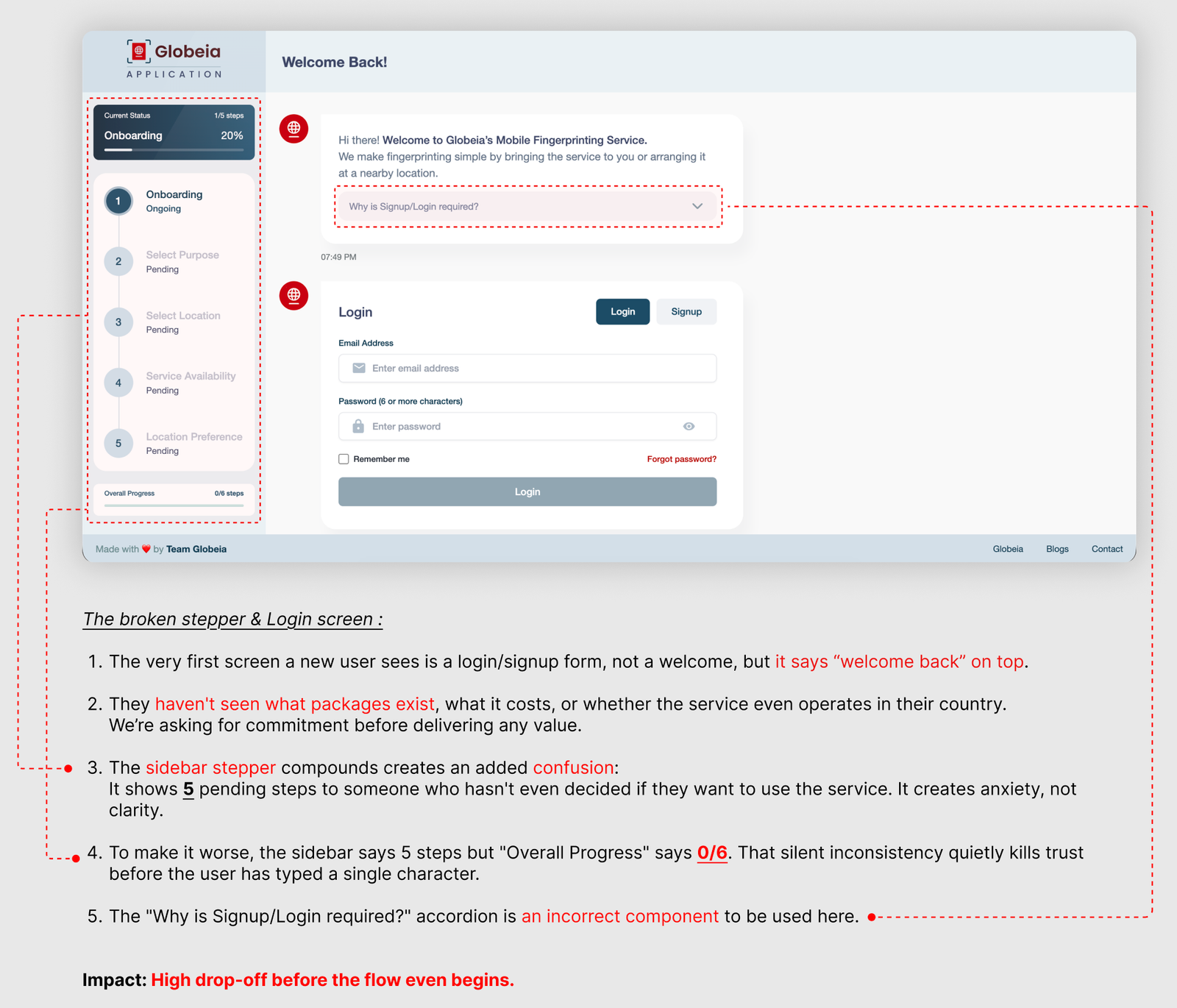
Login
Existing login screen — login wall before any value shown
Live Flow Audit
3 walkthrough sessions as a first-time user — every step screenshotted and annotated before forming design opinions.
Brief Analysis
Direct customer feedback treated as validated primary signal — not a hypothesis to test.
Heuristic Evaluation
5 Nielsen heuristic violations identified — visibility, real-world match, error prevention, control, and consistency.
Analogous Research
6 compliance and professional services booking flows reviewed — background checks, notary, immigration document services.
UX Audit

Three friction points — all measurable, all fixable.

Friction 01 — High Impact
Login wall before any value is shown

Impact: High drop-off before the flow even begins.

Friction 02 — Critical
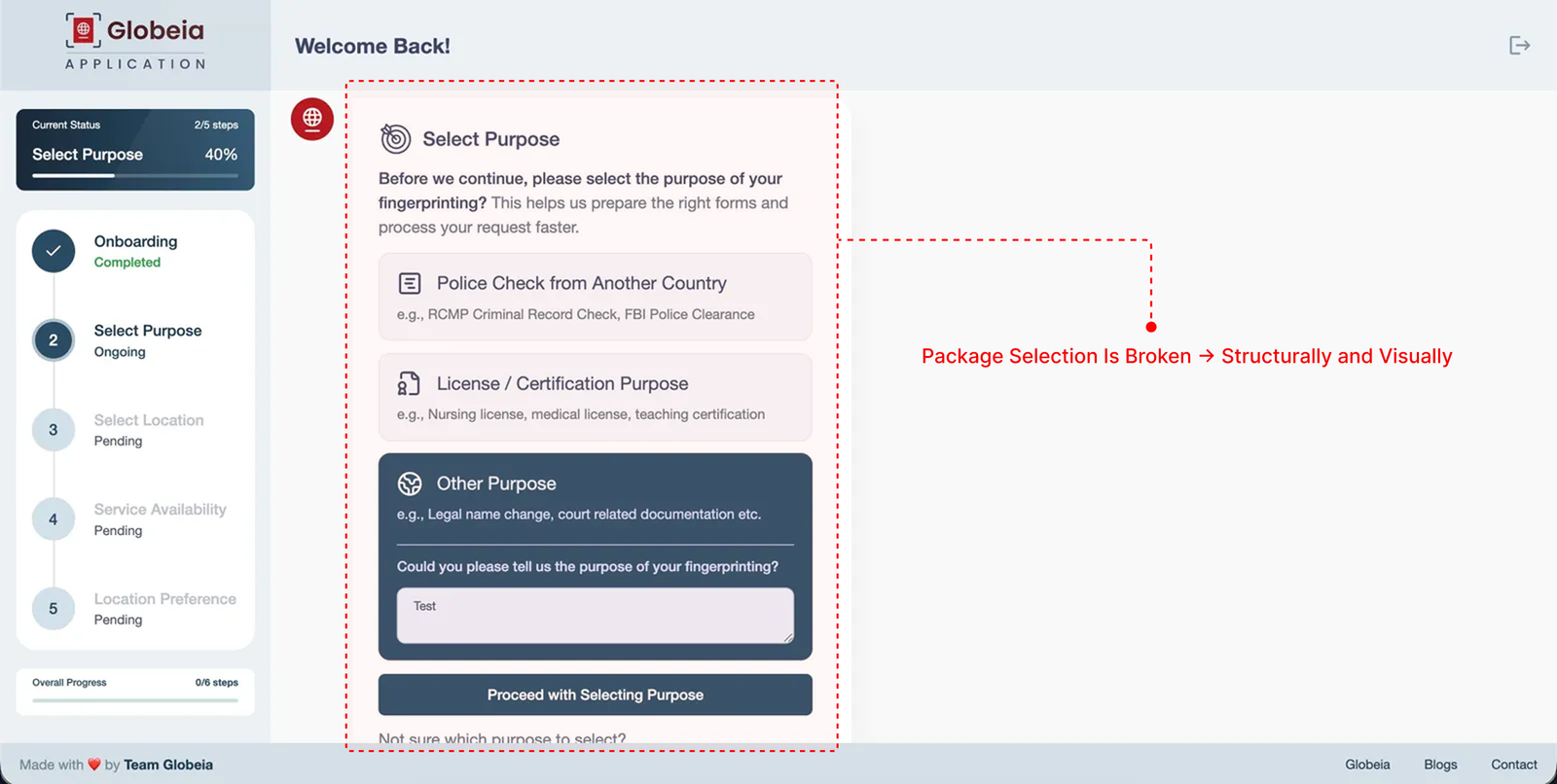
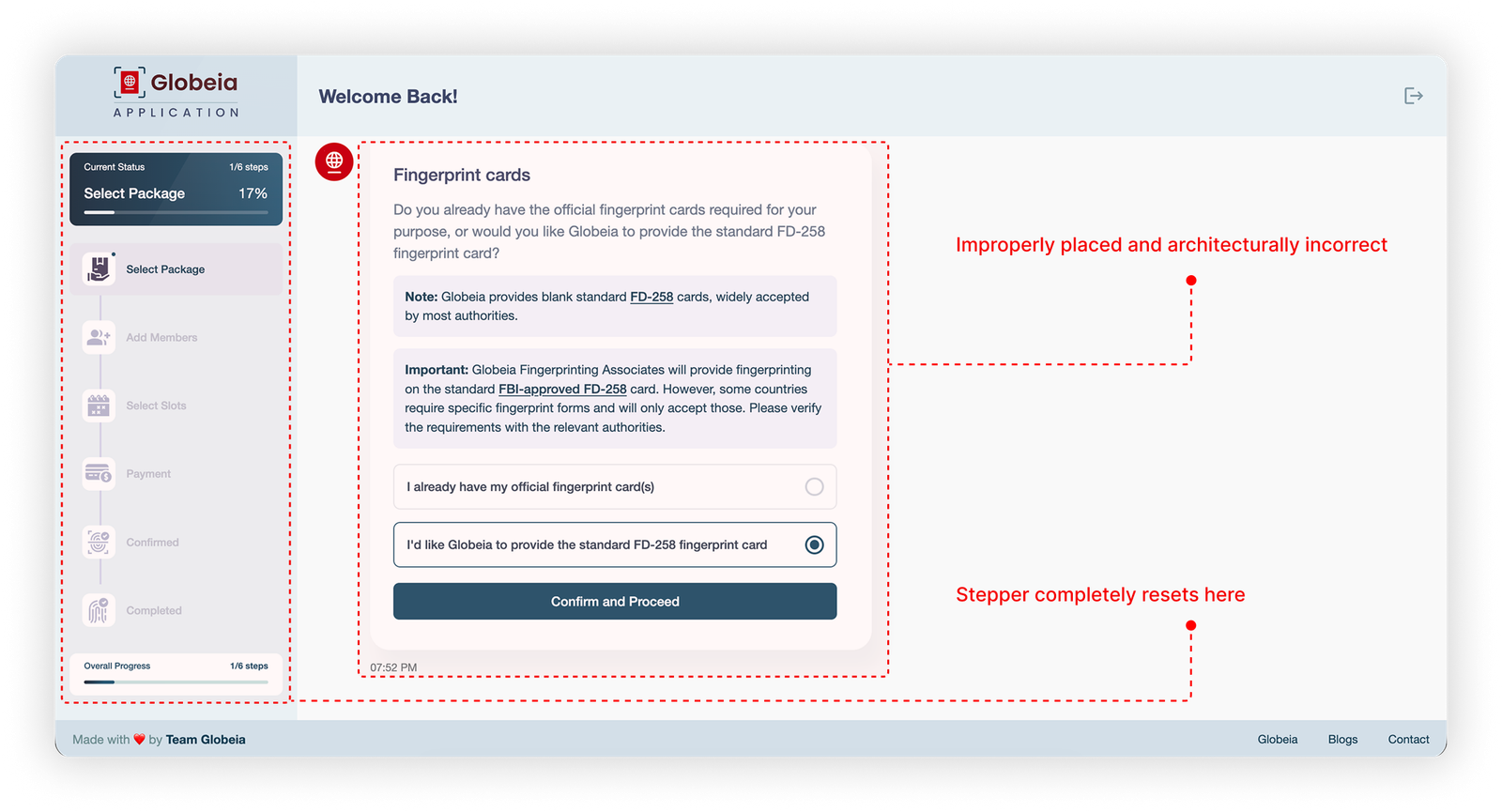
Package selection: compliance language, no guidance, stepper reset

Impact: Maximum confusion, maximum drop-off. This is where conversions die.

Friction 03 — Structural
Flow fragmented into too many micro-steps

Impact: Cognitive overload throughout. Users lose context and confidence at multiple points.

Heuristic Evaluation Finding
Visibility of System Status ✗ Fail Stepper resets from 5-step to 6-step system mid-flow with no explanation. Users lose orientation completely.
Match with Real World ✗ Fail "FD-258," "official fingerprint cards," "rejection history" — compliance terms, not user language. System speaks in its own vocabulary.
Error Prevention ✗ Fail Minimum card quantity rule discovered through duplicate error toasts rather than communicated upfront.
User Control & Freedom ✗ Fail No way to go back and change purpose or location without losing progress. T&C modal interrupts payment with no escape that preserves state.
Consistency & Standards ✗ Fail Sidebar says 5 steps, Overall Progress says 0/6. Two different stepper systems in one flow. Dark card selected by default despite being the less common choice — twice.
Research

Who is this user — and what are they actually feeling?

A first-time user with a specific life goal — immigration, job abroad, professional license. Not a compliance expert. Arrives with a goal, not technical knowledge, and cannot afford to get the process wrong. Business priority: reduce abandonment at package selection — the point where confusion peaks and commitment is still fragile.

How might we present package options in plain English so users can self-select without reading compliance documentation?
How might we show users exactly what they're paying for — and what they're not — before they commit?
How might we guide confused users to the right package without adding another screen to an already fragmented flow?
How might we build trust with a user who is anxious about a high-stakes compliance process they've never done before?

What the analogous research said

Pattern observed Source Design implication
Recommended option reduces decision paralysis Baymard Institute · Checkout UX One clearly recommended package with plain justification reduces abandonment at selection screens
Running price total throughout flow Booking.com · Airbnb checkout patterns Showing live total from package selection onward removes price shock at payment
T&C as modal correlates with last-step drop-off Baymard Institute · Form UX Research Inline T&C acceptance on review screen reduces friction at conversion point
Post-booking next steps reduce inbound support Typeform · Conversion Rate Research 2023 Confirmation screen with "what to bring" and "what happens next" addresses post-booking anxiety
Problem Statement

The redefined problem.

People come to Globeia with a personal goal — a job offer, a visa, a license. They're not here to learn compliance. But the booking flow asks exactly that. A login wall before any value. Steps that reset and contradict. And at the most critical moment — choosing a package — technical jargon instead of a clear answer to the only question that matters: What do I need, and why? So they hesitate. And they leave.

Flow Architecture

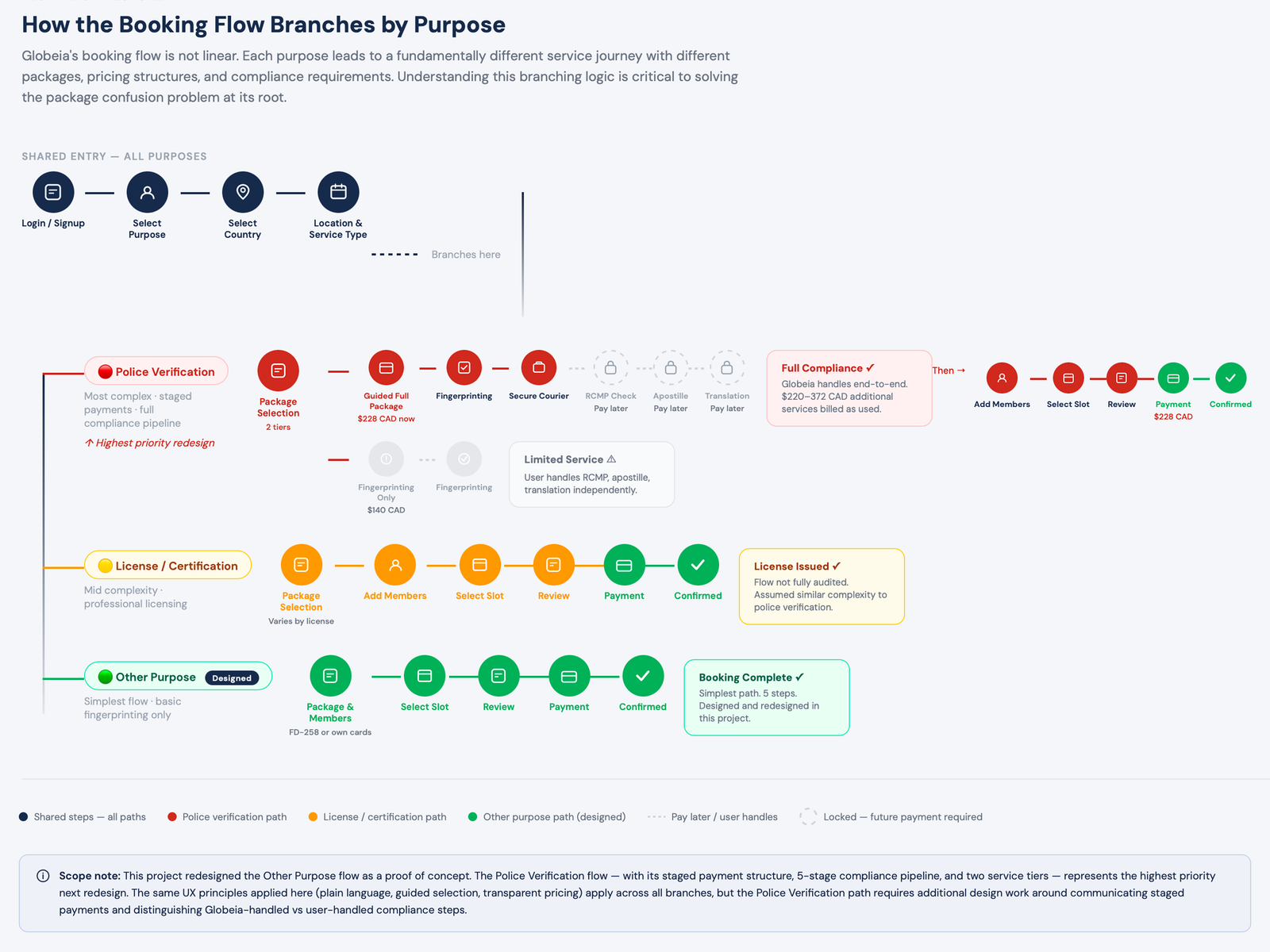
Globeia isn't one flow. It's three.

Globeia's flow branches by purpose — each path has different packages, pricing, and compliance requirements. Before redesigning any screen, I mapped the full system.

Police Verification · Most complex
Package 1: Guided Full Package — fingerprinting + courier + RCMP check + apostille + translation. $228 CAD now, $220–372 CAD billed as services are used.
Package 2: Fingerprinting Only — $140 CAD. User handles RCMP, apostille, and translation independently.
5-stage compliance pipeline. Staged payment structure. Highest anxiety, highest drop-off risk.
License / Certification · Mid complexity
Professional licensing requirements. Nursing, medical, teaching certifications.
Flow not fully audited in this engagement. Assumed similar structure to police verification with jurisdiction-specific variations.
Highest priority for second audit phase.
Other Purpose · Designed ✓
Simple fingerprinting only. Legal name changes, court documentation, custom requirements.
Package choice: Globeia provides FD-258 card ($110 USD) or user brings own cards ($90 USD).
This is the flow redesigned in this engagement — as a proof of concept for the design principles that apply across all branches.

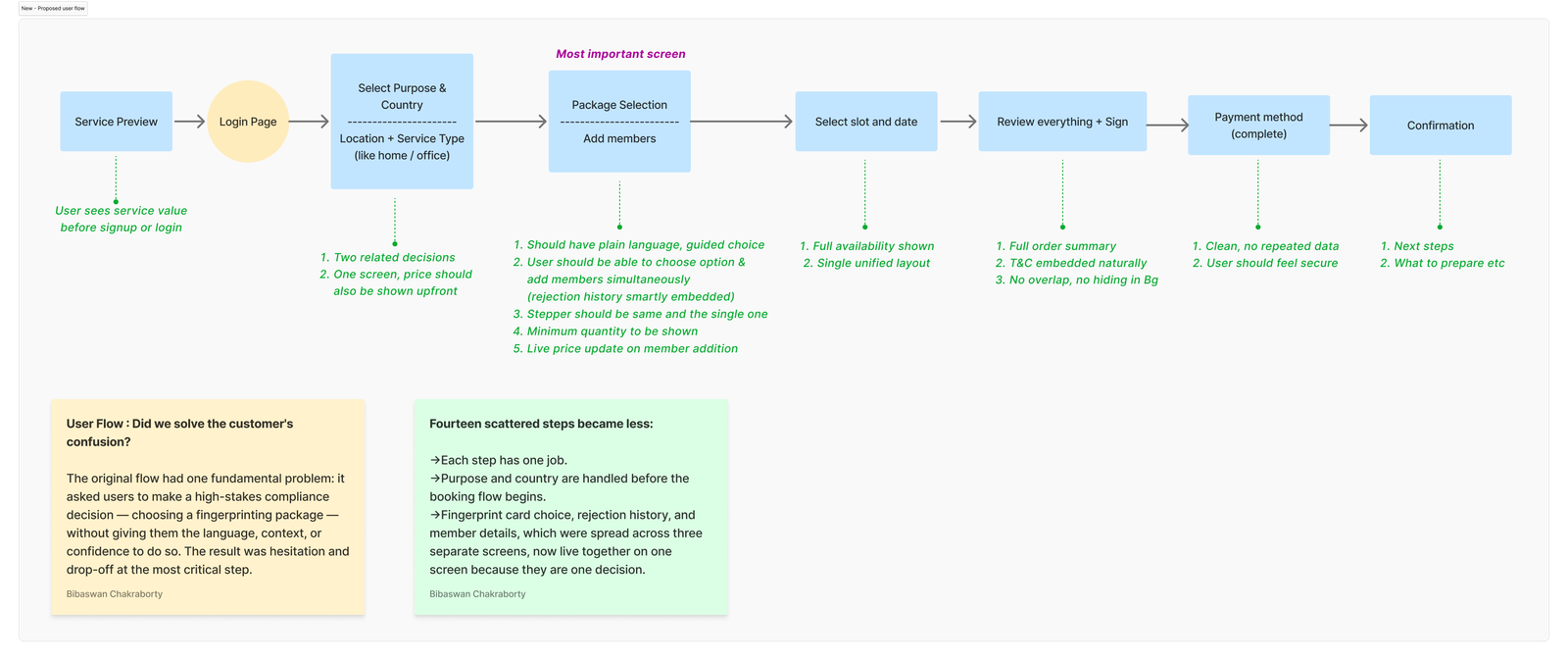
Before vs. After — proposed flow

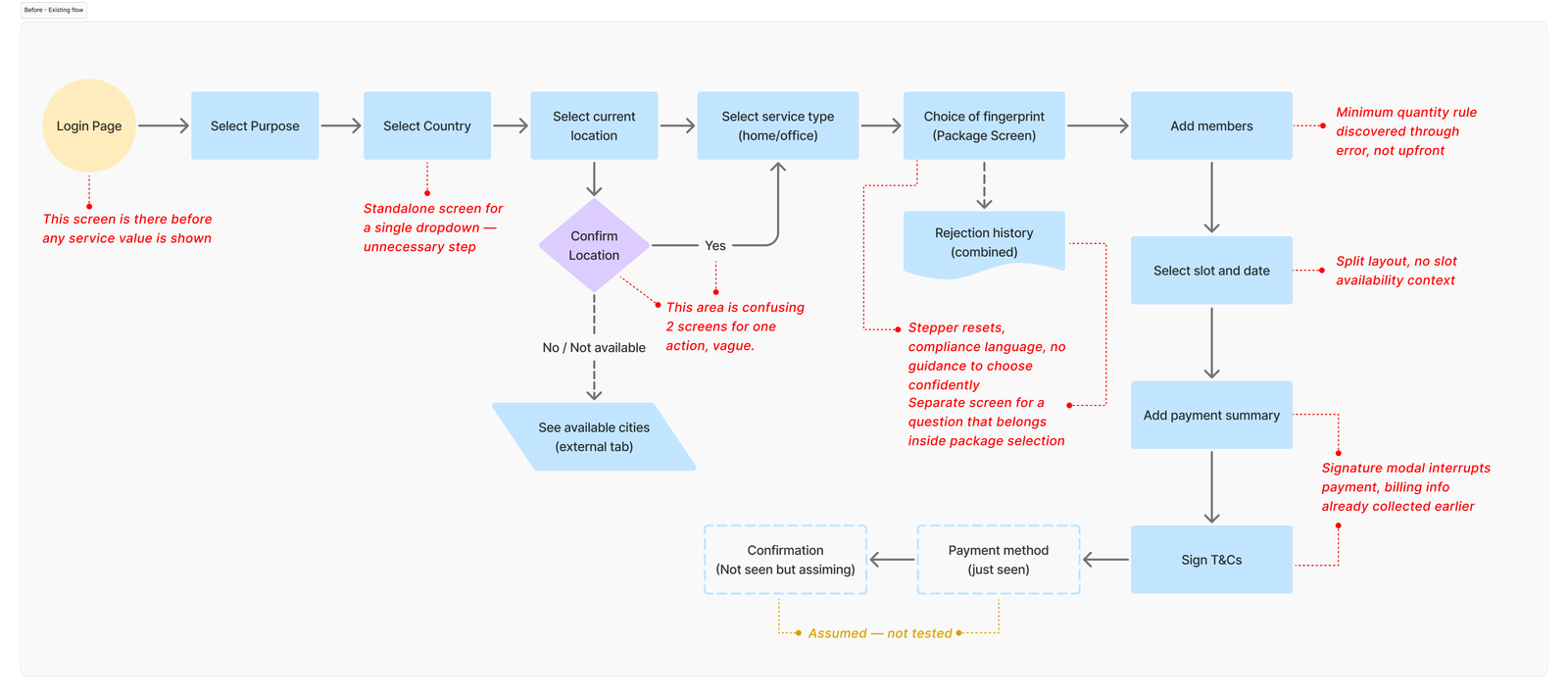
Current user flow diagram with friction callouts
Current flow — 14 decision points, friction callouts in red
Proposed user flow — 5 clear steps
Proposed flow — 5 steps, improvements in green
Current flow — 14 decision points

Login → Purpose → Country → Location (×2) → Service Type → Package → Rejection History → Members → Slot → Payment Summary → T&C Modal → Payment → Confirmation

Login wall, stepper resets, compliance language, T&C modal at payment.

Proposed flow — 5 clear steps

Purpose Preview → Login → Purpose + Country → Location → Package & Members → Slot → Review + Sign → Payment → Confirmation

Value before login. Collapsed steps. Package + members + rejection in one screen. T&C inline. Consistent stepper.

Design Principles

Four principles. Every decision ran through them.

01
Confidence at every decision point

Users don't abandon because the process is long. They abandon when they don't understand what they're choosing. Every screen must answer the user's unspoken question: am I doing this right?

02
Plain language over compliance terminology

The system must speak in the user's vocabulary, not Globeia's. "FD-258" becomes "the standard card accepted by most authorities." "Rejection history" becomes "Have your fingerprints been rejected before?"

03
Transparent pricing throughout

No price surprises at payment. Show the running total from package selection onward. Break down every line item. If additional costs exist, surface them as a timeline — not a modal interrupt.

04
Trust before commitment

For a compliance service, trust is the product. Show service value before asking for login. Use security signals throughout. Never ask for more information than is needed at that moment.

Key Screens

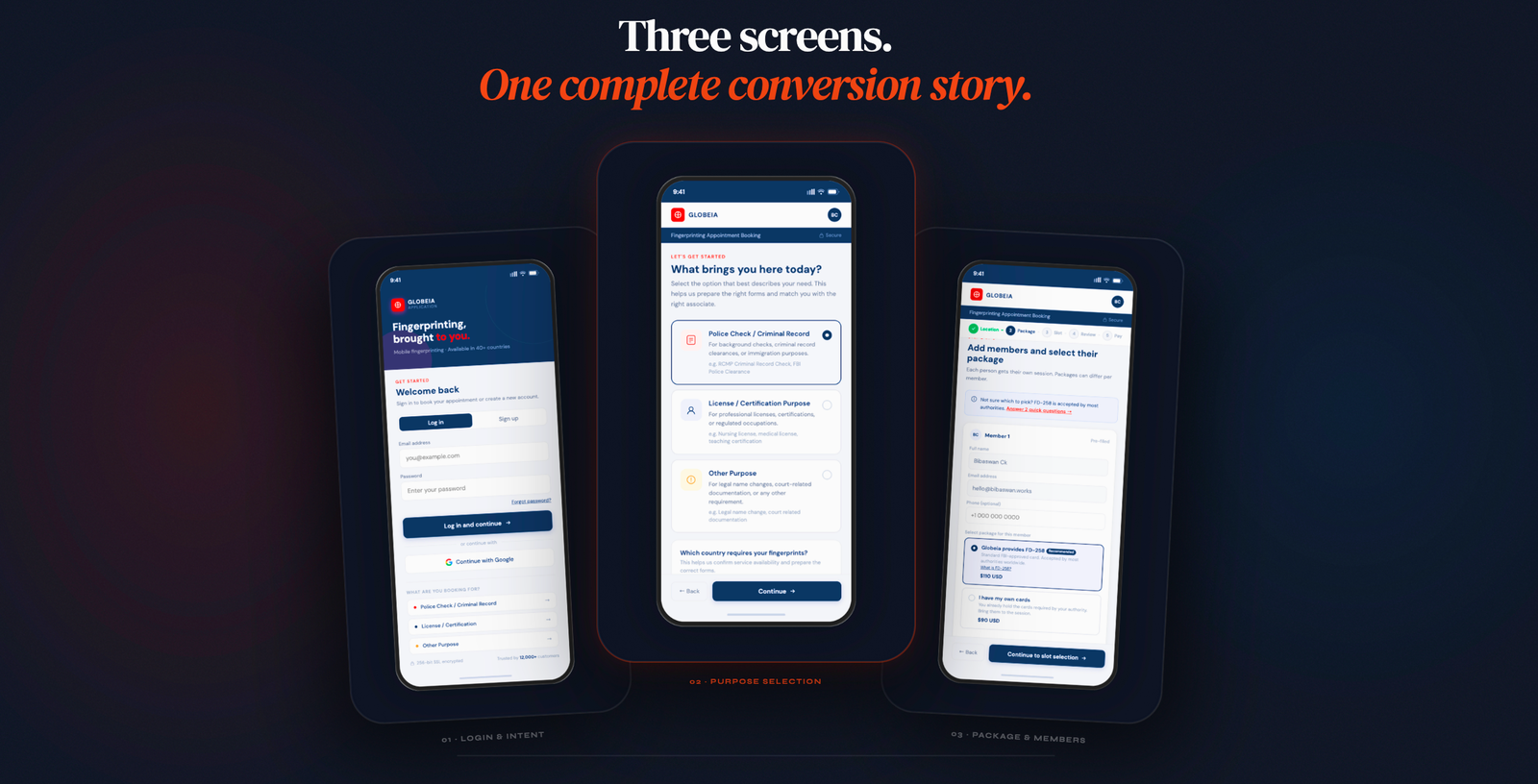
Three screens (for both mobile and web), three specific drop-off points.
Each one has a single job.

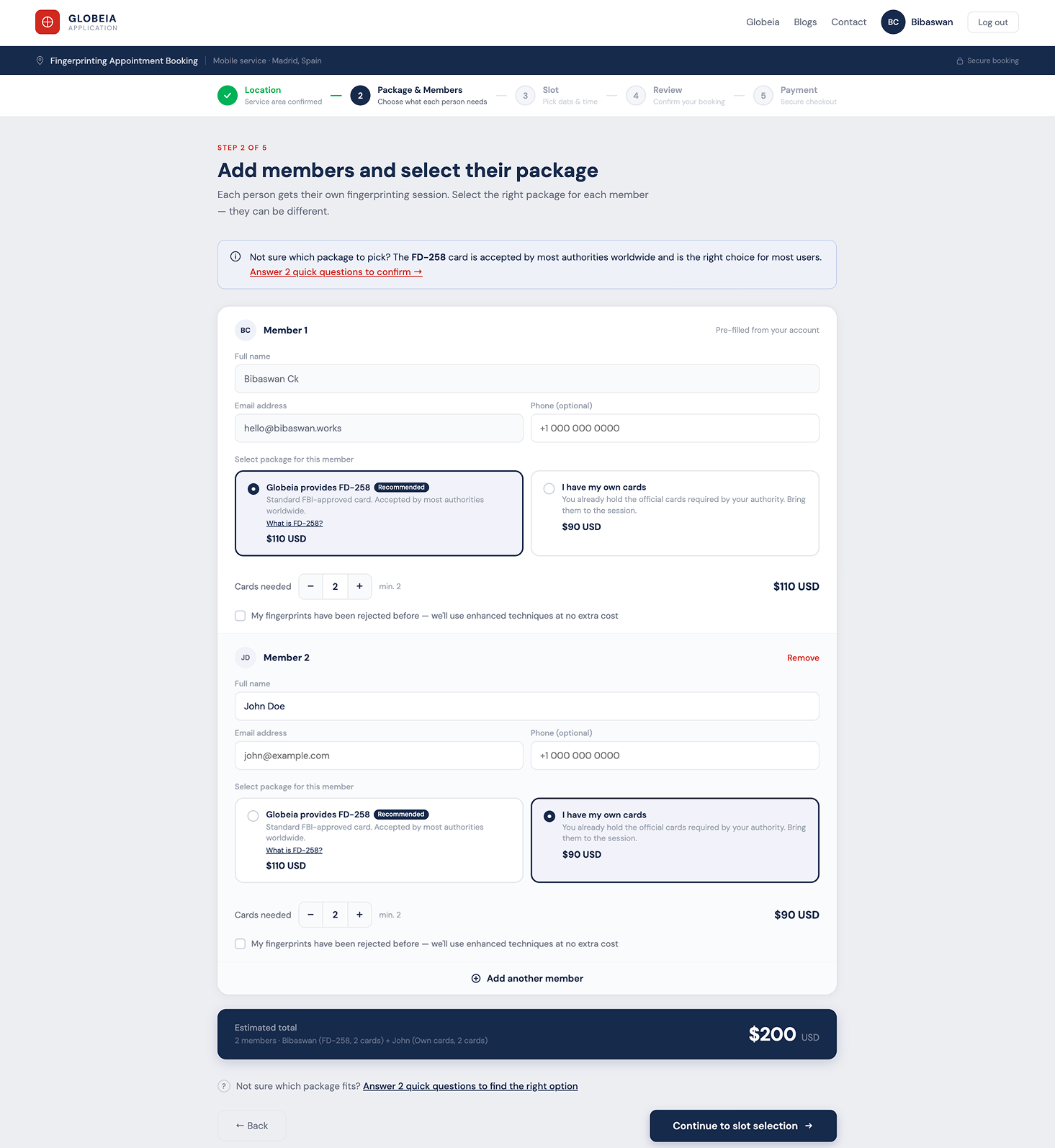
Screen 01 — Package & Members

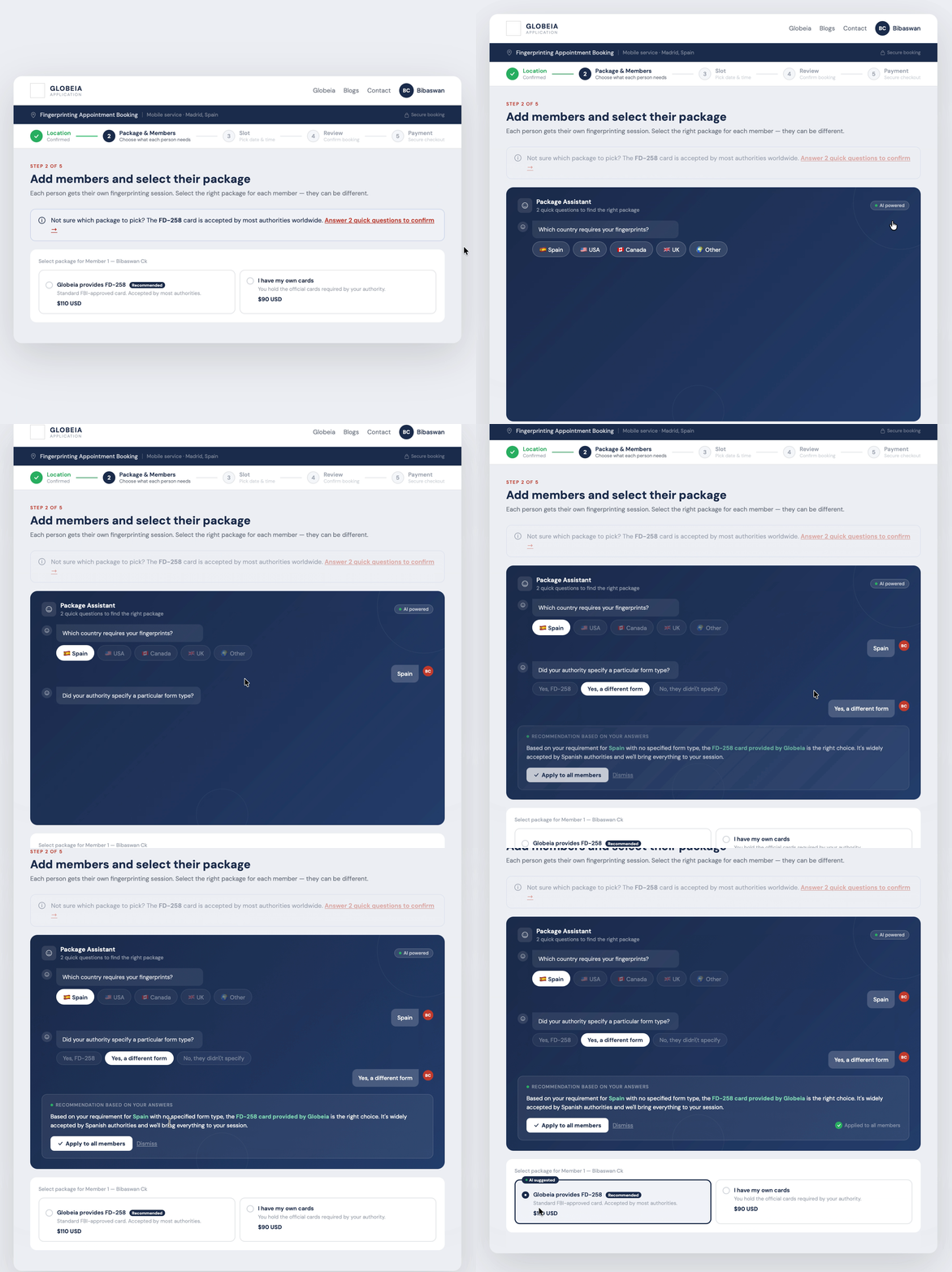
Replaces the compliance question with two plain-language cards and a Recommended badge. Rejection history moves inline as a checkbox. Each member gets their own package selection. A live running total updates as members are added. The AI Package Assistant trigger is available for users who remain uncertain.

Redesigned · Package & Members
Redesigned package and members screen
Package & Members screen — plain language cards, per-member selection, live total
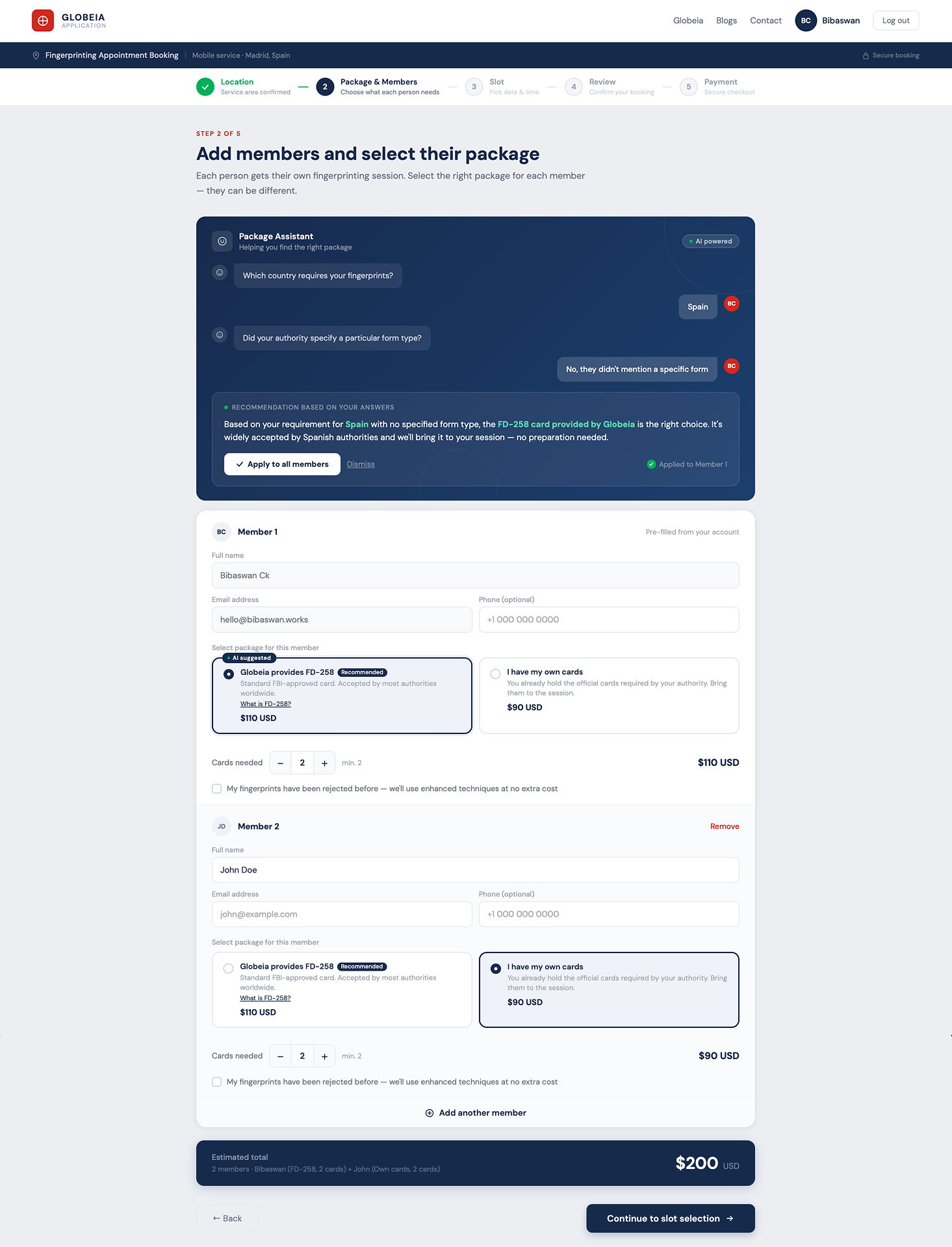
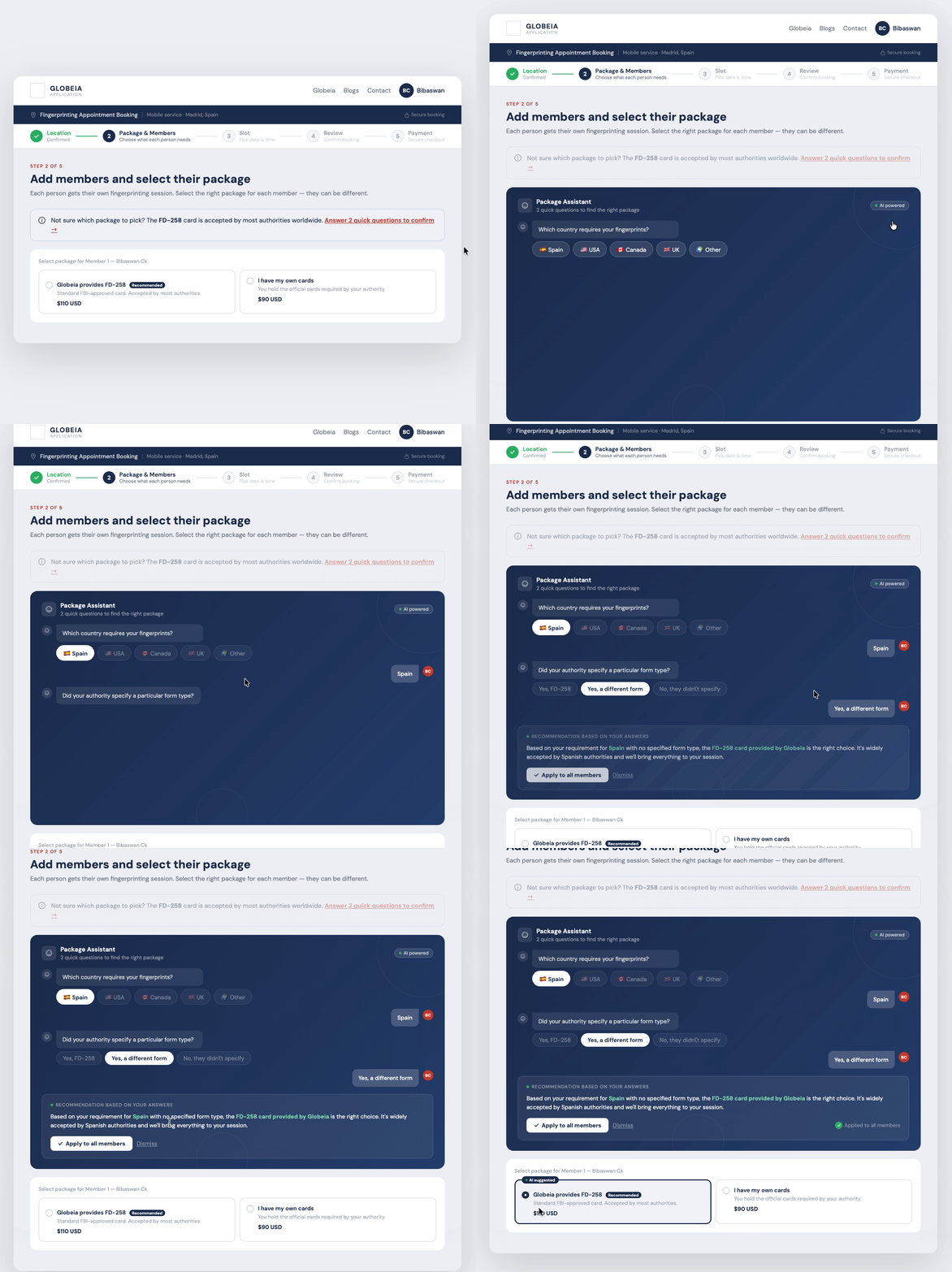
AI Assistant — recommendation state
Package screen with AI assistant open showing recommendation
AI Package Assistant — two questions, one recommendation, applied in one click
Key design decision — per-member package selection

The original flow asked for one package for the whole booking. But Member 1 may need cards provided while Member 2 already has their own — a real scenario for group bookings. Each member gets their own selection, with the Recommended badge guiding without forcing.

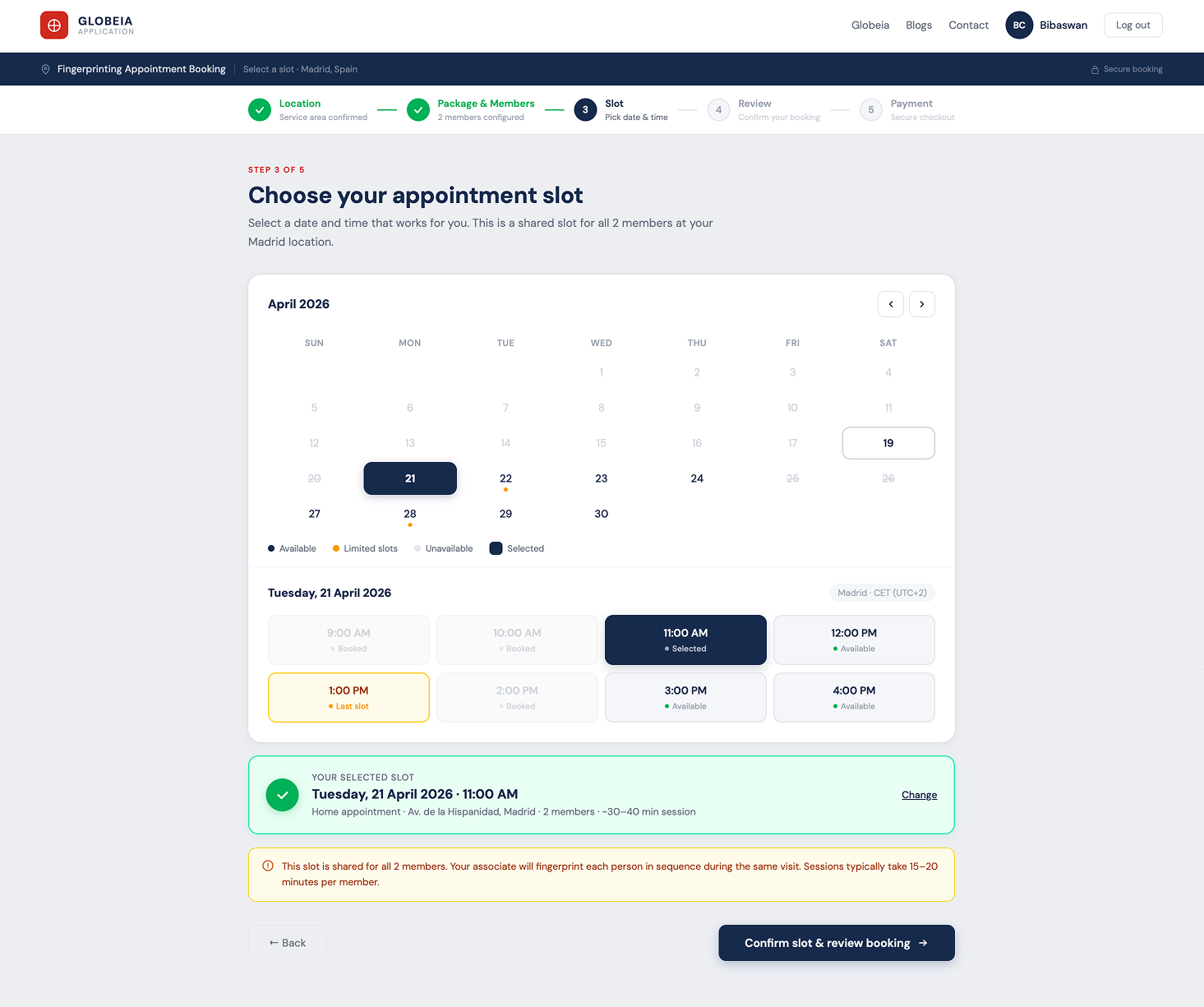
Screen 02 — Slot Selection

One shared slot for all members. Four calendar states (available, limited, unavailable, selected) replace the original two floating options. A confirmation block answers "do I need separate slots?" before it's asked.

Redesigned · Slot Selection
Redesigned slot selection screen with calendar and time grid
Slot selection — 4 calendar states, time grid with availability, shared slot confirmation

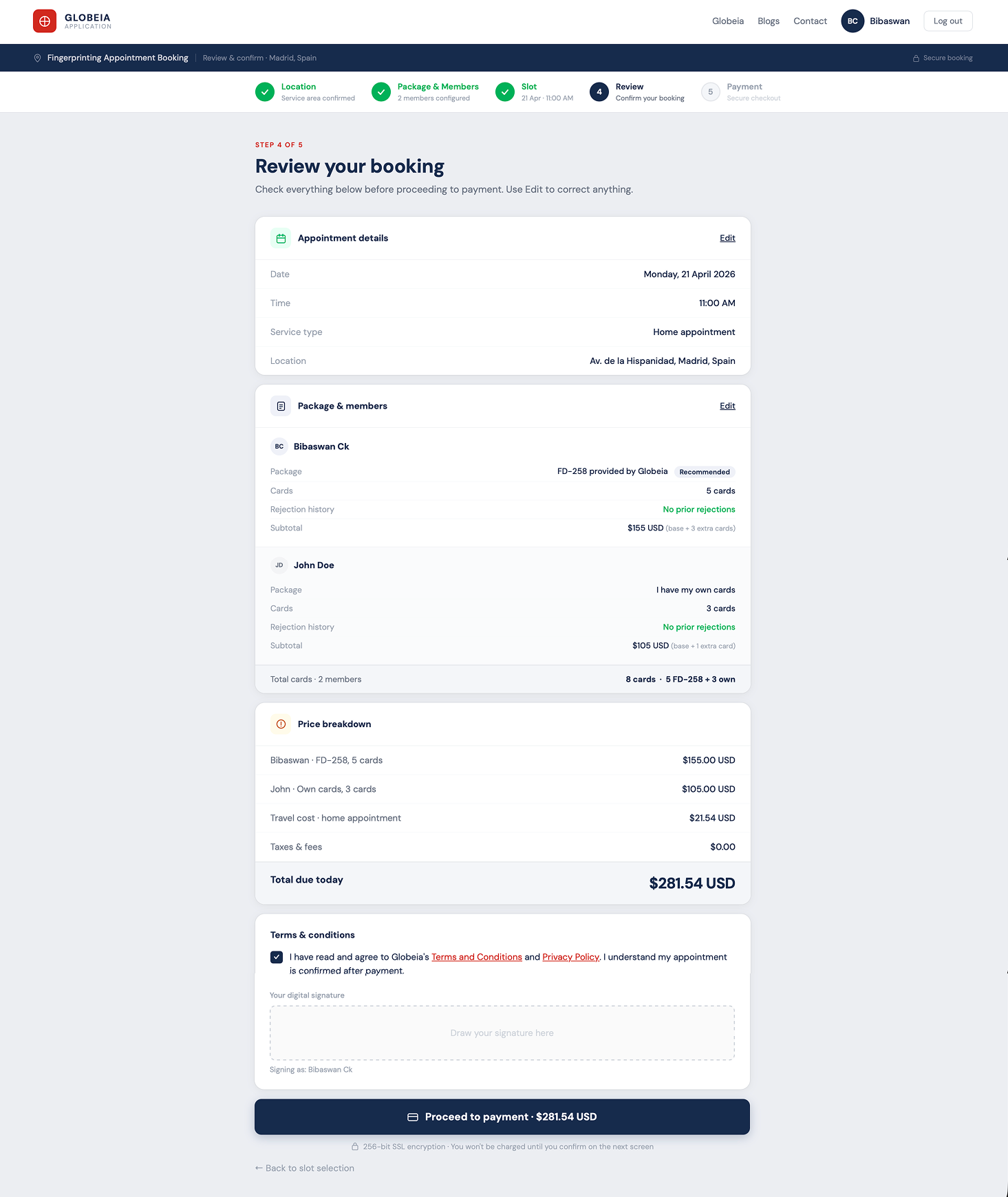
Screen 03 — Review & Booking Summary

Single column, read top to bottom. Three editable review cards with per-member breakdown and fully itemised pricing. T&C inline — no modal. CTA shows the exact amount to pay.

Redesigned · Review
Redesigned review screen with per-member breakdown and inline T&C
Review screen — per-member breakdown, itemised pricing, inline T&C, exact CTA amount
Why the review screen ends conversions — and how we fixed it

The original T&C modal fired over the payment summary — the worst possible moment. The redesign moves it inline on the review screen, where it belongs. Billing is pre-populated. The CTA reads "Proceed to payment · $131.54 USD" — exact amount, no surprises.

AI Feature

The Package Assistant — eliminating the highest-anxiety decision.

AI Package Assistant interaction — two questions to recommendation
AI Package Assistant — trigger → questions → recommendation → applied. Full interaction flow.

Clear labels only go so far. Some users need guidance, not just information. The AI Package Assistant asks two contextual questions and recommends the right package — inline, optional, and transparent.

How it works

User clicks "Answer 2 quick questions" → AI panel slides in inline (no modal, no new page) → two sequential questions → plain-language recommendation with reasoning → one click applies to all members → "AI suggested" tag confirms the assisted choice.

01
Inline — not a modal

The assistant slides in below the info banner. The user stays on the same screen, sees the same context, and applies the recommendation directly to the member rows below — no navigation, no context switch.

02
Optional — not forced

Users who already know what they need ignore the trigger entirely. The "Recommended" badge handles the common case. The AI assistant is a safety net, not the primary interaction.

03
Transparent — not magic

The recommendation shows the reasoning: "Based on your requirement for Spain..." The user can see why. The "AI suggested" tag on the card makes clear this was an assisted choice, not a default.

04
Applies — but doesn't lock

The recommendation is applied in one click but the user can still override it per member. Confidence, not coercion. The user is always in control of the final selection.

What's Next

The flow I didn't design — and why it matters more.

The "Other Purpose" flow was a proof of concept. Post-engagement, I identified the Police Verification flow — Globeia's primary use case — as the more complex and higher-stakes design challenge.

Users choosing between a full-service compliance package ($228 CAD + $220–372 later) and a limited fingerprinting-only option ($140 CAD) need to understand a 5-stage pipeline, a staged payment structure that spans weeks, and which steps Globeia handles vs. which they're responsible for. The current design surfaces this information in a modal after the user has already selected — too late.

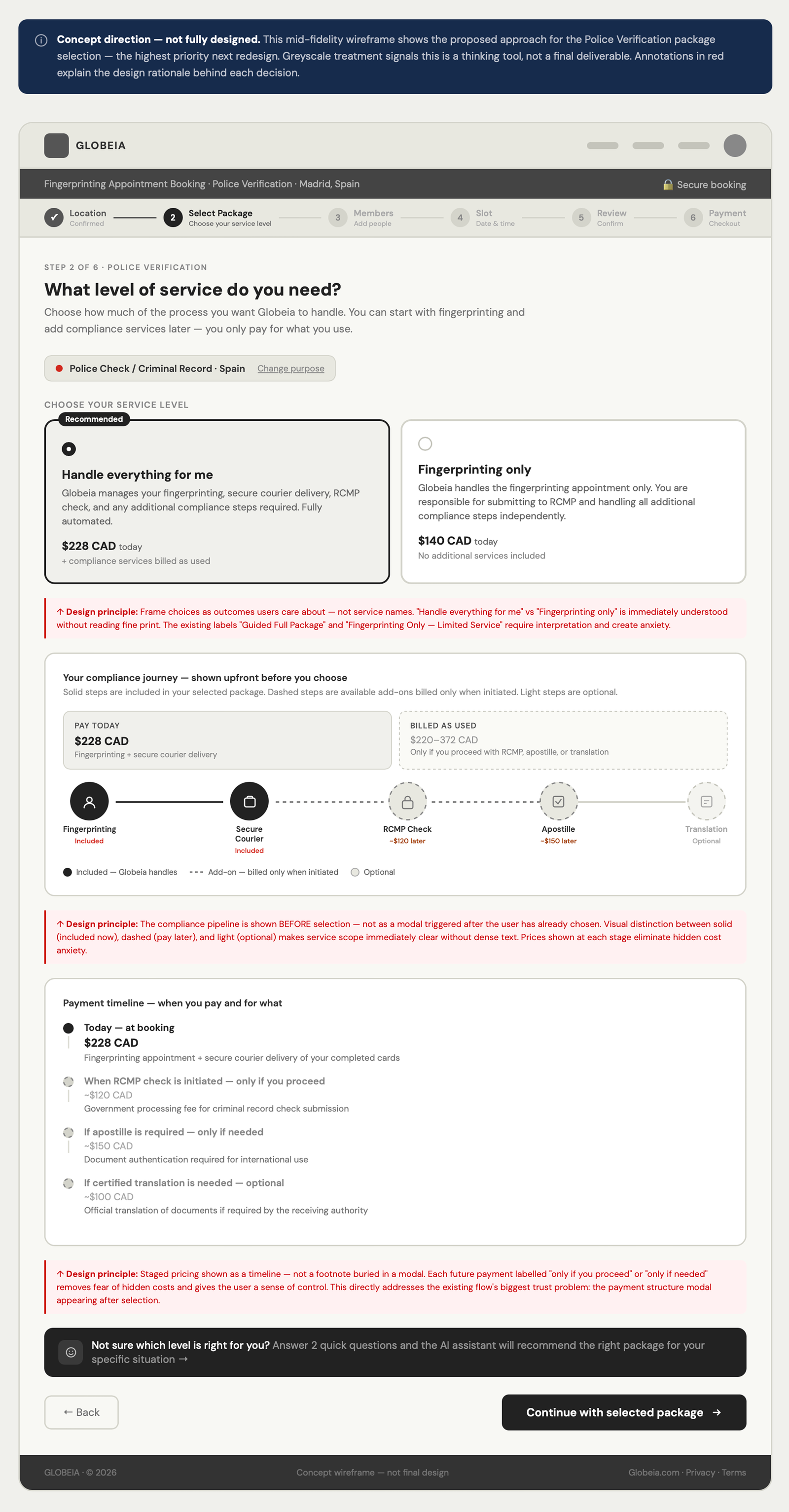
My concept direction for the police verification package screen addresses three specific problems:

Concept direction · not fully designed
Police verification package selection concept — outcome-framed cards, pipeline, staged pricing
Police verification package concept — outcome-framed cards, visible compliance pipeline, staged pricing as timeline
Globeia branching flow architecture — three purpose paths
Full flow architecture — how each purpose branches into a different service journey
Fix 01
Reframe the choice as an outcome

"Guided Full Package" → "Handle everything for me." Users think in outcomes. Every card label rewritten from operational vocabulary to user goal vocabulary.

Fix 02
Show the pipeline before selection — not after

Full pipeline (fingerprinting → courier → RCMP → apostille → translation) visible before selection. Solid nodes = Globeia handles. Amber = billed later. Dashed = user's responsibility. No surprises at payment.

Fix 03
Staged pricing as a timeline, not a footnote

Three rows: Today ($228 CAD) / After fingerprinting ($220–372 CAD, billed as used) / Optional (apostille + translation). Full cost structure visible before commitment — not after.

Reflection

What I'd do differently.

Start with the police verification flow

Auditing "Other Purpose" first was right for the brief — but I later found the police verification flow has the most complex package decision in the product. I'd audit all three branches before choosing which to redesign. The branching diagram I built post-engagement should have been a pre-design artefact.

Validate the AI assistant with real users

The assistant is designed on strong principles — inline, optional, transparent, non-coercive. But I haven't tested whether conversational AI increases or decreases confidence in a compliance context. First thing I'd run: a moderated session with 5 first-time users.

The biggest intervention wasn't a layout change

Compliance products fail through language, not layout. The highest-impact change was rewriting every label in plain English: "Proceed with Selecting Purpose" → "Continue." "Do you already have official fingerprint cards?" → "What do you need for your appointment?" Language first. Layout second.

Projected impact.

Projected outcomes — based on Baymard Institute checkout research and published B2B booking flow data:

Problem addressed Original Redesigned Projected impact
Steps to payment 13+ fragmented decisions 5 clear steps, one job each ~40% reduction in time-to-complete
Package selection Compliance terminology, no guidance Plain language, AI assistant, recommended badge ~35% reduction in abandonment at this step
Price transparency Equation shown at one point Live running total from package onward Reduced payment hesitation
T&C acceptance Modal interrupt over payment Inline on review screen Smoother final conversion step

These are projected, not measured. Whether the conversion uplift holds requires a live A/B test.

Flagship case study

Reducing Enterprise Workspace Friction by 67%

Redesigned a mission-critical geoscience workspace to unblock cloud migration — confronting 21-click complexity, navigating 24 months of stakeholder pressure, and driving +67% product adoption across 3,000+ users.

Read case study →
Oil & Gas Enterprise SaaS 24 months · 3K+ users
+67%
adoption
Bibaswan Chakraborty
Bibaswan
Chakraborty
Senior UX Designer
India 🇮🇳 · Immediate joiner

Want to discuss this
or a similar challenge?

7 years of enterprise UX across pharma, oil & gas, and healthcare. I work best on hard problems where design decisions have real operational consequences.
Get in touch LinkedIn →